Quick answer
Build the client as a snap-scrolling vertical feed that mounts one player at a time and prefetches the next videos. Back it with resumable tus uploads, an FFmpeg HLS ladder, CDN delivery, a two-tower plus multi-task recommender fed by real-time watch-time features, Valkey counters, PostgreSQL with replicas, and a WebSocket/SSE gateway with push.
- Built with Claude Code in about 26 minutes of agent time: 40 files, 10 pages and 10 API routes, with build and lint passing.
- Loop is a working TikTok-style clone: snap-scrolling feed of 15 real YouTube Shorts, likes with double-tap, comments, saves, share, follow, search, LIVE, camera/upload create flow, inbox, DMs and profiles.
- Only the active item mounts a YouTube iframe; every other item is a thumbnail. This is the same one-player-at-a-time, prefetch-the-neighbours principle production apps use with HLS.
- Video egress dominates cost: at 5M MAU the estimate is ~608 TB/day (~18 PB/month), so a CDN, efficient codecs and prefetch-waste tracking matter more than server prices.
- Recommendations run in stages: two-tower ANN retrieval and other sources, then a multi-task ranker on watch time and completion, then re-ranking with diversity and exploration slots for new videos.
- Uploads should be resumable (tus) and flow through an idempotent job pipeline: probe, a 4-rung 2-second-segment HLS ladder, thumbnails, moderation, embeddings, publish.
- Counters belong in Valkey with batched Postgres flushes. Likes are sets, views are validated events, and a nightly job reconciles drift.
- On Hetzner, estimated infrastructure runs from ~€274/month at launch to ~€12K/month at 5M MAU (excl. VAT and CDN egress), with steady load moving to dedicated AX servers at scale.
- Built with Claude
- DesignClaude design canvasThe app screens were designed with Claude on a design canvas, one board per product.
- CodingClaude CodeA Claude Code sub-agent wrote Loop: 40 files, 10 pages, 10 API routes, in about 26 minutes.
- Parallel agentsClaude Code sub-agentsSix clones were built at the same time, one sub-agent per app.
- Testing & screenshotsClaude CodeBuild, lint, a running server and 8 screenshots that Claude reviewed and fixed.
- Scalability & infrastructure analysisClaude Opus 5.5Capacity math, Hetzner server plans, real-time design, security and cost models.
- Source code
- github.com/suhasbhairav/tiktok-cloneMIT license
- Run it locally
- git clone https://github.com/suhasbhairav/tiktok-clone.git && cd tiktok-clone && npm install && npm run dev
- Stack
- Built with Claude CodeDesigned with ClaudeAnalysed with Claude Opus 5.5Next.js 16 (App Router, Cache Components)React 19 (useSyncExternalStore)Tailwind CSS v4Inter via next/fontYouTube IFrame embed (youtube-nocookie)IntersectionObserver + CSS scroll-snapMediaRecorder + getUserMediaServer-Sent EventsNext.js Route Handlers (in-memory demo backend)localStorage persistence
- Palette
- Background black #000000Video surface grey #1F1F1FAccent red #FE2C55Cyan #25F4EEDisc border #161616Muted text grey #8A8A8AAvatar grey #6B6B6BWhite #FFFFFF
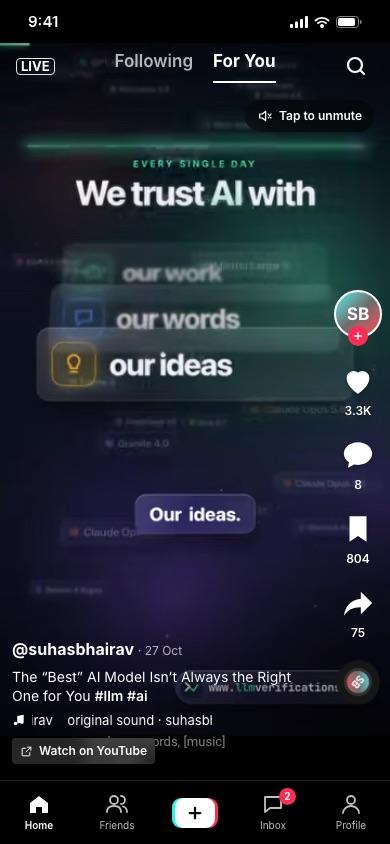
Screenshots of Loop
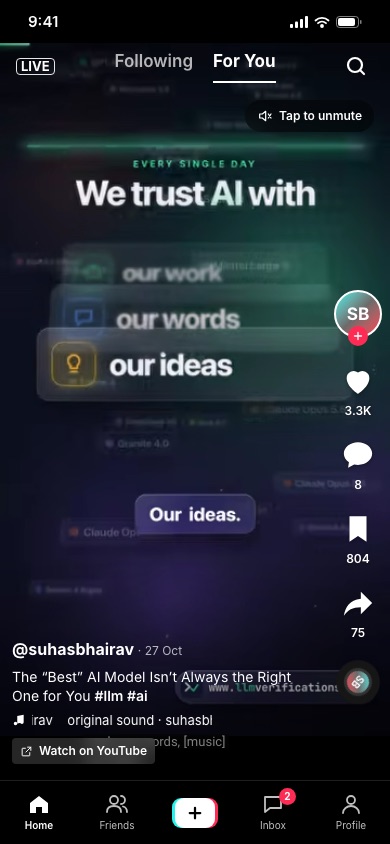
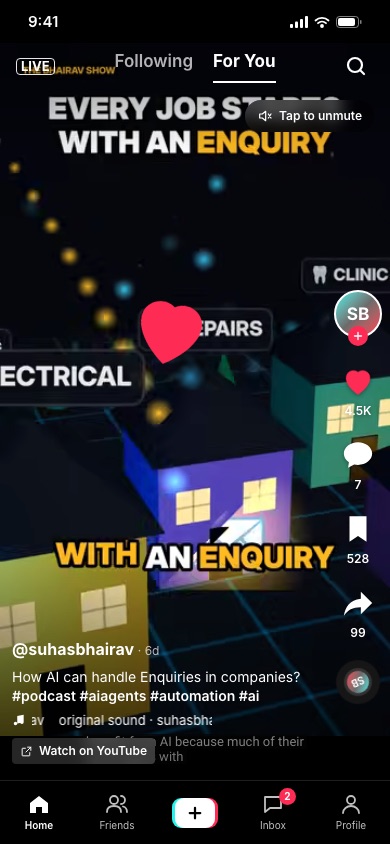
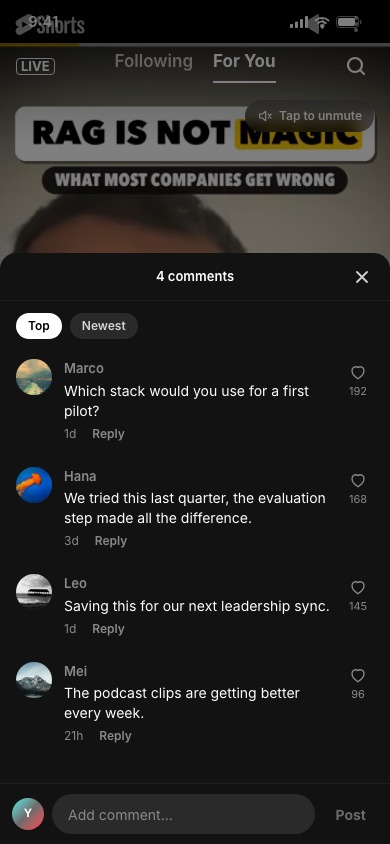
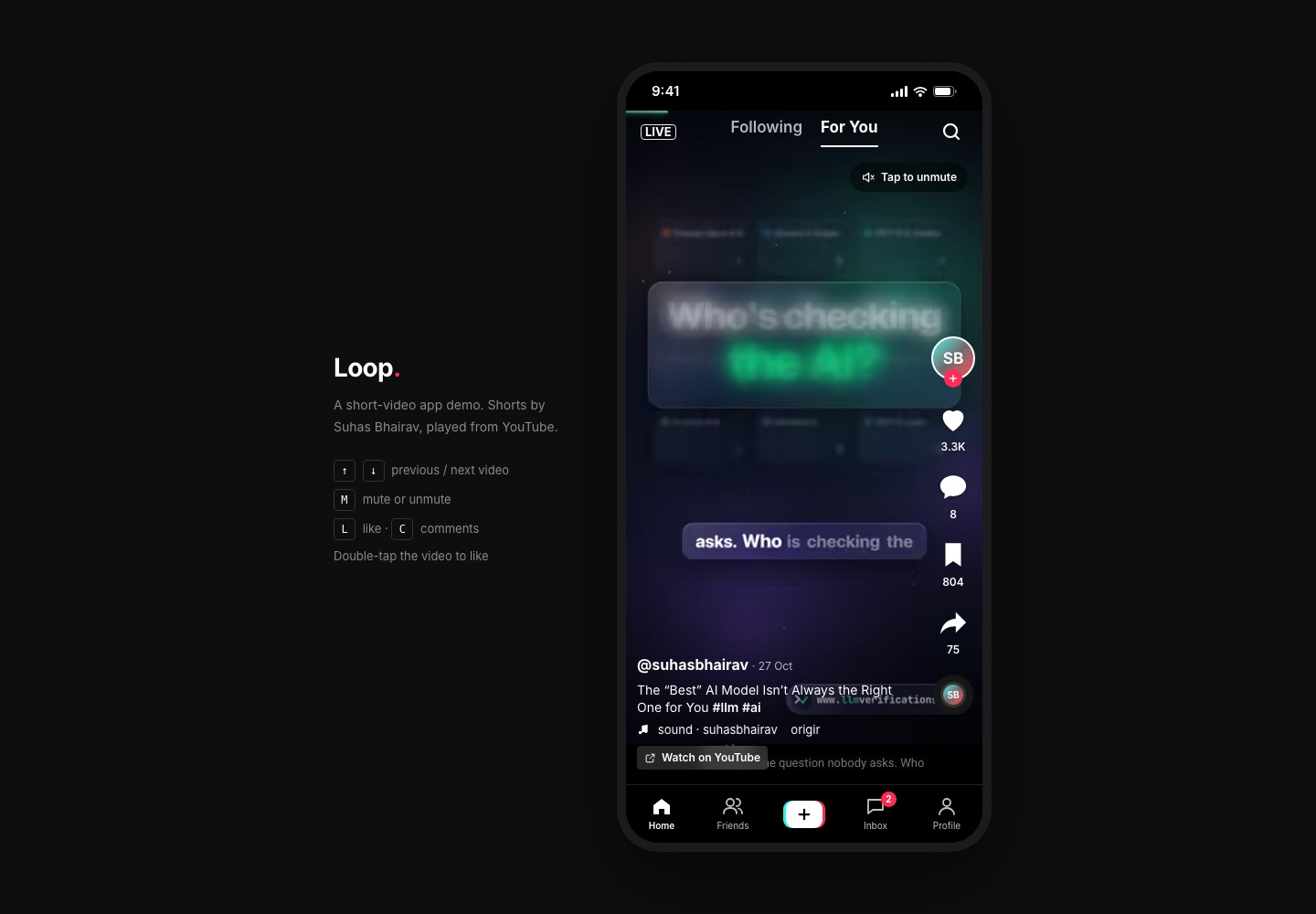
What works in the clone
Vertical snap-scrolling For You feed
CSS scroll-snap (snap-y mandatory) pages full-screen items. An IntersectionObserver at a 0.6 threshold picks the active one, and only that item mounts the youtube-nocookie iframe (autoplay, muted, loop). Every other item renders the hqdefault thumbnail center-cropped over a blurred copy of itself.
Keyboard, wheel and tap controls
Arrow keys, j/k and PageUp/PageDown page through the feed, and wheel/trackpad scrolling works natively. M toggles mute, L likes, C opens comments. A single tap pauses or plays through the YouTube IFrame API's postMessage commands, and a double tap likes with a heart animation.
Action rail with real APIs
Follow toggle on the avatar, plus Like, Save and Share, each with an optimistic UI update reconciled against POST /api/videos/:id/stats. The spinning sound disc links to the sound's search results.
Comments bottom sheet
URL-addressable via ?comments=1. It lists comments with Top/Newest sort, posts new comments, likes comments and pre-fills replies with an @mention. All of it runs through GET/POST/PATCH /api/comments.
Share sheet with Web Share
Copy link through the Clipboard API, native share through navigator.share where available, send to a friend (drops the video into that DM thread), open on YouTube, and Not interested, which hides the video and feeds back into ranking.
Following tab and LIVE
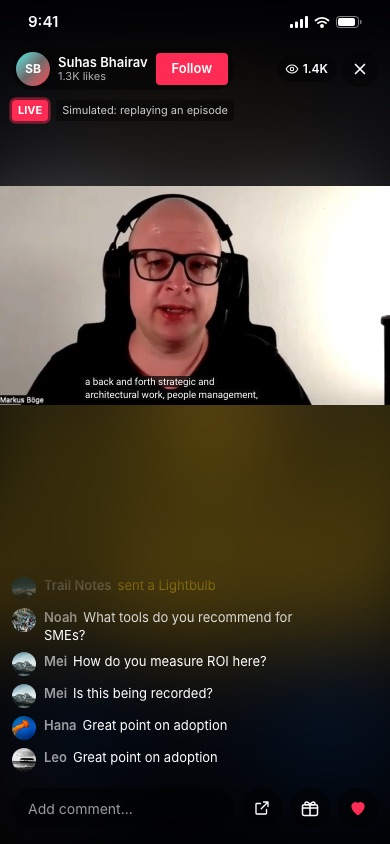
Following shows newest-first posts from followed creators only, with an empty state and suggested accounts. LIVE replays a long-form episode with chat, gifts, viewer counts and floating hearts streamed over Server-Sent Events.
Search and trending hashtags
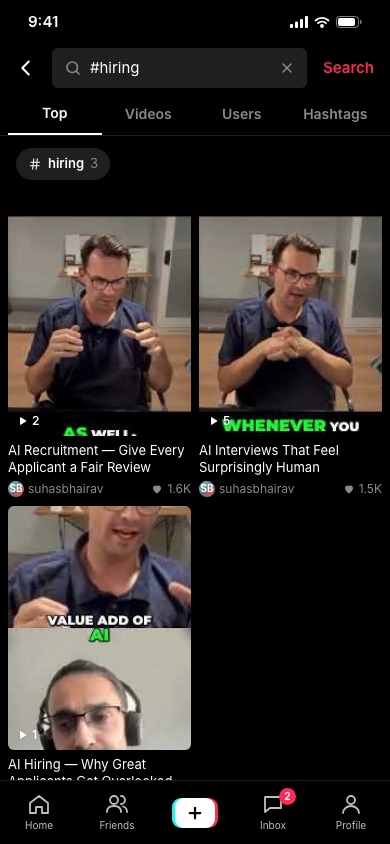
GET /api/search matches captions, hashtags and accounts. Exact hashtag search starts with #. Trending hashtags are ranked by video count and views, and recent searches are kept on the device.
Create: record or upload
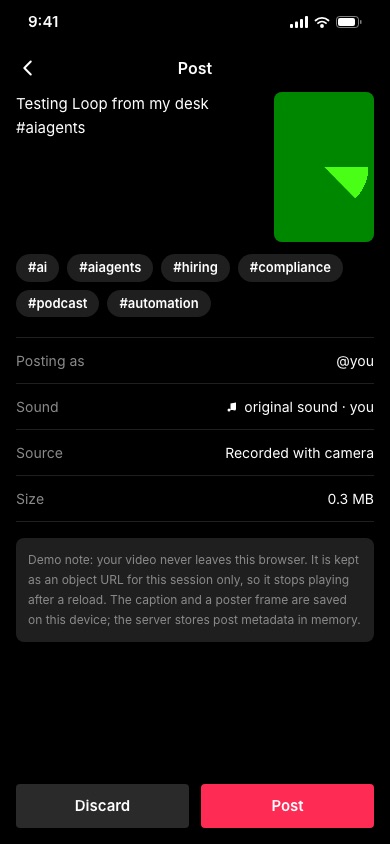
getUserMedia + MediaRecorder recording with flip camera, a 3 s timer and a 60 s cap, or a file upload up to 200 MB. Preview, caption with hashtag chips, then post. A canvas-captured poster frame persists, and the clip itself is a session-only object URL.
Inbox and DMs
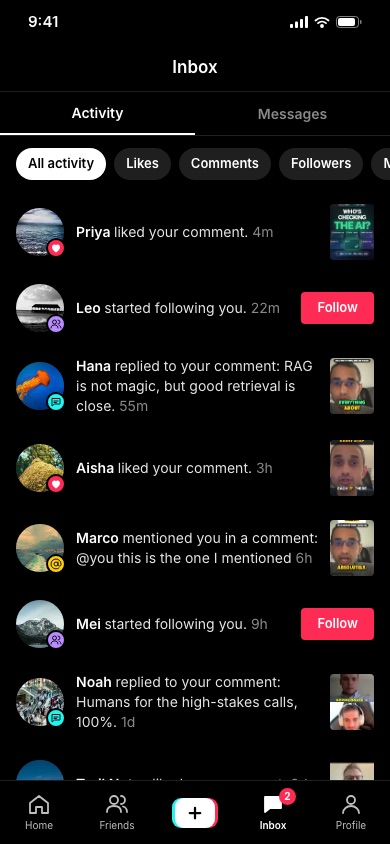
Activity notifications (likes, follows, replies, mentions, your own video-ready events) with filters and follow-back, a messages list with unread dots, and DM threads with idempotent sends, a typing indicator and simulated replies.
Profiles and creator pages
Your profile has stats, Edit profile, a share link and Posts/Liked/Favourites grids, plus a player for your own clips. /u/[handle] creator pages show Suhas Bhairav's channel grid and the demo accounts.
URL-addressable state
/video/[id] (the URL follows the visible video), ?comments=1, ?share=1, ?tab=following, /search?q=%23hiring, /inbox/priya and /profile?tab=liked are all deep-linkable.
Phone column on desktop
A max-width 390px, 844px-tall column with rounded corners on a neutral backdrop, with a keyboard cheat sheet on large screens. Client state is persisted to localStorage through useSyncExternalStore, so hydration stays clean.
What we built: Loop, a short-video app clone
Loop is a working short-video app in the style of TikTok, built with Next.js 16 (App Router), React 19 and Tailwind CSS v4. It follows a single mobile design file (390×844): a black, full-bleed video canvas, a "Following | For You" switcher at the top with a LIVE button on the left and search on the right, a right-hand action rail (avatar with a follow plus, like, comments, save, share, spinning sound disc), a caption block in the bottom-left and a five-slot bottom navigation with the layered cyan/red/white Create button. The palette is lifted from the design: pure black #000000, the video placeholder grey #1F1F1F, the accent red #FE2C55 and the cyan #25F4EE used for hover and for the Create button's offset layer. The type is Inter at 400/600/700.
Instead of a grey "Full-screen video" placeholder, the feed plays the 15 real YouTube Shorts from Suhas Bhairav's channel (@suhasbhairav) through the privacy-enhanced youtube-nocookie.com embed. Each short keeps its real title, publish date and YouTube view count, and every screen links back to the original on YouTube.
What is real
- The feed mechanics. CSS scroll-snap does the paging. An
IntersectionObserverchooses the active item. Only that item mounts an iframe; every other item is a cropped thumbnail over a blurred backdrop. Keyboard, wheel and trackpad all work, and so do mute/unmute and tap-to-pause through the YouTube IFrame API'spostMessageprotocol. - Interactions that hit an API. Likes, saves, shares and views post to
/api/videos/:id/stats. Comments are listed, posted and liked through/api/comments. Search, suggested accounts, inbox, DMs and post metadata each have their own route handler. - Recording and uploading.
/createusesgetUserMedia+MediaRecorderto record up to 60 seconds, with flip-camera and a 3-second timer, or accepts an uploaded file. You preview the clip, write a caption with hashtag suggestions, and post. The post appears in your profile with a poster frame grabbed through a canvas. - A realtime channel. The LIVE room consumes a Server-Sent Events stream (
/api/live) of chat messages, gifts and viewer counts. The stream setsretryand assigns event ids, soLast-Event-IDresume works. - URL-addressable state.
/video/[id],?comments=1,?share=1,/?tab=following,/search?q=%23hiring,/inbox/priyaand/profile?tab=likedcan all be deep-linked and screenshotted.
What is simulated
- Storage. Server writes go to in-memory module state, so they reset on restart. Per-user state (likes, follows, saves, hidden videos, DMs, profile, demo coins) lives in
localStorage. - Your videos. A recorded or uploaded clip is an object URL and lives only for the browser session. The app says so in the post form and again on the expired tile.
- LIVE. The live room replays a long-form episode. Chat lines and gifts are generated by the server.
- Ranking. For You uses a toy scorer: freshness decay + hashtag affinity from your likes + log popularity + per-session exploration noise. The rest of this guide covers what a production recommender, upload pipeline and realtime layer look like, and how to run them on Hetzner for millions of users.
How I built Loop with Claude: design, code and scaling plan
Loop was built with Claude at every step. I designed it with Claude on a design canvas in Claude, coded and tested it with Claude Code, and used Claude Opus 5.5 to work out how it scales to millions of users. Here is the actual workflow, including what I decided and what Claude did.
| Stage | Claude tool | What it did |
|---|---|---|
| Design | Claude design canvas | The app screens were designed with Claude on a design canvas, one board per product. |
| Coding | Claude Code | A Claude Code sub-agent wrote Loop: 40 files, 10 pages, 10 API routes, in about 26 minutes. |
| Parallel agents | Claude Code sub-agents | Six clones were built at the same time, one sub-agent per app. |
| Testing & screenshots | Claude Code | Build, lint, a running server and 8 screenshots that Claude reviewed and fixed. |
| Scalability & infrastructure analysis | Claude Opus 5.5 | Capacity math, Hetzner server plans, real-time design, security and cost models. |
1. Design with Claude
I designed the screens with Claude on a design canvas: six app screens, one board per product, each in the palette of the product it is modelled on. The Loop design uses an original name and original copy, so the clone borrows the product category and layout conventions, not TikTok's brand.
2. One shared brief, written with Claude Code
Before any app code, Claude Code wrote one brief that all six builds followed. It read the design boards from the Claude canvas, pulled my channel's videos from YouTube, and fetched current prices from Hetzner. The brief covered:
- Stack: the existing
create-next-appscaffold (Next.js 16, React 19, Tailwind CSS v4). Next 16 has breaking changes, so Claude was told to read the docs bundled innode_modules/next/dist/docs/rather than rely on memory. - Fidelity: match the design's layout, hex colours, fonts and spacing; replace grey placeholders with real media; use stroke SVG icons, not emoji.
- "Fully working": every visible control must do something, backed by Next.js route handlers so the UI talks to an API like a real product.
- Media: real videos from @suhasbhairav played through privacy-enhanced embeds.
- Proof: build, run, screenshot every main flow, look at each screenshot, fix what's wrong.
3. Coding with Claude Code sub-agents, in parallel
The main Claude Code session started six sub-agents, one per clone, each owning one folder and one port, so the six apps were built at the same time. Every agent ran on Claude Opus 5.5. The Loop agent worked for about 26 minutes. In that run Claude:
- Read the design file and the Next.js 16 docs it needed.
- Wrote the app: 40 source files, about 3,619 lines, with 10 page routes and 10 API route handlers (
/api/comments,/api/feed,/api/inbox,/api/live,/api/messages,/api/posts,/api/search,/api/users,/api/videos/[id],/api/videos/[id]/stats). - Ran
npm run buildandnpm run lintuntil both passed cleanly. - Started the production server and drove headless Chrome to capture 8 screenshots. For true phone-width shots it wrote a small Chrome DevTools Protocol script, because Chrome's
--window-sizeflag won't lay out narrower than about 500px. - Opened every screenshot, fixed the bugs it saw, and re-shot.
4. Analysing scalability with Claude
The sections that follow, from the data model to the cost breakdown, were drafted with Claude Opus 5.5. That covers capacity math, the Postgres and caching plan, Hetzner server choices per growth stage, the real-time notification design, security and monthly costs. Each one is marked where it starts. Claude worked from Hetzner's own price pages, fetched that day, rather than from memory, and showed its arithmetic so the estimates can be checked.
5. Review: Claude checking Claude
The main Claude Code session reviewed each agent's output instead of trusting it. It looked at the screenshots and rendered every page. It also caught an inconsistency across the six write-ups: some cost tables listed the price of one server where others listed the row total. All tables were normalised to show both. The agents were explicit about which parts are simulated (in-memory server state, fake payments or uploads where relevant) and which paths were not tested, and this page keeps that explicit.
What this means if you want to do the same
- Spend your time on the brief, not the boilerplate. A precise brief (stack, fidelity bar, definition of "working", proof required) is what made six parallel Claude Code builds come back consistent.
- Make Claude prove it. "Build passes, here are screenshots I looked at" is a much stronger signal than "done".
- Keep the architecture decisions yours. Claude wrote the code and the first draft of the scaling plan; deciding what is real, what is simulated and what goes to production is still the engineer's job.
- Start here: Claude Code overview · Sub-agents · Claude Opus
Page routes in the clone
/ · /create · /friends · /inbox · /inbox/[id] · /live · /profile · /search · /u/[handle] · /video/[id]
Screens walkthrough
Every screenshot below comes from the running clone (next start) at a 390×844 viewport, plus one desktop shot.
For You feed. The active short plays muted in a youtube-nocookie iframe that fills the frame. Before the iframe loads (and on every inactive item) you see the hqdefault thumbnail, center-cropped to cover the 9:16 area, over a blurred, scaled-up copy of itself. The top bar sits 44px from the top as in the design. The caption shows the author handle, a relative date, the cleaned title with hashtags parsed from the YouTube title (plus a few derived from keywords), the sound marquee and a "Watch on YouTube" chip. "Tap to unmute" switches sound through the IFrame API without reloading the player.
Double-tap to like. A transparent tap layer sits over the iframe, which has pointer-events: none, so the app owns every gesture. A single tap waits 280 ms. If no second tap arrives it toggles pause; if one does, it becomes a like, drawing a heart at the pointer position with a small random rotation and making an optimistic counter update that the server later reconciles. A double-tap only ever likes; it never unlikes.
Comments sheet. ?comments=1 opens the sheet on the current video, so the state can be shared and reloaded. Comments load from GET /api/comments with Top/Newest sorting. Posting goes through POST, liking a comment uses PATCH, and Reply pre-fills an @mention. The sheet covers the bottom nav like the native app and closes on Escape or a backdrop tap.
Search. With no query you see recent searches and the trending hashtags, ranked by video count and total views. A query searches captions, hashtags and accounts. A query starting with # is an exact hashtag filter. The results are tabbed into Top, Videos, Users and Hashtags, and each tab is stored in the URL (?q=…&t=Videos).
LIVE. The LIVE button opens a live-style room that replays the channel's most-watched long-form episode, clearly labelled as simulated. An EventSource consumes /api/live, which emits chat, gift and viewers events. You can chat, send gifts from a demo coin balance (shown as slide-in banners), tap to send floating hearts and follow the host.
Create. The camera screen shows a live preview. In headless Chrome that is the fake green test device. Record (or upload), preview, then write the post: caption, hashtag chips, posting identity, sound, source and size. Posting sends metadata to /api/posts, keeps the object URL in a session-only map, stores a 180×320 JPEG poster frame in localStorage and lands you on your profile grid.
Inbox. The activity notifications have filters: All, Likes, Comments, Followers and Mentions. Follow rows have a follow-back button and video rows link to the video. Your own "video is ready" events appear here too. The Messages tab lists DM threads with unread dots. A thread (/inbox/priya) supports sending, an idempotent clientId, a typing indicator and a simulated reply.
Desktop. On wide screens the app sits in a phone-sized column (max 390px wide, 844px tall, rounded corners) on a neutral backdrop. Beside it is a short cheat sheet of keyboard shortcuts: ↑/↓, M, L, C.
Frontend architecture
Routes
| Route | What it renders | Notes |
|---|---|---|
/ | For You feed (?tab=following for Following) | useSearchParams inside <Suspense> |
/video/[id] | The same feed, starting at that short | generateStaticParams for all 15 ids; URL follows scroll |
/live | Simulated live room | EventSource('/api/live') |
/search | Trending, results tabs | ?q= and ?t= |
/friends | Suggested and followed accounts | |
/create | Camera / upload → preview → post | No bottom nav |
/inbox, /inbox/[id] | Activity, messages, DM thread | ?tab=messages, ?filter=like |
/profile | Your stats and Posts/Liked/Favourites grids | ?tab=, ?post= |
/u/[handle] | Creator or demo-user profile | Static params for known handles |
Next.js 16 is configured with cacheComponents: true, which changes two things. First, any client component that reads useSearchParams must sit under a <Suspense> boundary, so the rest of the route can be prerendered. Second, dynamic segments either need generateStaticParams or have to treat params as runtime data inside Suspense. Loop prerenders the 15 video pages, the 4 DM threads and the 9 profile pages, and serves anything else on demand.
GET route handlers are also prerendered by default when they don't touch request data. Every GET handler in Loop reads request.url, which keeps it dynamic. That matters because the in-memory counters would otherwise be frozen into the build.
Component tree
app/layout.js
└─ AppShell            phone column, fake status bar, BottomNav, Toaster
   └─ page
      ├─ Feed          fetch /api/feed, IntersectionObserver, keyboard, sheets
      │  ├─ FeedItem   thumbnail, ActivePlayer (iframe + tap layer), rail, caption
      │  ├─ CommentsSheet
      │  └─ ShareSheet
      ├─ Live · Search · Friends · Create · Inbox/Thread · Profile/CreatorProfile
      └─ Suggested (SuggestedList, FollowButton) shared by Feed, Friends, Search
State
There are three layers:
- URL state covers anything worth sharing: the current video, open sheets, tabs, search query and the open post. Sheets open with
history.replaceState. In Next 16 that integrates with the router, souseSearchParamsre-renders without a navigation. - Client-persistent state (
lib/store.js) is a 70-line external store holding liked, saved, following, likedComments, notInterested, posts, threadExtras, readThreads, recentSearches, profile, muted, coins and a session id. Components read it throughuseSyncExternalStorewith a server snapshot of defaults. Hydration therefore matches the server HTML, and the real values arrive on the next render with nouseEffect+setStateflash. Astorageevent listener keeps several tabs in sync. AlllocalStorageaccess is wrapped in try/catch. - Server state is fetched with plain
fetchthrough a tinyapi()helper. Optimistic updates are applied locally, for example to the like count, and then reconciled with the counter the server returns.
Feed performance details
- One iframe at a time. Mounting 15 YouTube players would cost hundreds of MB and a dozen network waterfalls. The active item mounts
ActivePlayer, which owns the iframe, its loaded/paused state and the tap layer. Scrolling away unmounts it, which also resets pause state cleanly. - Thumbnail-first. The thumbnail is always underneath, and the iframe fades in on
onLoad, so a slow embed never shows black. - Neighbour prefetch. Items at index ±1 load their thumbnails eagerly and the rest lazily.
<link rel="preconnect">toyoutube-nocookie.comandi.ytimg.comin the layout removes the TLS handshake from the first swipe. - Stable callbacks. View counting starts a 2-second timer when an item becomes active. The callback is held in a ref so parent re-renders (likes, saves) don't reset the timer.
- Accessibility. Each item is a
<section aria-label>, rail buttons carryaria-pressed, sheets arerole="dialog"with Escape to close, and every action has a keyboard shortcut.
File structure
clones/tiktok-clone
├─ app/            routes + api/* route handlers (10 handlers)
├─ components/     AppShell, icons (inline stroke SVG), ui, feed/*, Live, Search, Create, Inbox, Profile…
├─ lib/            catalog.js (data shaping + search), server-store.js, store.js
└─ data/channel-videos.json
Production data model
The clone keeps everything in memory. A production short-video app splits data by access pattern:
- PostgreSQL is the source of truth for users, videos, the social graph, comments and moderation.
- Valkey holds hot counters, per-user feed candidate caches, seen-sets and rate limits.
- A columnar store (ClickHouse) takes the high-volume event stream: impressions, watch time, skips. The recommender trains on it.
- Object storage holds media.
Core schema (PostgreSQL 17)
-- IDs are 64-bit time-ordered (Snowflake-style) generated in the app tier,
-- so they sort by creation time and shard cleanly.
CREATE TABLE users (
  id            bigint PRIMARY KEY,
  handle        citext UNIQUE NOT NULL CHECK (handle ~ '^[a-z0-9._]{2,24}$'),
  display_name  text NOT NULL,
  bio           text NOT NULL DEFAULT '',
  avatar_key    text,
  region        text NOT NULL,           -- data residency + routing
  created_at    timestamptz NOT NULL DEFAULT now(),
  status        text NOT NULL DEFAULT 'active'  -- active | suspended | deleted
);

CREATE TABLE videos (
  id              bigint PRIMARY KEY,
  author_id       bigint NOT NULL REFERENCES users(id),
  caption         text NOT NULL DEFAULT '',
  duration_ms     int  NOT NULL,
  width           int  NOT NULL,
  height          int  NOT NULL,
  sound_id        bigint,
  status          text NOT NULL DEFAULT 'uploading',
                  -- uploading | processing | in_review | published | rejected | deleted
  visibility      text NOT NULL DEFAULT 'public',  -- public | friends | private
  hls_master_key  text,                  -- s3 key of master.m3u8
  poster_key      text,
  moderation      jsonb NOT NULL DEFAULT '{}',
  created_at      timestamptz NOT NULL DEFAULT now(),
  published_at    timestamptz
);
CREATE INDEX videos_author_published ON videos (author_id, published_at DESC)
  WHERE status = 'published';
CREATE INDEX videos_published ON videos (published_at DESC) WHERE status = 'published';

CREATE TABLE hashtags (id bigint PRIMARY KEY, tag citext UNIQUE NOT NULL);
CREATE TABLE video_hashtags (
  video_id bigint NOT NULL REFERENCES videos(id) ON DELETE CASCADE,
  hashtag_id bigint NOT NULL REFERENCES hashtags(id),
  PRIMARY KEY (hashtag_id, video_id)
);

CREATE TABLE follows (
  follower_id bigint NOT NULL,
  followee_id bigint NOT NULL,
  created_at  timestamptz NOT NULL DEFAULT now(),
  PRIMARY KEY (follower_id, followee_id)
);
CREATE INDEX follows_followee ON follows (followee_id, created_at DESC);

-- Likes are huge and append-heavy: hash-partition by video_id.
CREATE TABLE video_likes (
  video_id   bigint NOT NULL,
  user_id    bigint NOT NULL,
  created_at timestamptz NOT NULL DEFAULT now(),
  PRIMARY KEY (video_id, user_id)
) PARTITION BY HASH (video_id);
CREATE TABLE video_likes_p0 PARTITION OF video_likes FOR VALUES WITH (MODULUS 32, REMAINDER 0);
-- … p1 … p31
CREATE INDEX video_likes_user ON video_likes (user_id, created_at DESC); -- "Liked" tab

CREATE TABLE saves (
  user_id bigint NOT NULL, video_id bigint NOT NULL,
  created_at timestamptz NOT NULL DEFAULT now(),
  PRIMARY KEY (user_id, video_id)
);

CREATE TABLE comments (
  id         bigint PRIMARY KEY,
  video_id   bigint NOT NULL,
  author_id  bigint NOT NULL,
  parent_id  bigint,                     -- one level of replies
  body       text NOT NULL CHECK (length(body) BETWEEN 1 AND 300),
  like_count int  NOT NULL DEFAULT 0,    -- denormalised, updated in batches
  status     text NOT NULL DEFAULT 'visible',
  created_at timestamptz NOT NULL DEFAULT now()
) PARTITION BY HASH (video_id);
CREATE INDEX comments_top ON comments (video_id, like_count DESC, id DESC) WHERE status = 'visible';
CREATE INDEX comments_new ON comments (video_id, id DESC) WHERE status = 'visible';

-- Aggregated counters, flushed from Valkey every few seconds.
CREATE TABLE video_stats (
  video_id bigint PRIMARY KEY,
  views bigint NOT NULL DEFAULT 0, likes bigint NOT NULL DEFAULT 0,
  comments bigint NOT NULL DEFAULT 0, shares bigint NOT NULL DEFAULT 0,
  saves bigint NOT NULL DEFAULT 0, watch_ms bigint NOT NULL DEFAULT 0,
  completions bigint NOT NULL DEFAULT 0, updated_at timestamptz NOT NULL DEFAULT now()
);

CREATE TABLE notifications (
  user_id    bigint NOT NULL,
  id         bigint NOT NULL,
  kind       text NOT NULL,               -- like | comment | follow | mention | system
  actor_id   bigint, video_id bigint, comment_id bigint,
  payload    jsonb NOT NULL DEFAULT '{}',
  read_at    timestamptz,
  PRIMARY KEY (user_id, id)
) PARTITION BY RANGE (id);               -- monthly partitions by Snowflake time range

CREATE TABLE dm_messages (
  thread_id  bigint NOT NULL,
  id         bigint NOT NULL,
  sender_id  bigint NOT NULL,
  client_id  uuid   NOT NULL,             -- idempotency key from the client
  body       text, video_id bigint,
  created_at timestamptz NOT NULL DEFAULT now(),
  PRIMARY KEY (thread_id, id),
  UNIQUE (thread_id, client_id)
);

CREATE TABLE uploads (
  id          uuid PRIMARY KEY,           -- tus upload id
  user_id     bigint NOT NULL,
  video_id    bigint,
  size_bytes  bigint NOT NULL,
  offset_bytes bigint NOT NULL DEFAULT 0,
  storage_key text NOT NULL,
  state       text NOT NULL DEFAULT 'receiving', -- receiving | complete | failed | expired
  created_at  timestamptz NOT NULL DEFAULT now(),
  expires_at  timestamptz NOT NULL DEFAULT now() + interval '24 hours'
);
Why these choices
- Time-ordered bigint ids do two jobs. They act as cursors (
WHERE id < $cursor ORDER BY id DESC) and as shard keys that never collide. UUIDv7 would also work; bigints keep indexes smaller. - Likes are partitioned by
video_idbecause the hot query is "has this user liked this video" plus counts, and the write pattern is a burst on a viral video. Spreading a video's likes over 32 partitions doesn't help that one video's burst. What it does is keep each partition's B-tree small, and it makes vacuum and partition-level maintenance manageable. Viral bursts are absorbed in Valkey before they reach Postgres (see counters below). - Counters are denormalised into
video_statsand flushed in batches. Never runUPDATE videos SET likes = likes + 1per like: on a viral video that becomes a single hot row with lock contention. - Notifications are range-partitioned by time. Old partitions get detached and dropped after 90 days, which is far cheaper than
DELETE.
Sharding plan
At around 5M MAU a single primary with replicas still handles the relational load, because the event firehose goes to ClickHouse rather than Postgres. Past that, shard the user-owned tables (follows, saves, notifications, dm_messages) by user_id and the video-owned tables (video_likes, comments, video_stats) by video_id. Run 16 to 64 logical shards mapped onto a handful of physical clusters (Citus, or app-level routing through a shard map). The "Liked" tab, which needs likes by user, is served from a per-user projection written asynchronously from the like event stream, not from a cross-shard query.
Event store (ClickHouse)
CREATE TABLE events (
  event_date Date DEFAULT toDate(ts),
  ts DateTime64(3),
  user_id UInt64, session_id String, video_id UInt64,
  kind LowCardinality(String),      -- impression | play | watch | complete | like | skip | share
  watch_ms UInt32, video_ms UInt32, position UInt16,
  country LowCardinality(String), device LowCardinality(String)
) ENGINE = MergeTree
PARTITION BY event_date
ORDER BY (user_id, ts)
TTL event_date + INTERVAL 400 DAY;
API design
Loop's route handlers are a small version of the production API. A production public API would be versioned REST over HTTP/2, with a few streaming endpoints.
| Method | Endpoint | Purpose | Notes |
|---|---|---|---|
| GET | /v1/feed/foryou?cursor=&limit=8 | Ranked feed page | Returns items, next_cursor, request_id for attribution |
| GET | /v1/feed/following?cursor= | Chronological followed feed | Cursor = last (published_at, id) |
| GET | /v1/videos/{id} | Video + HLS URL + counters | Edge cacheable 30 s |
| POST | /v1/events | Batched client events | Up to 100 events, 202 Accepted |
| PUT/DELETE | /v1/videos/{id}/like | Like / unlike | Idempotent by design |
| PUT/DELETE | /v1/videos/{id}/save | Save / unsave | Idempotent |
| GET | /v1/videos/{id}/comments?sort=top|new&cursor= | Comments | Keyset pagination |
| POST | /v1/videos/{id}/comments | New comment | Idempotency-Key header |
| PUT/DELETE | /v1/comments/{id}/like | Comment like | |
| PUT/DELETE | /v1/users/{id}/follow | Follow / unfollow | |
| GET | /v1/search?q=&type=video|user|hashtag&cursor= | Search | Served from OpenSearch |
| GET | /v1/hashtags/trending | Trending tags | Recomputed every 5 min |
| POST | /v1/uploads (tus) | Create resumable upload | Returns Location |
| PATCH | /v1/uploads/{id} (tus) | Append chunk | Upload-Offset header |
| POST | /v1/videos | Publish (caption, upload id) | Idempotency-Key |
| GET | /v1/notifications?cursor= | Inbox activity | |
| POST | /v1/threads/{id}/messages | DM | client_id unique per thread |
| GET | /v1/stream | WebSocket / SSE | Notifications, DMs, live |
Pagination
Every list uses keyset cursors, never OFFSET. A cursor is an opaque base64url string of {last_sort_key, last_id}, signed with an HMAC so clients can't tamper with it. For the For You feed the cursor is different: it points at a server-side feed session. The ranker produces a batch of around 50 candidates and stores them in Valkey under feed:{user}:{session} with a 30-minute TTL, and the client pages through it 8 at a time. When the batch runs low, the server asks the ranker for more, excluding everything already served. This is also how you guarantee no repeats within a session.
Idempotency
Mobile networks retry. Like/save/follow are modelled as PUT/DELETE on a resource, so retries are harmless. For creates (comments, DMs, publish), the client sends an Idempotency-Key (a UUID). The server stores key → response in Valkey for 24 hours with SET NX. A retry returns the stored response, and a concurrent duplicate gets 409 and retries. The clone's /api/messages shows this pattern with clientId.
Rate limits
Use token buckets in Valkey keyed by user and IP, and return 429 with Retry-After and RateLimit-* headers. Rough starting budgets:
- Feed: 120 requests per minute
- Events: 30 batches per minute
- Likes: 300 per hour
- Comments: 30 per 10 minutes, with stricter limits for accounts under 7 days old
- Follows: 200 per day
- Uploads: 20 per day
- DMs: 100 per hour, plus a lower limit to non-mutuals
Signals like a spike in burst follows also feed the anti-spam model.
Event batching
Clients don't call one endpoint per view. They buffer events (impression, play start, progress at 25/50/75%, complete, loop, skip, like) and flush every 10 seconds or on visibility change with navigator.sendBeacon. The server accepts the batch, validates it, stamps a server timestamp, writes it to the event log and returns 202. View counts, ranking features and creator analytics are all computed from that one stream.
Scaling to millions: capacity math and architecture
Capacity model and architecture drafted with Claude Opus 5.5 inside Claude Code. All figures are estimates with the arithmetic shown.
Short video is unusual. Writes are cheap and rare, metadata reads are moderate, and bytes are everything. Every number below is an estimate for planning, with the arithmetic shown so you can swap in your own assumptions.
Assumptions (for 5M MAU)
- DAU/MAU = 30%, so 1.5M DAU.
- 45 minutes per day per DAU. At ~25 seconds of watch per video including skips, that is ~108 video starts per DAU per day.
- Average delivered bitrate across the ABR ladder on mobile: ~1.2 Mbps (mostly 540p/720p H.264; HEVC/AV1 would be lower).
- 2% of DAU upload one video per day. Average source 35 s at ~8 Mbps.
Read and write QPS (estimates)
- Video starts: 1.5M × 108 = 162M/day. Divided by 86,400 that is ~1,875/s average. Using a 3× peak factor, ~5,600/s at peak.
- Feed API calls (8 items per page): 162M / 8 = 20M/day, or ~235/s average and ~700/s peak.
- Client event batches (one per ~10 s of watch): 1.5M × 45 × 6 = 405M/day, or ~4,700/s average and ~14,000/s peak. Each batch carries ~5 events, so ~70,000 events/s at peak into the log.
- Likes: assume 8% of starts lead to a like. 162M × 0.08 = 13M/day, or ~150/s average and ~450/s peak. Comments run about a tenth of that.
- Uploads: 1.5M × 2% = 30,000/day, about 0.35/s, bursty in the evening.
Bandwidth and storage (estimates)
- Egress: 1.5M DAU × 45 min × 60 s × 1.2 Mbps ÷ 8 = ~608 TB/day of video. That is ~18 PB/month, and egress is by far the main cost. Prefetching wastes some of it (next-video segments that are never watched), so budget +10–15%.
- Peak egress throughput: 608 TB/day averages ~56 Gbps (608e12 × 8 / 86,400). At a 3× peak that is ~170 Gbps. This is CDN territory. You do not serve it from origin servers.
- New storage per day: 30,000 uploads × 35 s × 8 Mbps ÷ 8 = ~1.05 TB of sources. The HLS ladder (360/540/720/1080) adds roughly 1.6× the 1080p rendition. Call it ~1.8 TB/day all-in, ~55 TB/month. Keep sources for 30 days, then move them to cold storage or delete them once the renditions are verified.
- Metadata: small. 30K videos per day × ~2 KB per row is ~60 MB/day in Postgres. Likes at 13M rows/day × ~60 bytes with index overhead come to ~2–3 GB/day, which is the main Postgres growth driver.
Architecture
- Clients (web/iOS/Android) talk to:
- CDN (Bunny or Cloudflare). It serves HLS segments, posters and static assets, and caches by immutable segment URL with signed tokens.
- Edge load balancer (Hetzner LB at first, then HAProxy pairs on dedicated servers with keepalived). It terminates TLS for the API and the realtime gateway.
- Stateless API tier (Node.js/Next.js route handlers or Go services) in containers. It handles auth, feed sessions, the social graph, comments and the publish API.
- Ranking service. Candidate generation is an ANN index over video embeddings plus heuristic sources. The ranking model is served on CPU or GPU, and it reads features from the online feature store.
- Valkey cluster holds sessions, feed-session candidate lists, seen-sets (a Bloom filter per user), counters, rate limits and idempotency keys.
- PostgreSQL (a primary plus 2 replicas behind PgBouncer in transaction mode) for relational data, partitioned as above.
- Event log, either NATS JetStream or Kafka. Events flow into a stream processor (Flink, or a Go consumer) that writes realtime features to Valkey, aggregates counters and lands raw events in ClickHouse.
- Upload pipeline: tus servers → object storage → a transcode queue → FFmpeg workers (CPU, or GPU with NVENC) → moderation → publish.
- Search on OpenSearch, fed by change data capture from Postgres.
- Realtime gateway (Centrifugo) behind the LB, with Valkey/NATS as the pub/sub backplane, plus a push service for APNs/FCM/Web Push.
- Observability stack (Prometheus, Loki, Tempo, Grafana).
Stateless app tier
API pods keep nothing locally: sessions sit in Valkey and files in object storage. That lets you autoscale on CPU and request latency, and drain pods during deploys. One Node.js process on a dedicated core handles roughly 1,000–3,000 simple JSON requests/s. With feed and ranking calls being heavier, budget ~300 requests/s per core for the API, so ~700 feed req/s plus ~2,000 other API req/s at peak needs about 10 cores, plus headroom. Event ingestion should be a separate, tiny Go service, because at 14K batches/s you want something that validates and appends to the log, and nothing else.
Caching
- Video metadata: read-through Valkey cache with a 60 s TTL, invalidated on edit. The edge caches
GET /v1/videos/{id}for 30 s withstale-while-revalidate. - Counters: Valkey
HINCRBY video:{id} likes 1. A flusher writes deltas tovideo_statsevery 5 s. Displayed counts read from Valkey and fall back to Postgres. - Feed sessions: precomputed candidate lists in Valkey, as described in the API section.
- Comments, first page: cached per video for 10 s, since viral videos get hammered on the first page.
Postgres
Use a primary plus 2 streaming replicas, with PgBouncer in transaction pooling mode in front. Point reads that tolerate ~100 ms of lag (comment lists, profiles) at replicas, and send reads that follow your own writes ("did I like this") to the primary or check Valkey first. Patroni handles automatic failover. The big tables are partitioned (hash for likes and comments, range for notifications). Sharding waits until a single primary's write volume or working set no longer fits on the largest box, which for this workload is well past 5M MAU.
Queues
NATS JetStream suits the early stages: one binary, persistence, consumer groups, and simple to run on three nodes. Move the event firehose to Kafka (or Redpanda) once you need long retention for replays into training and several heavy consumers at ~70K events/s. Keep NATS for the job queues (transcode, moderation, notification fanout).
CDN and multi-region
Hetzner has six locations (Falkenstein, Nuremberg, Helsinki, Ashburn, Hillsboro, Singapore). Dedicated AX servers are only available in Germany and Finland. For global latency, put the CDN in front of the media and replicate object storage to a second location. Run the API in one primary region (EU) at first. Then add read-local, write-home: regional API and Valkey replicas in Ashburn and Singapore serve feeds and metadata locally, while writes go to the home Postgres. Only at hyperscale do you split users into home regions, each with its own Postgres shard set.
Deploying on Hetzner
Server plan drafted with Claude from Hetzner's own price pages, fetched by Claude Code on 11 November 2026. Verify prices on hetzner.com before ordering.
Hetzner is a strong fit for the parts of a short-video stack that burn CPU and disk: transcoding, Postgres, Valkey, the event log and the API tier. Prices are EUR/month, excl. VAT, as listed on hetzner.com in Nov 2026. Verify them before ordering. Some shared cloud plans are marked "currently not available" in some locations, so check stock.
Honest limits first
- Regions: Germany (Falkenstein, Nuremberg), Finland (Helsinki), USA (Ashburn VA, Hillsboro OR) and Singapore. Dedicated AX servers are only offered in Germany and Finland. The US cloud plans include only 1–5 TB of traffic, against 20 TB in the EU.
- No managed Postgres. You run it yourself (Patroni + pgBackRest) or use an external managed provider over a private link.
- Not a video CDN. Hetzner's included traffic is generous (20 TB per cloud server in the EU, unmetered on 1 Gbit dedicated ports in DE/FI), but 170 Gbps of global peak egress belongs on a CDN such as Bunny or Cloudflare, with Hetzner as the origin.
- DDoS: automatic DDoS protection comes with every product. Pair it with the CDN's WAF for layer 7.
Stage 1: Launch (0–50K MAU)
- 2× CPX32 (4 vCPU/8 GB) running the Next.js app and API in Docker, behind a Load Balancer (LB11, from ~€6/month, check console).
- 1× CCX23 (4 dedicated vCPU/16 GB) for PostgreSQL 17 + PgBouncer, with a Volume for WAL archive staging.
- 1× CPX22 for Valkey + NATS JetStream.
- 1× CPX42 (8 vCPU/16 GB) as the FFmpeg transcode worker. Short clips at 35 s take ~10–20 s of CPU per rendition on modern cores.
- Object Storage for sources, HLS renditions and backups: €6.49 base including 1 TB storage and 1 TB egress, then ~€6.35/TB-month.
- All servers share a Cloud Network (private 10.0.0.0/16). Only the LB is public. Cloud Firewall allows 443 to the LB and SSH from a bastion or WireGuard only.
- Orchestration: Docker Compose + Ansible. Deploy with GitHub Actions: build the image, push it to a registry, then run Ansible to roll the app servers one at a time behind the LB health check.
- Backups: pgBackRest to Object Storage (a full backup weekly, a differential daily, continuous WAL archiving), with a restore tested monthly.
Stage 2: Growth (~500K MAU)
- Move to k3s (three server nodes, then agents) on cloud servers. Hetzner's cloud-controller-manager provisions LBs and the CSI driver provisions Volumes.
- API: 4× CCX23, scaled by HPA.
- Postgres: primary + replica on 2× AX102 (16 cores, 128 GB, NVMe DC drives) under Patroni, connected to the cloud network through vSwitch. Dedicated NVMe beats network Volumes for database latency.
- Valkey: 2× CCX13 (primary/replica + Sentinel). NATS: 3× CCX13.
- Transcode: 4× AX42, unmetered traffic on 1 Gbit, pulling jobs from NATS.
- Realtime gateway: 2× CCX23 running Centrifugo.
- Monitoring: 1× CPX42 for Prometheus, Loki and Grafana.
Stage 3: Scale (~5M MAU)
This is the point to move steady-state load to dedicated AX servers. A dedicated AX102 costs about the same as a CCX33 but has twice the cores and 4× the RAM, plus local NVMe. Keep cloud servers for elastic or bursty roles: CI runners, overflow transcode, US/Singapore edge APIs.
- Bare-metal k3s or Kubernetes (Talos) across Falkenstein + Nuremberg, networked through vSwitch, with HAProxy + keepalived pairs as the edge.
- Postgres on 3× AX162 (48-core EPYC, 256 GB+), plus 2× AX102 analytics/read replicas.
- A Kafka/Redpanda cluster on 3× AX102, ClickHouse on the feature-store nodes, and GPU servers (GEX45 for NVENC transcode, GEX63 for model training and embedding inference).
- Object storage grows into the hundreds of TB. At that size, compare a self-run Ceph/MinIO cluster on storage-dense dedicated boxes against Hetzner Object Storage at ~€6.35/TB-month.
Stage 4: Hyperscale (10M+ MAU)
- Two EU sites in active/active (Falkenstein + Helsinki) with Postgres shards. Each shard has a primary in one site and a synchronous standby in the same site plus an async replica in the other.
- US and Singapore regions on Hetzner Cloud host the edge API, Valkey replicas and the realtime gateways. The CDN does the heavy lifting for media.
- A dedicated GPU pool for ranking-model training and real-time embedding updates.
Networking and security baseline
- A private network everywhere: cloud servers on Cloud Networks, dedicated servers on a vSwitch (VLAN), joined together.
- WireGuard for operator access. No public SSH.
- Hetzner Firewall for dedicated servers plus host nftables. Only HAProxy and the gateways listen publicly.
- TLS everywhere, internal traffic included (mTLS between services through the mesh, or Linkerd).
Backups and DR
- pgBackRest to Object Storage in a different location from the primary (for example, primary in Falkenstein and the repository in Helsinki), with encryption and 30-day retention.
- Object storage: renditions can be regenerated from sources, so replicate the sources across sites and keep renditions single-site plus the CDN.
- Practice a full restore of Postgres to a fresh AX server every quarter and time it. That number is your real RTO.
Hetzner server plan by growth stage
Prices in EUR per month, excl. VAT, as listed on hetzner.com in November 2026. Verify current pricing and availability before ordering.
Launch· 0–50K MAU
≈ €273.64 / monthHetzner Cloud only, single location (Nuremberg), Docker Compose + Ansible, Cloud Network + Cloud Firewall, pgBackRest to Object Storage. Media served through a CDN (egress billed by the CDN, not included).
| Role | Hetzner | Spec | Count | Unit € / mo | Total € / mo |
|---|---|---|---|---|---|
| App + API (Next.js, Docker) | CPX32 | 4 vCPU / 8 GB / 160 GB NVMe | 2 | €35.99 | €71.98 |
| PostgreSQL 17 + PgBouncer | CCX23 | 4 dedicated vCPU / 16 GB / 160 GB NVMe | 1 | €86.49 | €86.49 |
| Valkey + NATS JetStream | CPX22 | 2 vCPU / 4 GB / 80 GB NVMe | 1 | €19.99 | €19.99 |
| FFmpeg transcode worker | CPX42 | 8 vCPU / 16 GB / 320 GB NVMe | 1 | €69.99 | €69.99 |
| Load Balancer | LB11 | from ~€6/month, check console | 1 | €6.00 | €6.00 |
| Object Storage (≈3 TB: base incl. 1 TB + 2 TB extra) | Object Storage | €6.49 base + ~€6.35/TB-month | 1 | €19.19 | €19.19 |
Growth· ~500K MAU
≈ €1,778.02 / monthk3s on cloud servers, plus dedicated AX servers for Postgres and transcoding joined through vSwitch. Patroni failover, Centrifugo realtime, Prometheus/Loki/Grafana. AX setup fees excluded.
| Role | Hetzner | Spec | Count | Unit € / mo | Total € / mo |
|---|---|---|---|---|---|
| API pods (k3s) | CCX23 | 4 dedicated vCPU / 16 GB | 4 | €86.49 | €345.96 |
| PostgreSQL primary + replica (Patroni) | AX102 | Ryzen 9 7950X3D 16c / 128 GB DDR5 ECC / 2×1.92 TB NVMe DC | 2 | €159.00 | €318.00 |
| Valkey primary/replica + Sentinel | CCX13 | 2 dedicated vCPU / 8 GB | 2 | €43.49 | €86.98 |
| NATS JetStream cluster | CCX13 | 2 dedicated vCPU / 8 GB | 3 | €43.49 | €130.47 |
| Transcode workers | AX42 | Ryzen 7 PRO 8700GE 8c / 64 GB DDR5 ECC / 2×512 GB NVMe | 4 | €79.00 | €316.00 |
| Realtime gateway (Centrifugo) | CCX23 | 4 dedicated vCPU / 16 GB | 2 | €86.49 | €172.98 |
| Load Balancer | LB21 | from ~€6/month, check console (budgeted ~€20) | 1 | €20.00 | €20.00 |
| Object Storage (≈50 TB) | Object Storage | €6.49 base incl. 1 TB + 49 TB × ~€6.35 | 1 | €317.64 | €317.64 |
| Monitoring (Prometheus, Loki, Grafana) | CPX42 | 8 vCPU / 16 GB / 320 GB NVMe | 1 | €69.99 | €69.99 |
Scale· ~5M MAU
≈ €11,980.14 / monthSteady-state load on dedicated AX/GEX servers in Falkenstein + Nuremberg over vSwitch, HAProxy + keepalived edge, Kafka/Redpanda event log, ClickHouse + feature store, GPU transcode and model training. CDN egress (~18 PB/month estimate) billed separately.
| Role | Hetzner | Spec | Count | Unit € / mo | Total € / mo |
|---|---|---|---|---|---|
| API / feed / ingest services | AX42 | 8c / 64 GB DDR5 ECC | 12 | €79.00 | €948.00 |
| PostgreSQL primary + sync/async standbys | AX162 | EPYC 9454P 48c / 256 GB DDR5 ECC / 2×1.92 TB NVMe DC | 3 | €319.00 | €957.00 |
| PostgreSQL read/analytics replicas | AX102 | 16c / 128 GB / 2×1.92 TB NVMe DC | 2 | €159.00 | €318.00 |
| Valkey cluster (counters, feed sessions, features) | AX42 | 8c / 64 GB | 6 | €79.00 | €474.00 |
| Kafka / Redpanda event log | AX102 | 16c / 128 GB / NVMe DC | 3 | €159.00 | €477.00 |
| CPU transcode pool | AX102 | 16c / 128 GB | 8 | €159.00 | €1,272.00 |
| GPU transcode (NVENC) | GEX45 | i5-13500 / 64 GB / RTX PRO 4000 Blackwell SFF 24 GB | 4 | €214.00 | €856.00 |
| Recsys training + embedding inference | GEX63 | Core Ultra 7 265 / 128 GB / RTX PRO 6000 Blackwell Max-Q 96 GB | 2 | €999.00 | €1,998.00 |
| Feature store + ClickHouse | AX102 | 16c / 128 GB / NVMe DC | 4 | €159.00 | €636.00 |
| Realtime gateways (Centrifugo) | AX42 | 8c / 64 GB | 6 | €79.00 | €474.00 |
| Edge HAProxy + keepalived | AX42 | 8c / 64 GB | 2 | €79.00 | €158.00 |
| Observability (Mimir/Loki/Tempo) | AX42 | 8c / 64 GB | 3 | €79.00 | €237.00 |
| Object Storage (≈500 TB) | Object Storage | €6.49 base incl. 1 TB + 499 TB × ~€6.35 | 1 | €3,175.14 | €3,175.14 |
Hyperscale· 10M+ MAU
≈ €33,265.14 / monthTwo EU sites active/active (Falkenstein + Helsinki) with sharded Postgres. US (Ashburn/Hillsboro) and Singapore edge APIs and gateways run on Hetzner Cloud (dedicated AX is DE/FI only; those cloud servers are not itemised here). Dedicated GPU pool for recsys, multi-CDN for media.
| Role | Hetzner | Spec | Count | Unit € / mo | Total € / mo |
|---|---|---|---|---|---|
| API / feed / ingest services | AX42 | 8c / 64 GB DDR5 ECC | 30 | €79.00 | €2,370.00 |
| PostgreSQL shards (6 primaries + 6 standbys) | AX162 | 48c / 256 GB+ / NVMe DC | 12 | €319.00 | €3,828.00 |
| Valkey clusters | AX42 | 8c / 64 GB | 12 | €79.00 | €948.00 |
| Kafka / Redpanda | AX102 | 16c / 128 GB / NVMe DC | 6 | €159.00 | €954.00 |
| CPU transcode pool | AX102 | 16c / 128 GB | 20 | €159.00 | €3,180.00 |
| GPU transcode + live transcode | GEX45 | RTX PRO 4000 Blackwell SFF 24 GB | 10 | €214.00 | €2,140.00 |
| Recsys training | GEX131 | Xeon Gold 5412U / 256 GB+ / RTX PRO 6000 96 GB | 2 | €1,499.00 | €2,998.00 |
| Embedding + ranking inference | GEX63 | RTX PRO 6000 Blackwell Max-Q 96 GB | 4 | €999.00 | €3,996.00 |
| Feature store + ClickHouse | AX102 | 16c / 128 GB | 8 | €159.00 | €1,272.00 |
| Realtime + live chat gateways | AX42 | 8c / 64 GB | 16 | €79.00 | €1,264.00 |
| Edge HAProxy pairs | AX42 | 8c / 64 GB | 4 | €79.00 | €316.00 |
| Observability | AX42 | 8c / 64 GB | 6 | €79.00 | €474.00 |
| Object Storage (≈1.5 PB) | Object Storage | €6.49 base incl. 1 TB + 1,499 TB × ~€6.35 | 1 | €9,525.14 | €9,525.14 |
Realtime: live streaming, live chat and gifts, notifications and push
Real-time design and code drafted with Claude Opus 5.5 in Claude Code.
A short-video app has four realtime surfaces with very different shapes:
- Live video: one publisher to many viewers, high bandwidth, latency of a few seconds.
- Live chat and gifts: many to many inside a room, small messages, spiky.
- Activity notifications: one event fanned out to one recipient, or to millions of followers when a big creator posts.
- Push: delivery to devices that are offline.
Live streaming: ingest and delivery
- Ingest. Accept RTMP for OBS and older encoders, and WHIP (WebRTC-HTTP Ingestion Protocol) for in-app and browser go-live, which gets glass-to-ingest latency under a second. An ingest node (SRS, MediaMTX or Janus) receives the stream, authenticates the stream key/JWT and forwards it to a packager.
- Transcode. Live ABR ladder: 1080p60 → 720p → 480p → 360p. Use GPU nodes (NVENC on GEX45) at about 15–25 concurrent 1080p transcodes per GPU, depending on preset. That figure is an estimate, so benchmark your preset.
- Packaging: LL-HLS with 2 s segments and 200–500 ms partial segments, playlist delta updates and blocking playlist reload. That gives ~2–4 s of end-to-end latency over a normal HTTP CDN. Use WebRTC fan-out (WHEP) only for interactive features such as co-hosting, PK battles or guests, where you need under 500 ms.
- Distribution. The CDN caches partial segments. Origin shield sits in front of the packager.
- Recording. The same segments go to object storage, so the stream becomes a replay right after it ends.
In the Loop clone, the LIVE room replays a long-form YouTube episode and simulates the room around it.
Live chat and gifts
Chat is a pub/sub problem with rooms of very different sizes. Run a gateway tier of Centrifugo nodes, or a custom uWebSockets.js/Go gateway, holding WebSocket connections. The tier sits behind the LB with sticky-free routing, plus a backplane (NATS or Valkey pub/sub) so a message published on any node reaches every node with subscribers in that room.
Choosing the transport:
- WebSocket is the default for chat and gifts: bidirectional, cheap per message, works everywhere.
- SSE is fine for receive-mostly streams (the clone uses it). It is plain HTTP, CDN- and proxy-friendly, and has built-in
Last-Event-IDresume. - WebTransport (HTTP/3) offers unreliable datagrams and no head-of-line blocking. It is promising for heart storms and reactions, but browser support is incomplete in 2026. Treat it as progressive enhancement.
Rules that keep a 200K-viewer room alive:
- Server-side sampling. Nobody can read 3,000 messages a second. Above a threshold, the room service forwards a sample of chat (always including the host, moderators, gifts and the viewer's own messages) and sends aggregate counts for the rest.
- Hearts are aggregated, not relayed. Clients send taps in batches, the room service sums them per 500 ms, and it broadcasts one
{hearts: 1834}tick. - Gifts are money. A gift is a transaction first, a message second. Debit the coin balance in Postgres in a serialisable transaction with an idempotency key, credit the creator ledger, then publish the gift event. Never trust a client "gift sent" message.
- Backpressure. Each connection has a bounded send queue. If a slow client's queue fills, drop non-critical messages (chat samples) before critical ones (gifts, moderation actions), and disconnect it if the queue stays full.
Activity notifications: fanout
Most notifications (likes, comments, follows, mentions) target one recipient, so the problem is volume, not fanout. The hard case is "a creator you follow posted" or "went live" for an account with 10M followers.
- Fanout-on-write for normal accounts: when a video is published, a worker pages through
followsbyfollowee_idand enqueues per-recipient notifications in batches of 1,000. - Fanout-on-read for large accounts (more than ~100K followers): don't write 10M rows. Store one "creator posted" event. When a user opens the inbox or the Following feed, merge in recent events from the big accounts they follow (a small set per user) at read time.
- Aggregation: "Priya and 23 others liked your video" is computed with a collapse key
(recipient, kind, video)inside a time window, so 24 likes produce one row and one push, not 24.
Delivery guarantees and reconnection
- Notifications are written to Postgres first, as the durable inbox. The realtime push is best-effort on top.
- Every message carries a monotonic per-user sequence number. On reconnect, the client sends its last seen sequence (in SSE,
Last-Event-ID) and the gateway replays the gap from a short Valkey stream (XRANGE) or falls back to the REST inbox. - Delivery is at-least-once, and clients dedupe by id.
Offline push
- Web Push with VAPID keys for browsers (the service worker shows the notification).
- APNs (token-based auth, HTTP/2) for iOS and FCM HTTP v1 for Android.
- A push service consumes
notify.*subjects from NATS. It checks per-user preferences, quiet hours and rate caps (for example, at most 1 social push per 15 minutes per user), sends the push, removes tokens that return 410/Unregistered, and records the outcome for analytics.
Implementation sketch (Node, SSE with resume)
// GET /api/stream - per-user notification stream with Last-Event-ID resume.
export async function GET(request) {
  const userId = await requireUser(request);
  const lastSeq = Number(request.headers.get("last-event-id") || 0);
  const enc = new TextEncoder();
  const stream = new ReadableStream({
    async start(ctrl) {
      const send = (seq, data) =>
        ctrl.enqueue(enc.encode("id: " + seq + "\nevent: notify\ndata: " + JSON.stringify(data) + "\n\n"));
      // 1) replay anything missed while offline (bounded)
      for (const [seq, n] of await valkey.xrange("inbox:" + userId, lastSeq + 1, "+", 200)) send(seq, n);
      // 2) live tail via NATS subject per user
      const sub = nats.subscribe("notify.user." + userId);
      request.signal.addEventListener("abort", () => sub.unsubscribe());
      const ping = setInterval(() => ctrl.enqueue(enc.encode(": ping\n\n")), 25000);
      for await (const m of sub) { const n = JSON.parse(m.data); send(n.seq, n); }
      clearInterval(ping);
    },
  });
  return new Response(stream, { headers: { "Content-Type": "text/event-stream", "Cache-Control": "no-cache" } });
}
Deep dive: recommendations, the upload pipeline, prefetching and counters
Deep-dive drafted with Claude Opus 5.5 in Claude Code.
In a short-video app, the product is the recommender, and the upload pipeline and client prefetching decide whether the recommender's choices feel instant. This section walks through the four systems in the order a video meets them.
1. The recommendation system
A For You request has roughly 100–200 ms to turn "user X opened the app" into 8 ranked videos from a catalogue of millions. Production systems do this in stages, and each stage is cheaper per item than the next.
Stage A: candidate generation (thousands of candidates from millions, under 30 ms). Several sources run in parallel and their outputs are merged:
- Two-tower retrieval. This is the main source. A user tower embeds the user from their recent watch history, likes, follows, country, language and device. A video tower embeds the video from its visual, audio, caption, hashtag and creator features. Both towers output 64–256-dimensional vectors, trained so that the dot product predicts engagement (sampled-softmax loss over in-batch negatives, with a correction for popularity bias). Video embeddings are precomputed and loaded into an ANN index (HNSW via FAISS, ScaNN, or pgvector/Qdrant for smaller catalogues). At request time you compute one user embedding and run one ANN search for the top ~1,000.
- Follow graph. New posts from followed creators.
- Item-to-item. "Viewers who completed X also completed Y", seeded from the last few videos the user finished.
- Trending and fresh. Trending by region and hashtag, plus a fresh pool of new uploads that need exposure.
- Exploration. Videos from creators and topics outside the user's usual clusters.
Filters run before ranking: already seen (a per-user Bloom filter in Valkey, ~1% false positives), blocked creators, "Not interested", region and age restrictions, and moderation state.
Stage B: ranking (around 500 candidates down to 50, under 50 ms). A heavier model, such as a multi-task DNN (DLRM/DCN-v2-style) or gradient-boosted trees early on, scores each candidate on several heads at once:
- P(watch past 3 s)
- expected watch time (or completion probability)
- P(like), P(share), P(comment), P(follow creator)
- P(skip in under 1 s), which counts as a negative
The final score is a weighted sum tuned against long-term retention, not short-term clicks. For example:
score = w1·E[watch_ratio] + w2·P(like) + w3·P(share) + w4·P(follow)
      − w5·P(fast_skip) − w6·P(report)
Watch time and completion are the strongest signals for short video, because they are dense (every impression produces one) and hard to fake, while likes are sparse. Normalise by duration: a 9-second video watched twice (a loop) is a much stronger signal than 20 seconds of a 60-second video. Clients therefore report watch_ms, video_ms and loop counts.
Stage C: re-ranking and policy (50 down to 8). Re-ranking applies diversity (no two consecutive videos from the same creator, a cap per topic cluster within a window), freshness boosts, business rules, and exploration slots. One common pattern reserves 1 or 2 of every 8 slots for an epsilon-greedy or Thompson-sampling bandit over the fresh pool. Each new video gets an initial batch of impressions (say 300–1,000) in the audiences its embedding predicts. If completion and like rates beat the cohort baseline, it graduates to larger pools. This is the "every video gets a chance" loop that makes a cold-start creator possible.
The real-time feature store. Ranking quality depends on features that are seconds old, not a day old:
- Online store (Valkey). It holds user features (last 50 watched video ids, per-topic engagement rates over the last hour and day, session length so far) and video features (impressions, completion rate and like rate over rolling 1 h/24 h windows, velocity). A stream processor (Flink, or a Go consumer group on Kafka/NATS) updates these from the event stream within seconds.
- Offline store (ClickHouse/Parquet on object storage). It holds the same feature definitions computed in batch for training. Point-in-time correctness is the classic bug: training rows must join the feature values as they were at impression time. Log the served features with each impression ("feature logging") and train on those.
- A shared feature registry (Feast, or a homegrown one) means a feature is defined once and computed the same way online and offline.
Training loop. Retrain the ranking model daily, or keep training it continuously on streaming data. Retrain the two-tower model weekly and refresh video embeddings for new uploads within minutes: the video tower runs as part of the upload pipeline, so a new video is retrievable as soon as it is published. Deploy with shadow traffic, then interleaving or A/B tests. Judge models on long-term metrics (7-day retention, daily watch time), not just offline AUC.
Cold start. New users get a popularity- and region-based mix plus an onboarding interest picker, and the model adapts within the first 10–20 swipes from the real-time features. New videos are handled by the exploration pool above.
2. The upload pipeline
- Resumable upload (tus). The client creates an upload (
POST /v1/uploadswithUpload-Length), then sends 5–8 MB chunks withPATCHandUpload-Offset. A dropped connection resumes from the last acknowledged offset, which matters on mobile. A tus server (tusd, or tus-node-server) streams the chunks straight to object storage as an S3 multipart upload. Validate the size against the plan limit and the MIME type by sniffing the first bytes, not the extension. - Upload complete → job. A hook publishes
video.uploadedto NATS with the storage key. The API creates thevideosrow inprocessing. - Probe and sanitise.
ffprobereads the duration, rotation, codecs and HDR flags. Reject anything over the maximum duration and strip metadata such as GPS. Normalise rotation and variable frame rate. - Transcode to a short HLS ladder. For short vertical video:
| Rendition | Resolution | Video bitrate | Notes |
|---|---|---|---|
| 1080p | 1080×1920 | ~3.5 Mbps | Wi-Fi, high-end |
| 720p | 720×1280 | ~1.8 Mbps | Default on good 4G/5G |
| 540p | 540×960 | ~1.0 Mbps | Typical mobile |
| 360p | 360×640 | ~0.45 Mbps | Poor networks, fast first frame |
Encode H.264 High for compatibility, and HEVC or AV1 for capable devices, since they cut egress by 30–50%. Use 2-second segments (short videos need fast startup and quick ABR switches), CMAF/fMP4, closed GOPs aligned across renditions, AAC audio at 96–128 kbps and a master.m3u8. Workers are stateless consumers. One FFmpeg process per rendition, run in parallel, finishes a 35-second clip in seconds on a modern 16-core box. GPU NVENC (GEX45) gives the best cost per minute once volume is steady.
- Thumbnails and sprites. Pick a poster frame (scene-detection plus a sharpness or face score, or the creator's choice), generate WebP/AVIF posters in two sizes, and a sprite sheet for scrubbing.
- Moderation. Before publish, run perceptual hashing against known-bad hash lists (PhotoDNA/CSAM databases through the proper programmes), image and frame classifiers for nudity, violence and weapons, ASR (Whisper) on the audio plus text classifiers on the caption and transcript, and an audio fingerprint check for copyrighted music. Low-risk videos are published automatically. Borderline ones go to a human review queue with limited distribution in the meantime. Anything clearly violating is blocked and the account flagged.
- Embeddings. Run the video tower and the content-understanding models (topics, language). Write the vector to the ANN index and the features to the store.
- Publish. Set the status to
published, emitvideo.published(fanout to followers, search indexing) and notify the creator ("Your video is ready", as in Loop's inbox).
Every step is idempotent, keyed by video id and step, so a retry or a crashed worker never double-publishes. A video_jobs table tracks the state machine, and a sweeper re-queues stuck jobs.
3. Prefetching the next videos on clients
Fast swiping only works if the next video is already on the device:
- Prefetch depth: while video n plays, fetch the manifest plus the first 1–2 segments (2–4 s) of n+1 and n+2 at a conservative rendition, usually 540p. Prefetch only posters for n+3…n+5.
- Bandwidth-aware: reduce depth on cellular or when the device reports Save-Data or low battery, and grow it on Wi-Fi.
- Start low, switch up: begin playback at the prefetched rendition and let ABR climb once throughput is measured.
- Cancel on skip: abort in-flight prefetches for items the user has already swiped past.
- Waste accounting: log prefetched-but-unplayed bytes. They are part of your egress bill (the 10–15% overhead budgeted earlier).
- Players: hls.js or Shaka on the web with a small buffer target for short content, AVPlayer with
preferredForwardBufferDurationon iOS, ExoPlayer/Media3 with a customLoadControlon Android. Keep a pool of 2–3 player instances and recycle them rather than creating one per item.
Loop applies the same idea at the scale a YouTube embed allows: it loads neighbouring thumbnails eagerly, preconnects to the embed origins and mounts exactly one player.
4. View and like counters
Counting looks trivial until a video gets 50,000 likes a minute.
- What counts as a view is a product decision. A common definition is playback for at least 2–3 seconds, or completion for very short videos, deduplicated per user per video per time window. The client's event batch carries the evidence, and the server validates it: plausible
watch_ms, a valid session token, and no impossible rates from one device. - Write path: events go to the log, and a stream consumer applies dedup (a Valkey
SETwith TTL, or a per-video HyperLogLog for unique viewers) andHINCRBY video:{id} views 1. A flusher writes the aggregated deltas to Postgresvideo_statsevery few seconds in one batchedUPDATE … FROM (VALUES …). - Likes are a set, not a counter: a PK insert of
(video_id, user_id)is idempotent, and the counter is derived. The API writes the like to Valkey (SADDplusHINCRBY) and publishes an event. A consumer persists it to Postgres in batches. The client shows the optimistic count straight away, which is exactly what Loop does. - Hot keys: for a viral video, shard the counter (
video:{id}:likes:{0..15}, increment a random shard and sum on read), or aggregate in the stream processor for 1-second windows before touching Valkey. - Display: show approximate counts (1.2M). Exactness doesn't matter there, which lets you serve counts from caches with a few seconds of staleness.
- Reconciliation: a nightly job recomputes counts from the source tables and the event warehouse, and corrects drift.
Security, privacy and trust and safety
Threat model and mitigations drafted with Claude in Claude Code.
Authentication and sessions
- OIDC (Sign in with Apple and Google) plus passkeys (WebAuthn) as the primary login, with phone or email OTP as a fallback. No passwords to leak.
- Web: opaque session ids in
HttpOnly; Secure; SameSite=Laxcookies, with session records in Valkey. Mobile apps get short-lived access tokens (15 min, signed JWTs that APIs verify locally) plus rotating refresh tokens bound to the device, with reuse detection that revokes the whole token family. - Authorization: check object-level permissions on every request. For example, a private or friends-only video is checked against the follow graph on the API and through signed CDN URLs, so a leaked HLS URL expires within minutes.
OWASP Top 10, applied to this app
- Broken access control: IDOR on
/videos/{id}(private or draft videos) and on DM threads. Enforce ownership checks in a single policy layer, never in UI code. - Injection: parameterised SQL only. Escape search queries for OpenSearch. Run FFmpeg with a fixed argument list (never shell strings) inside a sandbox, because media parsers are a real attack surface.
- SSRF: "import from URL" features must use an allow-list resolver that blocks private ranges.
- Security misconfiguration: strict security headers on the web app. The CSP below allows the player and image origins and nothing else.
- Vulnerable components: Renovate plus
npm audit/osv-scanner in CI, and FFmpeg and ImageMagick pinned and patched quickly.
Content-Security-Policy: default-src 'self'; img-src 'self' data: blob: https://i.ytimg.com https://cdn.example.com;
  media-src 'self' blob: https://cdn.example.com; frame-src https://www.youtube-nocookie.com;
  connect-src 'self' https://api.example.com wss://rt.example.com; script-src 'self' 'nonce-…';
  style-src 'self' 'unsafe-inline'; frame-ancestors 'none'; base-uri 'self'
Strict-Transport-Security: max-age=63072000; includeSubDomains; preload
X-Content-Type-Options: nosniff
Referrer-Policy: strict-origin-when-cross-origin
Permissions-Policy: camera=(self), microphone=(self), geolocation=()
Abuse, spam and fake engagement
- Rate limits per user, device and IP (token buckets in Valkey), with stricter budgets for new accounts.
- Device attestation (App Attest / Play Integrity) for the high-value endpoints: likes, follows, views and gifts.
- Like/view farms show up as graph anomalies: many accounts with the same device fingerprint, synchronous actions, or low-entropy watch patterns. Score these events and don't count low-trust ones in public counters or ranking features. A silent discount beats a ban that teaches farms what you detect.
- Comment spam and harassment: text classifiers, link throttling, creator-level keyword filters and a "restrict" mode.
Uploads and content moderation
See the pipeline above: file-type sniffing, size and duration limits, sandboxed transcoding, hash matching against CSAM databases through the proper programmes (with mandatory reporting obligations), ML classifiers, ASR on the audio, music fingerprinting and human review queues with escalation. Keep an appeals flow and a transparency log of enforcement actions.
Secrets, encryption and DDoS
- Secrets in SOPS + age (Git) or Vault/OpenBao, injected at runtime and never baked into images. Rotate database credentials and CDN signing keys on a schedule.
- In transit: TLS 1.3 at the edge and mTLS between services. At rest: LUKS on dedicated server disks, encrypted pgBackRest repositories, and server-side encryption on object storage.
- DDoS: Hetzner's automatic network-level DDoS protection, plus a CDN/WAF in front of the API and media for layer 7, and challenge pages for abusive patterns.
Privacy and compliance (GDPR / India DPDP)
- A lawful basis per purpose. Personalised recommendations need a clear explanation in the privacy notice, and the EU DSA requires a non-profiled feed option, such as a chronological Following feed like the one Loop has.
- Data export and account deletion. Deletion cascades to videos, comments, likes, embeddings and feature-store rows, and backups age out within the retention window.
- Minors: age assurance, private-by-default accounts for under-16s, no DMs from strangers and no live gifting.
- Data residency: EU users' data stays in the DE/FI regions. Sign a DPA with every processor (CDN, push providers).
- Audit logging: an append-only log (shipped to a write-once bucket) of admin actions, moderation decisions and access to user data, kept at least 1 year.
Observability and operations
Telemetry
- Metrics: Prometheus scraping every service, using RED for APIs (rate, errors, duration) and USE for hosts. Grafana dashboards per service. VictoriaMetrics or Mimir once retention and cardinality grow.
- Logs: structured JSON, sent through Vector/Alloy to Loki, with a trace id on every line.
- Traces: OpenTelemetry SDKs in the Node and Go services, exported to Tempo. Trace a feed request across API → ranker → feature store → Valkey to find where the 150 ms went.
- Client telemetry matters most for video: time to first frame, rebuffer ratio, the distribution of rendition switches, swipe-to-play latency and prefetch hit rate, segmented by country, ISP and device class. Collect it through the same event pipeline.
SLOs (starting points)
| SLI | SLO |
|---|---|
| Feed API availability | 99.9% monthly |
| Feed API p95 latency | < 250 ms |
| Time to first frame p75 (mobile) | < 600 ms (with prefetch < 150 ms) |
| Rebuffer ratio | < 0.5% of watch time |
| Upload → published p95 | < 60 s (excluding human review) |
| Notification delivery p95 | < 5 s |
Alert on error-budget burn rate (fast burn: 14× over 1 h, slow burn: 6× over 6 h), not on raw CPU. Page only on user-facing SLO burn. Everything else goes to a ticket queue.
On-call
Keep a primary and secondary rotation, runbooks linked from every alert, blameless postmortems, and a weekly review of incidents and toil. Video apps have predictable evening peaks, so schedule deploys and maintenance away from local prime time.
Load testing (k6)
Model a realistic session mix: open the app, take 8–15 feed pages, send event batches every 10 s, like 8% of videos, comment 0.5%. Ramp to 2× the expected peak and watch PgBouncer wait time, Valkey latency and the event-ingest lag. A snippet is in the code section.
Chaos and restore drills
- Kill a Postgres primary in staging every month and measure Patroni failover time (target under 30 s).
- Run a quarterly full restore drill from pgBackRest to a fresh server, and verify row counts and checksums.
- Hold game days for losing a Valkey node, a NATS node, a transcode pool or a whole Hetzner location.
CI/CD
GitHub Actions or a self-hosted Forgejo/Woodpecker setup runs lint, unit tests, a Next.js build, image builds, Trivy scans and SBOM generation. Images are signed (cosign), and Argo CD (GitOps) rolls them out progressively: canary at 5%, then 25%, then 100%, with automatic rollback on SLO regression. Database migrations follow expand/contract and run as a separate, reviewed job. Ranking-model releases go through the same canary process with online metric guards.
Cost breakdown
Cost model calculated by Claude Code from the Hetzner line items above, excl. VAT.
Hetzner prices are EUR/month excl. VAT, as listed on hetzner.com in Nov 2026. Verify them before ordering. Cloud prices use NBG1/FSN list prices. Dedicated servers exclude one-time setup fees (for example €49 for an AX42, €129 for an AX102). CDN egress is not included in the Hetzner totals and is estimated separately below, because it dominates.
| Tier | MAU | Hetzner infra / month | Infra per 1K MAU | Est. video egress / month | Notes |
|---|---|---|---|---|---|
| Launch | 0–50K | ~€274 | ~€5.50 (at 50K) | ~60 TB | Cloud only, Docker Compose |
| Growth | ~500K | ~€1,778 | ~€3.56 | ~600 TB | k3s, dedicated Postgres and transcode |
| Scale | ~5M | ~€11,980 | ~€2.40 | ~18 PB | Mostly dedicated AX + GPU |
| Hyperscale | 10M+ | ~€33,265+ | ~€3.33 (at 10M) | 36 PB+ | Multi-site, sharded, recsys GPUs |
How the egress estimate is built
The formula is MAU × 30% DAU × 45 min × 60 s × 1.2 Mbps ÷ 8 × 30 days. At 5M MAU that gives ~18 PB/month. At large-volume CDN rates in the low single-digit dollars per TB (an assumption; get quotes), egress is tens of thousands per month at 5M MAU, more than all the servers combined. At Launch scale, the same formula gives ~60 TB at 50K MAU, a few hundred euros/dollars on a volume CDN.
Main cost drivers, in order
- Video egress. Cut it with HEVC/AV1 renditions (30–50% fewer bytes per minute), per-title encoding, a capped default rendition on cellular, smarter prefetch (track wasted bytes), and multi-CDN price negotiation. Serving EU traffic straight from AX servers' unmetered 1 Gbit ports through your own cache tier is a real lever at scale. Each port tops out at ~1 Gbit/s (10 Gbit is an add-on), so plan the server count accordingly.
- Storage growth at ~55 TB/month at 5M MAU. Delete sources after verification, delete renditions nobody watches (the bottom ~1080p for videos with under N views), and tier old content to cheaper storage.
- Transcode compute. Use GPU NVENC for steady volume and spot-like cloud CPU servers for bursts. Skip 1080p for low-quality sources.
- Recommendation compute. Distil the ranking model, cache user embeddings per session, and use CPU inference for the first-pass ranker.
Cost per 1K users
Infra-only cost per 1K MAU falls from ~€5.50 to ~€2.40 as you move from cloud to dedicated servers, then rises again at hyperscale, when multi-region redundancy and GPU training clusters arrive. Including CDN egress, budget €15–30 per 1K MAU per month at the Scale tier, depending on watch time and codec mix. This is an estimate; the egress price is the key unknown.
Roadmap: from this clone to a production launch
Foundation
- Replace the in-memory stores with PostgreSQL (the schema above) and Valkey. Add migrations (
node-pg-migrate, Drizzle or Atlas). - Auth: passkeys + OIDC, server sessions, account deletion and export.
- Replace YouTube embeds with your own HLS playback (hls.js on the web, native players on mobile) and signed CDN URLs.
Creation
- tus resumable uploads to object storage, plus a NATS job queue.
- An FFmpeg worker producing the 4-rung HLS ladder, posters and sprites, as an idempotent job state machine.
- A moderation pipeline: hash matching, classifiers, ASR, a review queue and an appeals process.
- Camera features: a trim editor, sounds library (licensed), captions from ASR.
Distribution
- Client event batching (
sendBeacon), the event log and ClickHouse. - v1 ranking: heuristic scoring on real-time features (completion rate, velocity, follow graph), plus exploration slots.
- v2: two-tower retrieval with ANN, a multi-task ranker, a feature store with point-in-time training data, and A/B testing infrastructure.
- Prefetching of the next 2 videos' first segments, and player pooling.
- Counters through Valkey with batched flushes, plus nightly reconciliation.
Realtime
- Centrifugo gateway, per-user notification streams, and Web Push/APNs/FCM.
- Notification aggregation and fanout-on-read for big creators.
- Live: WHIP/RTMP ingest, GPU live transcode, LL-HLS, room chat with sampling, and gifts backed by a ledger.
Operations and compliance
- OpenTelemetry, dashboards, SLOs and burn-rate alerts. k6 load test at 2× the projected peak.
- pgBackRest to a second location, restore drill, Patroni failover drill.
- Privacy notice, DSA non-profiled feed toggle, minors' protections, DPA with every processor.
- Trust and safety tooling: admin console, audit log, enforcement transparency.
Launch
- Soft launch in one region on the Launch tier topology. Watch time to first frame, rebuffer ratio, D1/D7 retention and creator upload success rate.
- Graduate to the Growth tier once Postgres CPU stays above 50% at peak or the transcode queue lag goes past 60 s.
Implementation snippets
Snap-scroll feed with IntersectionObserver (React)
The core of Loop's feed. CSS does the paging, the observer picks the active item, and only the active item mounts a player.
export function Feed({ items }) {
  const rootRef = useRef(null);
  const [active, setActive] = useState(0);

  useEffect(() => {
    const root = rootRef.current;
    const io = new IntersectionObserver(
      (entries) => entries.forEach((e) => e.isIntersecting && setActive(Number(e.target.dataset.index))),
      { root, threshold: 0.6 }
    );
    root.querySelectorAll("[data-index]").forEach((el) => io.observe(el));
    return () => io.disconnect();
  }, [items]);

  return (
    <div ref={rootRef} className="h-full snap-y snap-mandatory overflow-y-scroll">
      {items.map((v, i) => (
        <section key={v.id} data-index={i} className="relative h-full snap-start snap-always">
          <img src={v.thumbnail} alt="" className="absolute inset-0 h-full w-full object-cover"
               loading={Math.abs(i - active) <= 1 ? "eager" : "lazy"} />
          {i === active && <Player id={v.id} />}
        </section>
      ))}
    </div>
  );
}
Controlling the YouTube embed without reloading it
With enablejsapi=1, the embed accepts JSON commands over postMessage. Loop uses these for mute/unmute and tap-to-pause.
const src = `https://www.youtube-nocookie.com/embed/${id}?autoplay=1&mute=1&loop=1&playlist=${id}&playsinline=1&controls=0&enablejsapi=1`;

function yt(iframe, func, args = []) {
  iframe?.contentWindow?.postMessage(JSON.stringify({ event: "command", func, args }), "*");
}

// after onLoad:
yt(iframeRef.current, muted ? "mute" : "unMute");
yt(iframeRef.current, paused ? "pauseVideo" : "playVideo");
Batched like counters in Valkey with a periodic Postgres flush
Absorbs viral bursts in Valkey and writes aggregated deltas to Postgres every few seconds in one statement.
// on like (idempotent: SADD returns 0 if already liked)
async function like(videoId, userId) {
  const added = await valkey.sadd(`likes:${videoId}`, userId);
  if (added) {
    await valkey.hincrby("likes:delta", videoId, 1);
    await nats.publish("video.liked", JSON.stringify({ videoId, userId, ts: Date.now() }));
  }
  return added === 1;
}

// flusher, every 5s (single leader via a Valkey lock)
async function flush() {
  const deltas = await valkey.eval(`
    local d = redis.call('HGETALL', KEYS[1]); redis.call('DEL', KEYS[1]); return d`, 1, "likes:delta");
  if (!deltas.length) return;
  const rows = [];
  for (let i = 0; i < deltas.length; i += 2) rows.push([BigInt(deltas[i]), Number(deltas[i + 1])]);
  await sql`
    INSERT INTO video_stats (video_id, likes)
    SELECT * FROM unnest(${rows.map(r => r[0])}::bigint[], ${rows.map(r => r[1])}::bigint[])
    ON CONFLICT (video_id) DO UPDATE SET likes = video_stats.likes + EXCLUDED.likes, updated_at = now()`;
}
Short-video HLS ladder with FFmpeg (aligned GOPs, 2 s segments)
One pass producing four renditions plus a master playlist for a vertical clip. Keyframes are forced every 2 s so segments align across renditions.
ffmpeg -i in.mp4 -filter_complex \
 "[0:v]split=4[a][b][c][d];[a]scale=1080:1920[v1];[b]scale=720:1280[v2];[c]scale=540:960[v3];[d]scale=360:640[v4]" \
 -map "[v1]" -map "[v2]" -map "[v3]" -map "[v4]" -map 0:a -map 0:a -map 0:a -map 0:a \
 -c:v libx264 -profile:v high -preset veryfast -sc_threshold 0 \
 -force_key_frames "expr:gte(t,n_forced*2)" \
 -b:v:0 3500k -maxrate:v:0 3850k -bufsize:v:0 7000k \
 -b:v:1 1800k -maxrate:v:1 1980k -bufsize:v:1 3600k \
 -b:v:2 1000k -maxrate:v:2 1100k -bufsize:v:2 2000k \
 -b:v:3 450k  -maxrate:v:3 500k  -bufsize:v:3 900k \
 -c:a aac -b:a 96k -ac 2 \
 -f hls -hls_time 2 -hls_playlist_type vod -hls_segment_type fmp4 \
 -hls_segment_filename "out/v%v/seg_%03d.m4s" -master_pl_name master.m3u8 \
 -var_stream_map "v:0,a:0 v:1,a:1 v:2,a:2 v:3,a:3" out/v%v/index.m3u8
Resumable uploads with tusd behind nginx
tus needs request buffering off and generous body sizes. Chunks stream straight to tusd, which writes to S3-compatible Object Storage.
location /v1/uploads/ {
    proxy_pass http://tusd:1080/files/;
    proxy_request_buffering off;
    proxy_buffering off;
    proxy_http_version 1.1;
    client_max_body_size 0;          # tus chunks; size enforced by tusd -max-size
    proxy_set_header X-Forwarded-Host $host;
    proxy_set_header X-Forwarded-Proto $scheme;
    proxy_set_header Upgrade $http_upgrade;
    proxy_set_header Connection "upgrade";
}
# tusd -s3-bucket videos-src -s3-endpoint https://fsn1.your-objectstorage.com \
#      -max-size 524288000 -hooks-http http://api:3000/hooks/tus -behind-proxy
Two-tower candidate retrieval with pgvector (small-catalogue start)
Before you need FAISS or ScaNN, pgvector with an HNSW index serves ANN retrieval for catalogues up to a few million videos.
CREATE EXTENSION IF NOT EXISTS vector;
CREATE TABLE video_embeddings (
  video_id   bigint PRIMARY KEY REFERENCES videos(id),
  embedding  vector(128) NOT NULL,
  published_at timestamptz NOT NULL,
  region     text NOT NULL
);
CREATE INDEX ON video_embeddings USING hnsw (embedding vector_ip_ops) WITH (m = 16, ef_construction = 200);

-- $1 = user tower output for this request
SET hnsw.ef_search = 200;
SELECT video_id, (embedding <#> $1) * -1 AS score
FROM video_embeddings
WHERE region = $2 AND published_at > now() - interval '90 days'
ORDER BY embedding <#> $1
LIMIT 1000;
k6 load test for a feed session
A realistic session mix: feed pages, event batches every ~10 s and likes on ~8% of videos.
import http from "k6/http";
import { sleep, check } from "k6";

export const options = {
  scenarios: { swipe: { executor: "ramping-vus", stages: [
    { duration: "5m", target: 2000 }, { duration: "20m", target: 2000 }, { duration: "5m", target: 0 } ] } },
  thresholds: { "http_req_duration{name:feed}": ["p(95)<250"], http_req_failed: ["rate<0.001"] },
};
const BASE = __ENV.BASE || "https://api.example.com";

export default function () {
  let cursor = "";
  for (let page = 0; page < 10; page++) {
    const r = http.get(`${BASE}/v1/feed/foryou?limit=8&cursor=${cursor}`, { tags: { name: "feed" } });
    check(r, { ok: (res) => res.status === 200 });
    cursor = r.json("next_cursor") || "";
    for (const v of r.json("items") || []) {
      sleep(Math.random() * 20 + 3);
      if (Math.random() < 0.08) http.put(`${BASE}/v1/videos/${v.id}/like`, null, { tags: { name: "like" } });
    }
    http.post(`${BASE}/v1/events`, JSON.stringify({ events: [{ kind: "watch", watch_ms: 12000 }] }),
      { headers: { "Content-Type": "application/json" }, tags: { name: "events" } });
  }
}
Server-Sent Events endpoint with Last-Event-ID (Next.js route handler)
The pattern behind Loop's /api/live: an SSE stream with event ids and a retry hint, cleaned up on client abort.
export async function GET(request) {
  const lastId = Number(request.headers.get("last-event-id")) || 0;
  const enc = new TextEncoder();
  let id = lastId, timer;
  const stream = new ReadableStream({
    start(ctrl) {
      ctrl.enqueue(enc.encode("retry: 3000\n\n"));
      const send = (event, data) =>
        ctrl.enqueue(enc.encode(`id: ${++id}\nevent: ${event}\ndata: ${JSON.stringify(data)}\n\n`));
      timer = setInterval(() => send("viewers", { count: 1200 + Math.round(Math.random() * 50) }), 1500);
      request.signal.addEventListener("abort", () => { clearInterval(timer); ctrl.close(); });
    },
    cancel() { clearInterval(timer); },
  });
  return new Response(stream, { headers: {
    "Content-Type": "text/event-stream", "Cache-Control": "no-cache, no-transform", "X-Accel-Buffering": "no" } });
}
Related videos from The Bhairav Show
Frequently asked questions
How did you build the TikTok clone with Claude Code?
I designed Loop with Claude on a design canvas, then gave Claude Code the design and a written brief covering the stack, the fidelity bar, what "fully working" means and the proof required. A Claude Code sub-agent running Claude Opus 5.5 built the app in about 26 minutes: it wrote the Next.js app and API routes, got build and lint passing, ran the app, took and reviewed screenshots, and drafted the scaling plan.
Can Claude Code build a production-ready TikTok clone?
Claude Code can build a complete, working frontend with API routes quickly, as Loop shows. Production readiness also needs the backend described in this guide: a real database, authentication, a real-time gateway, media or payment pipelines, security hardening and operations. Claude Code helps write that too, but the architecture and risk decisions stay with the engineer.
Which Claude tools were used to build this clone?
Claude's design canvas for the screens, claude Code and its sub-agents for coding, testing and screenshots, and Claude Opus 5.5 for the scalability, Hetzner infrastructure, real-time and security analysis.
How do you build a TikTok clone?
Start with a vertical feed: CSS scroll-snap for paging, an IntersectionObserver to pick the active video, and one player mounted at a time. Add likes, comments, follows and sharing on top of an API. The hard parts come later: a resumable upload pipeline that transcodes to HLS, a recommendation system that learns from watch time, and a CDN for video delivery. Loop implements the app layer with Next.js 16 and documents the production layers.
How does the TikTok For You algorithm work?
Short-video recommenders run in stages. Candidate generation (two-tower embeddings with an ANN index, the follow graph, trending and fresh pools) narrows millions of videos to about a thousand. A multi-task ranking model then predicts watch time, completion, likes, shares and fast skips, and a re-ranking stage adds diversity and exploration slots. Watch time and completion rate are the strongest signals because every impression produces them.
What is a two-tower model in recommendations?
A two-tower model has two neural networks: one embeds the user (history, follows, context) and one embeds the item (visual, audio, text and creator features) into the same vector space. They are trained so the dot product predicts engagement. Item vectors are precomputed and indexed for approximate nearest-neighbour search, so retrieval at request time is one user embedding plus one ANN lookup.
How do short-video apps handle video uploads?
Use resumable uploads (the tus protocol) so mobile clients can continue after a dropped connection, writing straight to S3-compatible object storage. An upload-complete hook queues a job that probes the file, transcodes it to an HLS ladder (360p to 1080p with 2-second segments), generates thumbnails, runs moderation (hash matching, classifiers, ASR) and computes embeddings before publishing.
What video format should a TikTok clone use?
Deliver HLS (or DASH) with CMAF/fMP4 segments of about 2 seconds and an adaptive bitrate ladder of 360p, 540p, 720p and 1080p in vertical 9:16. H.264 gives universal compatibility. HEVC or AV1 renditions for capable devices cut egress by 30–50%, which matters because bandwidth is the largest cost.
How much bandwidth does a TikTok-like app use?
As an estimate, 1.5M daily users watching 45 minutes at an average 1.2 Mbps comes to about 608 TB per day (1.5M × 2,700 s × 1.2 Mbps ÷ 8), roughly 18 PB per month, with peaks around 170 Gbps. That is why video is served from a CDN, with origin servers only filling the cache.
How do apps like TikTok make swiping instant?
The client prefetches the manifest and the first 1–2 segments of the next one or two videos at a modest rendition while the current video plays, keeps a small pool of player instances, starts playback at the prefetched quality and lets adaptive bitrate climb. Prefetching is reduced on cellular or Save-Data, and prefetches for skipped items are cancelled.
How are view and like counts implemented at scale?
Likes are stored as a set (an idempotent insert of video and user) with a derived counter. Bursts are absorbed in Valkey with HINCRBY or sharded counters, then flushed to Postgres in batches every few seconds. Views come from validated client watch events, deduplicated per user and window. A nightly job reconciles counters against the source data.
How does live streaming work in a TikTok clone?
Creators publish over RTMP (OBS) or WHIP (WebRTC from the app or browser). Servers transcode to an ABR ladder on GPUs and package low-latency HLS with partial segments for 2–4 seconds of delay through a normal CDN. Chat and gifts run over WebSockets through a gateway with a pub/sub backplane. Gifts are processed as ledger transactions before the gift event is broadcast.
Can I host a TikTok clone on Hetzner?
Yes. Hetzner suits the compute and storage side: API servers, self-managed PostgreSQL, Valkey, NATS or Kafka, FFmpeg and GPU transcoding, and Object Storage. It has no managed Postgres, and dedicated AX servers are only offered in Germany and Finland, so pair it with a CDN such as Bunny or Cloudflare for global video delivery. This guide gives four tiers from about €274 to €33,000+ per month, excl. VAT and excluding CDN egress.
Should I use WebSockets or SSE for notifications?
SSE is enough for receive-only streams such as notifications and counters. It is plain HTTP, works with proxies and CDNs, and resumes with Last-Event-ID. Use WebSockets for bidirectional traffic like live chat and DMs. Either way, write notifications durably first, use the realtime channel as a best-effort fast path, and deliver to offline devices through Web Push (VAPID), APNs and FCM.
Is the Loop TikTok clone open source and free to run?
Loop runs locally with npm install and npm run dev, with no API keys required. It plays Suhas Bhairav's public YouTube Shorts through the youtube-nocookie embed, stores per-user state in localStorage and keeps server writes in memory, so it is a learning and prototyping base rather than a production service.
How do I moderate user-uploaded videos?
Layer automated checks before publishing: file sniffing and limits, perceptual hash matching against known abusive content through the proper industry programmes, frame classifiers for nudity and violence, speech-to-text plus text classifiers for the audio and caption, and audio fingerprinting for copyrighted music. Send borderline cases to human review with limited distribution in the meantime, and keep appeals and an audit log.
More SaaS clones
- YouTube cloneHow I Built a YouTube Clone Using Claude Code: Viewly
- ChatGPT cloneHow I Built a ChatGPT Clone Using Claude Code: Assist
- Facebook cloneHow I Built a Facebook Clone Using Claude Code: Kinfolk
- Airbnb cloneHow I Built an Airbnb Clone Using Claude Code: nestly
- Snapchat cloneHow I Built a Snapchat Clone Using Claude Code: Glint