This AI Lab project demonstrates a Sales Knowledge Engine designed for revenue teams that need practical AI workflows instead of another blank chatbot. The system allows sales teams to upload sales collateral, proposals, RFPs, case studies, product documents, CRM exports, and customer notes as PDFs, then run structured AI workflows through simple action buttons.
The key idea behind this prototype is that enterprise AI adoption does not happen by asking every sales rep to become a prompt engineer. A blank chatbot creates friction because users must know what to ask, how to phrase it, how to verify the answer, and what action to take next. This project demonstrates a more practical pattern: workflow buttons that behave like familiar productivity actions.
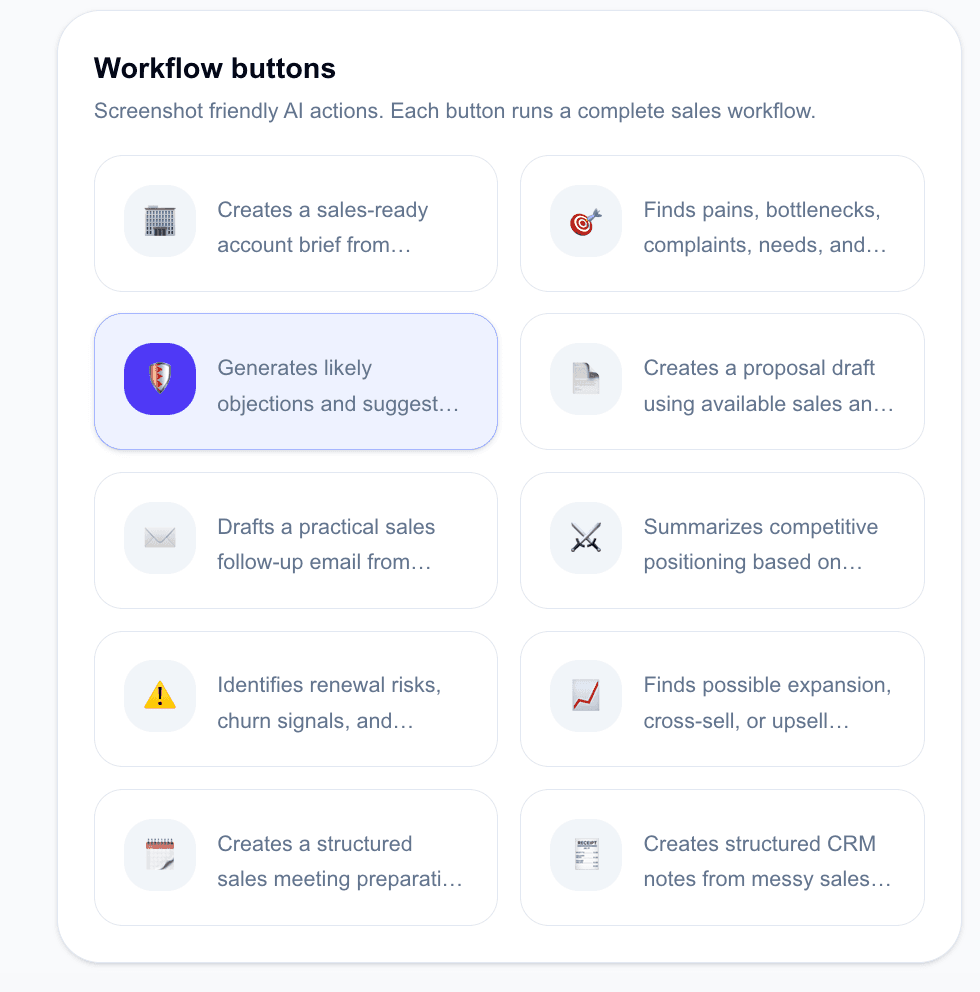
Instead of asking the user to type a long prompt, the interface exposes 10 ready-to-use sales workflows: account briefing, customer pain point discovery, objection handling, proposal drafting, follow-up email generation, competitor comparison, renewal risk review, upsell opportunity discovery, meeting preparation, and CRM note generation.
Why This Is Not Just Another RAG Chatbot
Many internal AI rollouts fail because employees are given a chatbot and told to ask better questions. That approach works for technical users and early adopters, but it often fails with normal business teams. Salespeople, account managers, solution consultants, and customer-facing teams usually need speed, clarity, and guided actions.
This prototype takes a different approach. The chatbot is intentionally secondary. The main interface is built around task-specific sales actions such as Generate Account Brief, Find Customer Pain Points, Prepare Objection Handling, Draft Proposal Section, Review Renewal Risk, and Generate CRM Note.
This makes the AI system feel less like an experimental chatbot and more like a practical work assistant. The sales user does not need to invent the workflow. The workflow is already visible as a button.
How the Workflow-Based Interface Works
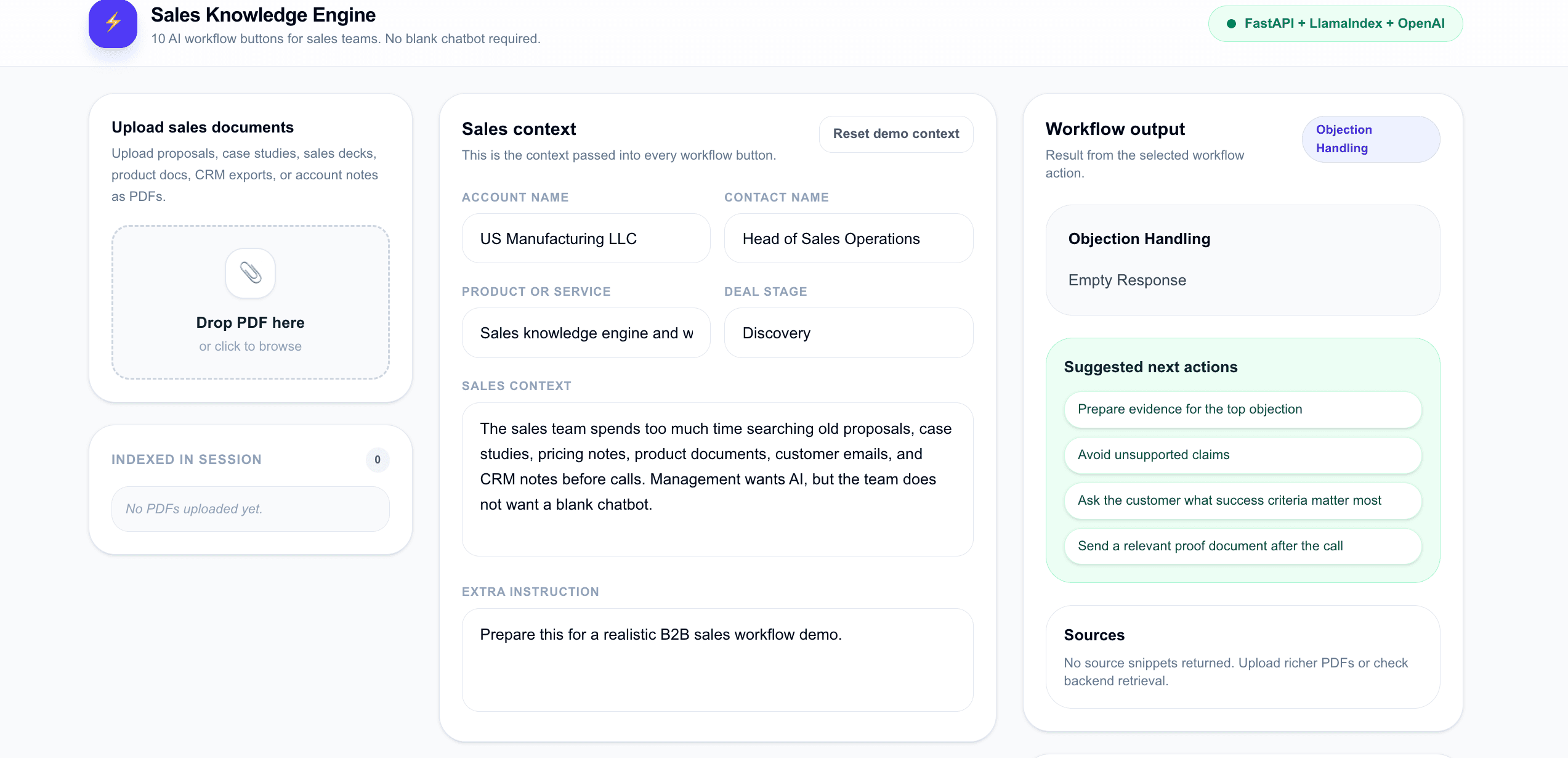
The application has four main zones. The first zone is the document upload panel, where sales teams can upload PDFs such as product decks, RFPs, proposal history, customer notes, security questionnaires, and competitive material. These documents are indexed into a local LlamaIndex-powered retrieval system.
The second zone is the sales context panel. This lets the user provide structured information such as account name, contact name, product or service, deal stage, sales context, and extra instruction. This gives the AI enough business context to generate useful workflow outputs instead of vague generic answers.
The third zone is the workflow output panel. When the user clicks a workflow button, the backend retrieves relevant context from the uploaded documents and produces a structured answer. The output is designed to be useful for real sales work, not just for conversation.
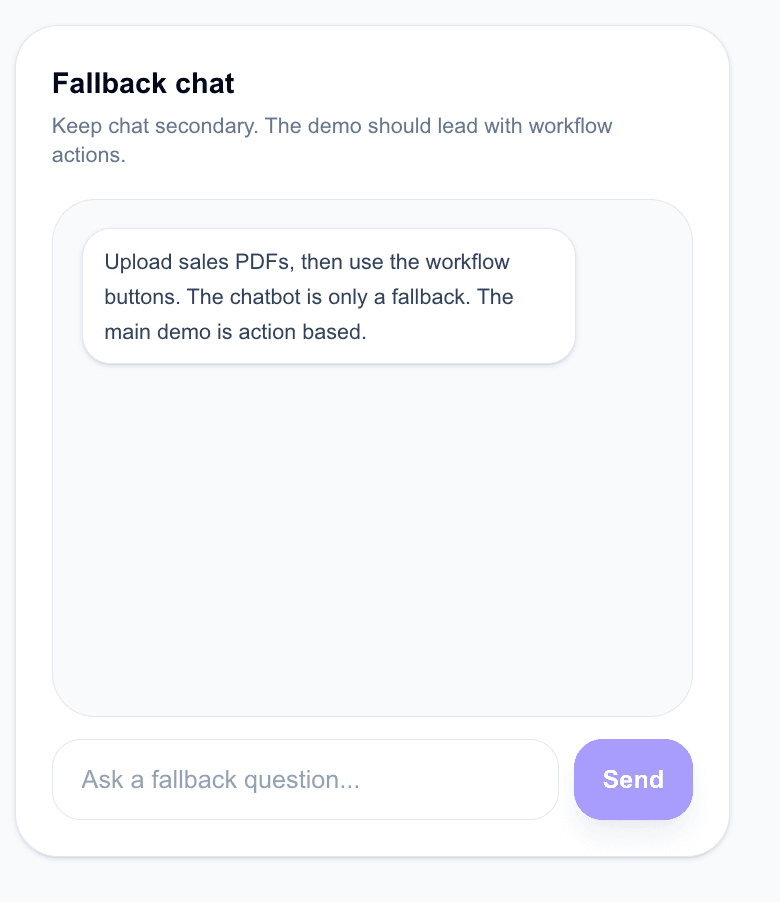
The fourth zone is fallback chat. This is intentionally placed as a secondary interaction mode. The product message is clear: the primary experience is not ask anything. The primary experience is click the next useful sales action.
The 10 Sales Workflows Demonstrated
The prototype demonstrates 10 workflow actions that map directly to common sales and revenue operations tasks:
- Account Briefing: Generates a structured account brief before discovery calls, demos, QBRs, or stakeholder meetings.
- Customer Pain Point Finder: Identifies explicit and implied customer problems from uploaded material and sales context.
- Objection Handling: Prepares likely objections, suggested responses, proof points, and claims to avoid.
- Proposal Draft: Creates a first draft of a proposal section based on available sales and product knowledge.
- Follow-Up Email: Drafts a practical sales follow-up email after calls, demos, or proposal reviews.
- Competitor Comparison: Summarizes competitive positioning and comparison criteria from available documents.
- Renewal Risk Review: Identifies churn signals, renewal risks, open issues, and retention actions.
- Upsell Opportunity Finder: Finds possible expansion, cross-sell, and upsell opportunities from customer context.
- Meeting Preparation: Creates a structured preparation brief with agenda, questions, talking points, and likely objections.
- CRM Note Generator: Converts messy sales context into clean CRM-ready notes for systems like Salesforce, HubSpot, Pipedrive, or Airtable.
Business Problem Solved
Sales teams often lose time searching through scattered knowledge: old proposals, RFP responses, customer notes, product documents, pricing explanations, support history, battlecards, meeting notes, and CRM records. The problem is not only document search. The real problem is turning scattered knowledge into usable sales actions.
A generic chatbot can answer questions, but it still pushes too much work onto the user. The user must decide what to ask, how to phrase the question, how to validate the response, and how to convert the answer into a sales action. This prototype shows how to reduce that cognitive load by packaging common sales tasks into repeatable workflows.
For example, a sales rep preparing for a customer meeting can click Generate Account Brief instead of manually reading several PDFs. An account manager preparing for a renewal conversation can click Review Renewal Risk. A sales operations user can click Generate CRM Note to convert messy context into structured CRM fields.
Related internal examples include AI use cases for CRM notes and sales call summaries, AI use cases for sales proposals and quote drafting, and proposal-history agents for B2B service firms.
Architecture and Technology Stack
The backend is built with FastAPI and LlamaIndex. Uploaded PDFs are parsed, embedded, and stored in a localized vector index. The workflow endpoints use the indexed documents as retrieval context, then generate structured outputs through OpenAI models.
The frontend is built with Next.js, React, and Tailwind CSS. The UI is intentionally designed for screenshots and executive demos. It avoids the look of a developer playground and instead presents AI as a business workflow layer.
The system demonstrates a lightweight architecture suitable for pilots where companies want to test AI-powered document intelligence without immediately committing to a large external vector database or enterprise platform.
Why Local Vector Persistence Matters
For early AI pilots, local vector persistence can be a practical architecture pattern. It allows teams to upload sensitive sales documents, index them locally, and test retrieval workflows without introducing unnecessary infrastructure complexity. This is useful for demos, pilots, internal proof-of-concepts, and controlled experiments with enterprise documents.
In production, this pattern can later be extended to secure enterprise vector stores such as pgvector, Qdrant, Milvus, or other governed retrieval systems. The important point is that the workflow design remains the same: AI should appear as guided business actions, not only as a chat window.
Suggested Next Actions as Part of the Workflow
Each workflow output also includes suggested next actions. For example, the objection handling workflow can suggest preparing evidence for the top objection, avoiding unsupported claims, asking the customer what success criteria matter most, and sending a relevant proof document after the call.
This is important because useful enterprise AI should not stop at generating text. It should help the user decide what to do next. The prototype therefore moves from answer generation toward action support.
Fallback Chat Is Still Available
The application still includes a fallback chat interface for open-ended questions. However, the design deliberately keeps chat secondary. This reflects a realistic enterprise adoption insight: many employees do not want to start from a blank prompt box. They prefer guided actions, templates, examples, and clear workflow buttons.
The fallback chat is useful for follow-up questions, edge cases, and exploratory queries. But the main value is in the workflow layer.
Strategic Value for Sales Leaders and Business Heads
For sales leaders, revenue operations heads, and business executives, this prototype shows how AI can be introduced in a practical and adoption-friendly way. The goal is not to impress users with a general-purpose chatbot. The goal is to reduce repeated manual work in account preparation, proposal drafting, objection handling, meeting prep, renewal reviews, and CRM hygiene.
The strongest adoption pattern is simple: make AI look like useful workflow buttons that sit close to daily work. When the interface is clear, business users are more likely to use AI repeatedly because they understand what each action does.
For adjacent blog patterns, see real-time AI coaching for sales reps, AI agents for competitive battle cards, and AI for shortening the B2B sales cycle.
Extension Patterns
This prototype can be extended into a more advanced sales knowledge platform with CRM integration, role-based access control, source highlighting, citation previews, account-level memory, multi-user workspaces, analytics on workflow usage, and approval paths for generated content.
It can also be adapted for other departments such as customer support, after-sales service, procurement, legal operations, quality teams, and internal knowledge management. The same pattern applies across functions: observe the repeated workflow first, then convert it into AI actions.
Conclusion
The Sales Knowledge Engine demonstrates a practical shift from AI chatbots to AI workflow assistants. It shows how sales teams can use uploaded knowledge not only to ask questions, but to complete real work: prepare meetings, write follow-ups, handle objections, review renewal risks, find upsell opportunities, and generate CRM notes.
The lesson from this project is simple: enterprise AI adoption improves when users are not forced to invent prompts. AI becomes more useful when it is packaged as clear, trusted, repeatable workflow actions inside the way people already work.
About the Builder
Suhas Bhairav builds production-grade AI applications, RAG systems, knowledge engines, workflow assistants, and enterprise AI prototypes for practical business adoption. This AI Lab prototype is part of a broader series on moving from generic AI demos to usable AI workflows for real teams.