This AI Lab project demonstrates an enterprise-grade multi-agent customer support ticket analyzer. The system converts a raw customer support ticket into structured operational intelligence: severity, urgency, SLA risk, customer sentiment, root-cause hypotheses, diagnostic questions, recommended actions, escalation guidance, customer response drafts, and governance checks.
The goal is not to present a generic chatbot. The goal is to show how a production-style support intelligence layer can be designed for enterprise environments where support tickets affect revenue, customer trust, SLA exposure, and cross-team operations.
This project was created by Suhas Bhairav as part of an AI Lab series focused on practical, buildable, production-oriented AI systems.
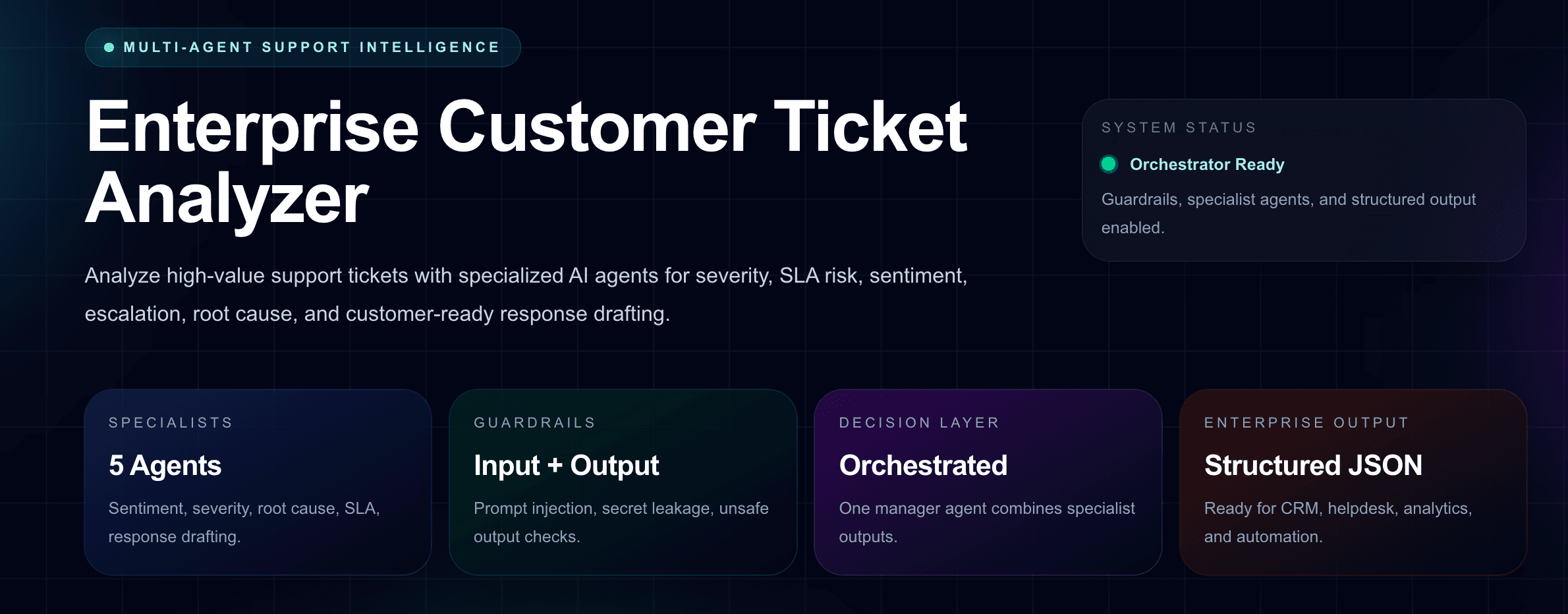
What the Project Demonstrates
The project demonstrates how a customer support organization can move from manual ticket triage to AI-assisted operational analysis. A support ticket is submitted through a polished Next.js interface and processed by a backend route that uses multiple specialized AI agents. Each agent focuses on a specific responsibility, while a central orchestrator combines the outputs into one governed analysis.
The interface is designed to feel like an internal enterprise operations dashboard rather than a generic prompt box. This matters because enterprise AI adoption often depends on whether the system fits existing workflows, supports review, and produces structured outputs that can be routed into helpdesk, CRM, analytics, and escalation systems.
Core Capabilities
- Classifies support tickets by category, subcategory, severity, and urgency.
- Detects SLA risk and recommends first-response and resolution targets.
- Analyzes customer sentiment, frustration signals, emotional intensity, and relationship risk.
- Identifies probable root causes and missing diagnostic information.
- Generates internal checks for billing, engineering, security, support, or customer success teams.
- Recommends prioritized operational actions with ownership and rationale.
- Drafts a safe customer-facing reply and an internal support note.
- Applies governance checks such as hallucination risk, human review need, PII awareness, and escalation requirement.
Why Multi-Agent Support Analysis Matters
Enterprise support tickets are rarely simple. A single ticket may contain business impact, customer emotion, technical symptoms, SLA obligations, renewal risk, security implications, product history, and escalation context. A single generic prompt can summarize the ticket, but it often fails to separate these concerns cleanly.
A multi-agent design allows the system to divide the work into focused analytical roles. One agent analyzes sentiment. Another assesses severity. Another studies root-cause possibilities. Another evaluates SLA risk. Another drafts the response. The orchestrator then combines these results into a final structured output suitable for support operations.
This mirrors how real enterprise support teams work: support leads, customer success managers, engineering owners, billing specialists, and security teams each look at the same ticket from a different angle.
Architecture Overview
The project uses a frontend form and dashboard built with Next.js, React, and Tailwind CSS. The backend uses a Next.js API route with the OpenAI Agents SDK. The route defines specialist agents, guardrails, schemas, and an orchestration layer that returns structured JSON.
The architecture follows a manager-as-tools pattern. The orchestrator remains responsible for the final answer but calls specialist agents as tools to obtain focused analysis. This is useful for enterprise ticket analysis because the final output must be consistent, structured, and governed.
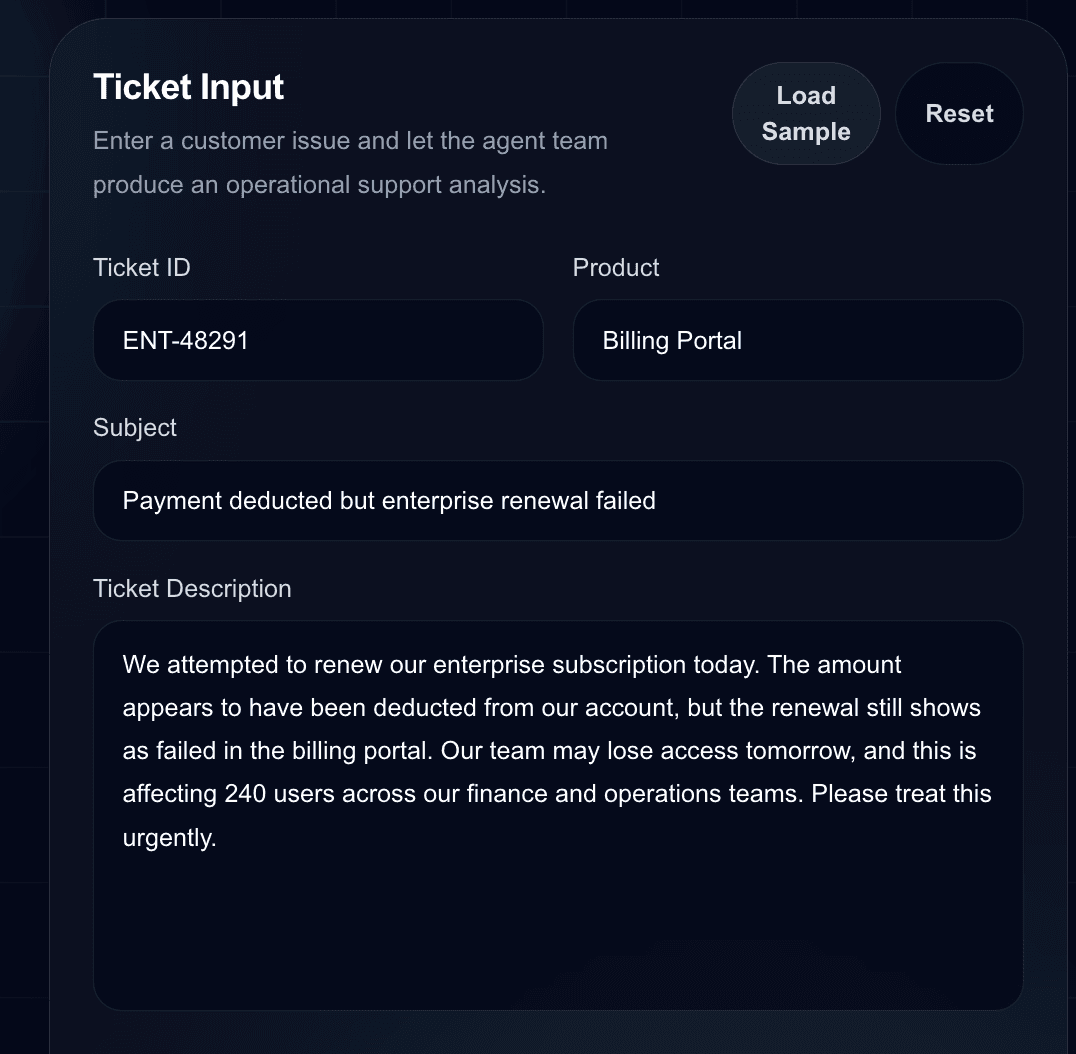
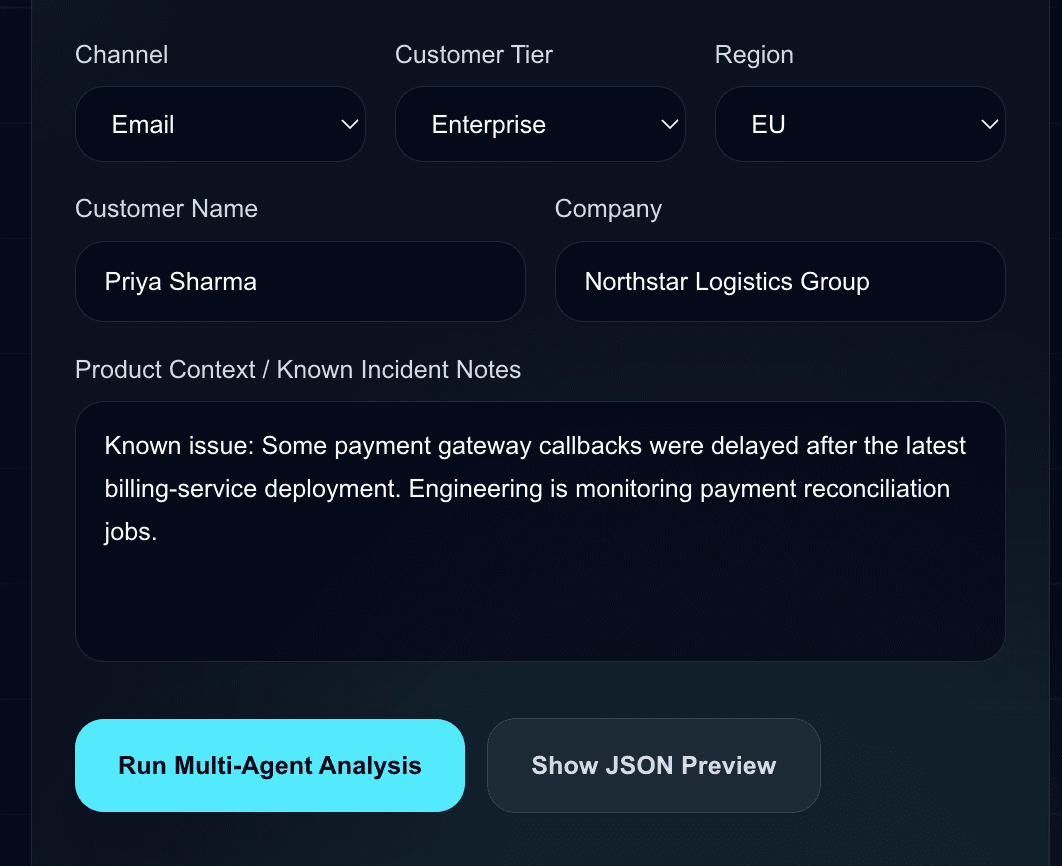
Frontend Layer
The frontend provides a responsive dashboard where the user can enter ticket details such as subject, description, customer tier, region, product, channel, customer name, company, and known incident notes.
Backend Agent Layer
The backend contains several specialist agents. The Customer Sentiment Analyst detects emotion, frustration, and relationship risk. The Severity and Escalation Analyst classifies the impact level. The Root Cause Analyst identifies likely technical and operational causes. The SLA Risk Analyst evaluates breach exposure. The Customer Response Drafting Agent prepares a customer-facing reply and an internal note.
The Enterprise Ticket Analysis Orchestrator coordinates these agents and returns the final structured response. This response can be displayed in the UI or integrated with CRM, helpdesk, or incident management systems.
Guardrail Layer
The system includes input and output guardrails. Input guardrails are used to detect prompt injection attempts, suspicious instructions, or secret exposure. Output guardrails are used to reduce the risk of unsafe customer communication, unsupported claims, credential leakage, or hidden instruction disclosure.
For enterprise workflows, guardrails are not optional decoration. They are part of the operating model. Support teams need AI output that can be reviewed, routed, and trusted within human-controlled processes.
Example Ticket Scenario
The demo scenario shown in the screenshots is an enterprise billing renewal issue. A customer reports that payment was deducted, but the renewal still failed in the billing portal. Around 240 users may lose access the next day, creating a high-impact support and customer success risk.
This ticket is a good demonstration case because it touches multiple operational concerns: payment reconciliation, subscription entitlement, SLA risk, customer trust, engineering investigation, billing ownership, customer communication, and human review.
Severity, SLA Risk, and Executive Summary
The dashboard converts the ticket into high-level operational signals such as severity, urgency, SLA risk, and escalation requirement. These are the signals that support leaders need first when deciding whether to escalate, who should own the issue, and how quickly action is required.
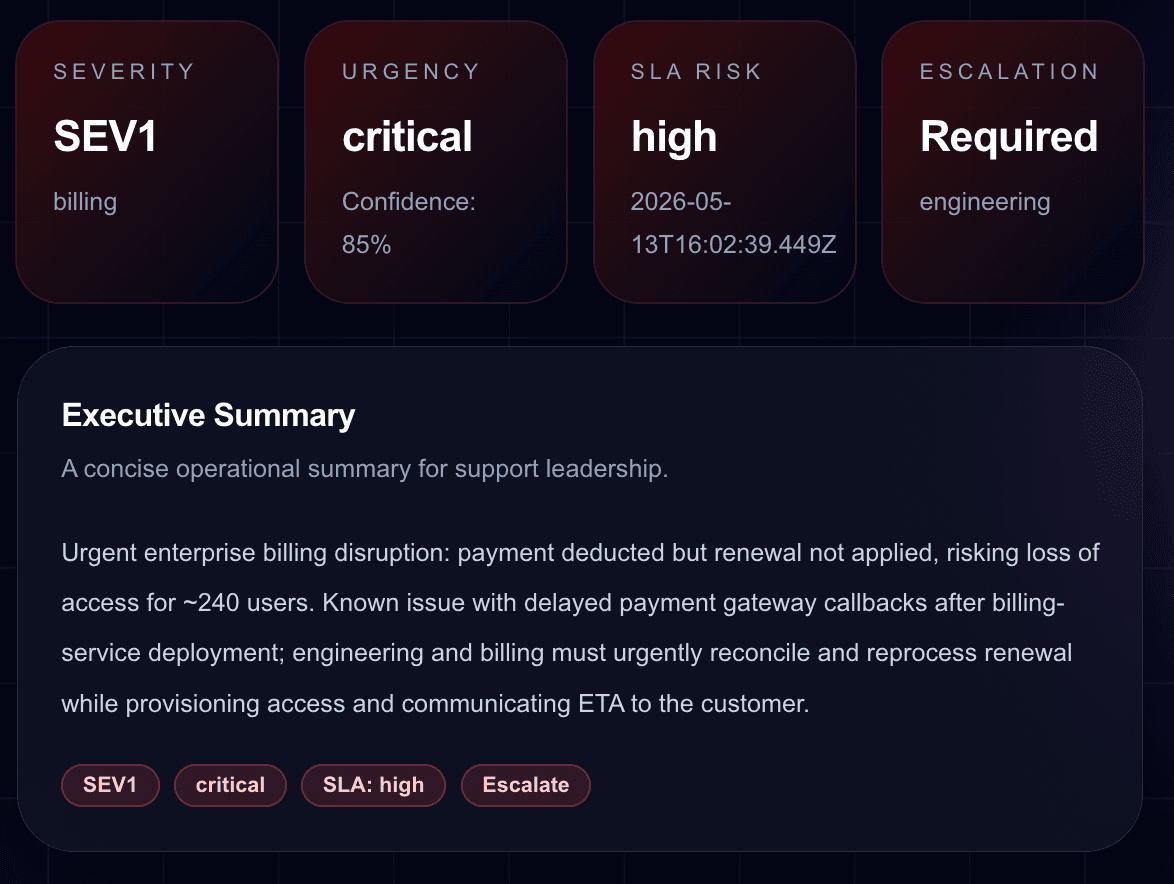
The executive summary is designed for quick operational reading. It avoids unnecessary verbosity and focuses on business impact, likely cause, escalation need, and next operational steps.
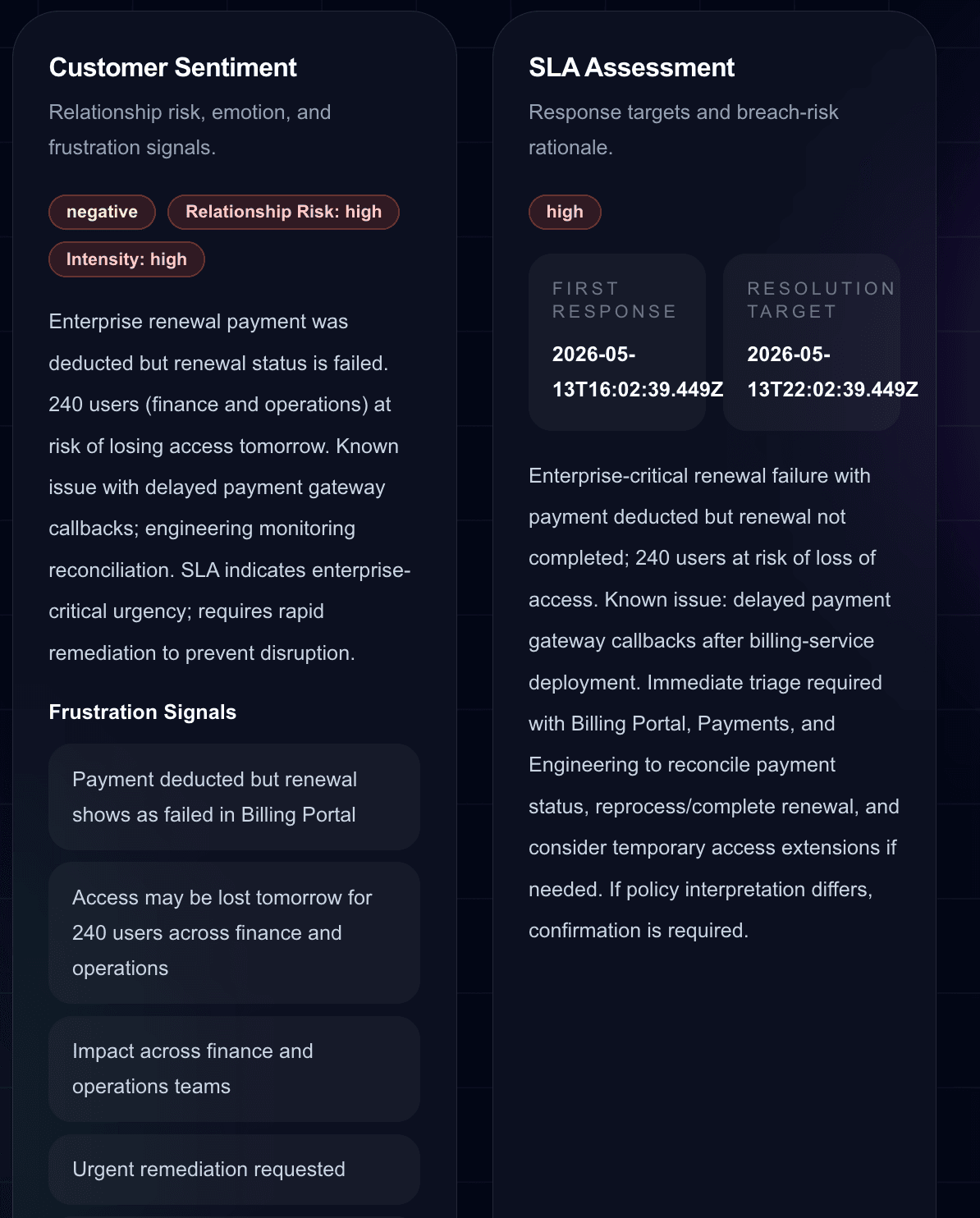
Customer Sentiment and SLA Assessment
The customer sentiment section identifies negative sentiment, relationship risk, emotional intensity, and concrete frustration signals. This helps support and customer success teams understand not only what broke, but how the customer is likely to perceive the incident.
The SLA assessment section translates the ticket into response and resolution pressure. It provides first-response and resolution targets, plus rationale. In production, this could be connected to customer-specific SLA policies and contract tiers.
Root Cause Analysis
The root-cause section turns the support ticket into probable causes and suggested internal checks. In the billing renewal example, the system identifies possible delayed payment gateway callbacks, reconciliation service backlog, mismatch between payment status and entitlement updates, and the need to verify whether the renewal record was linked correctly.
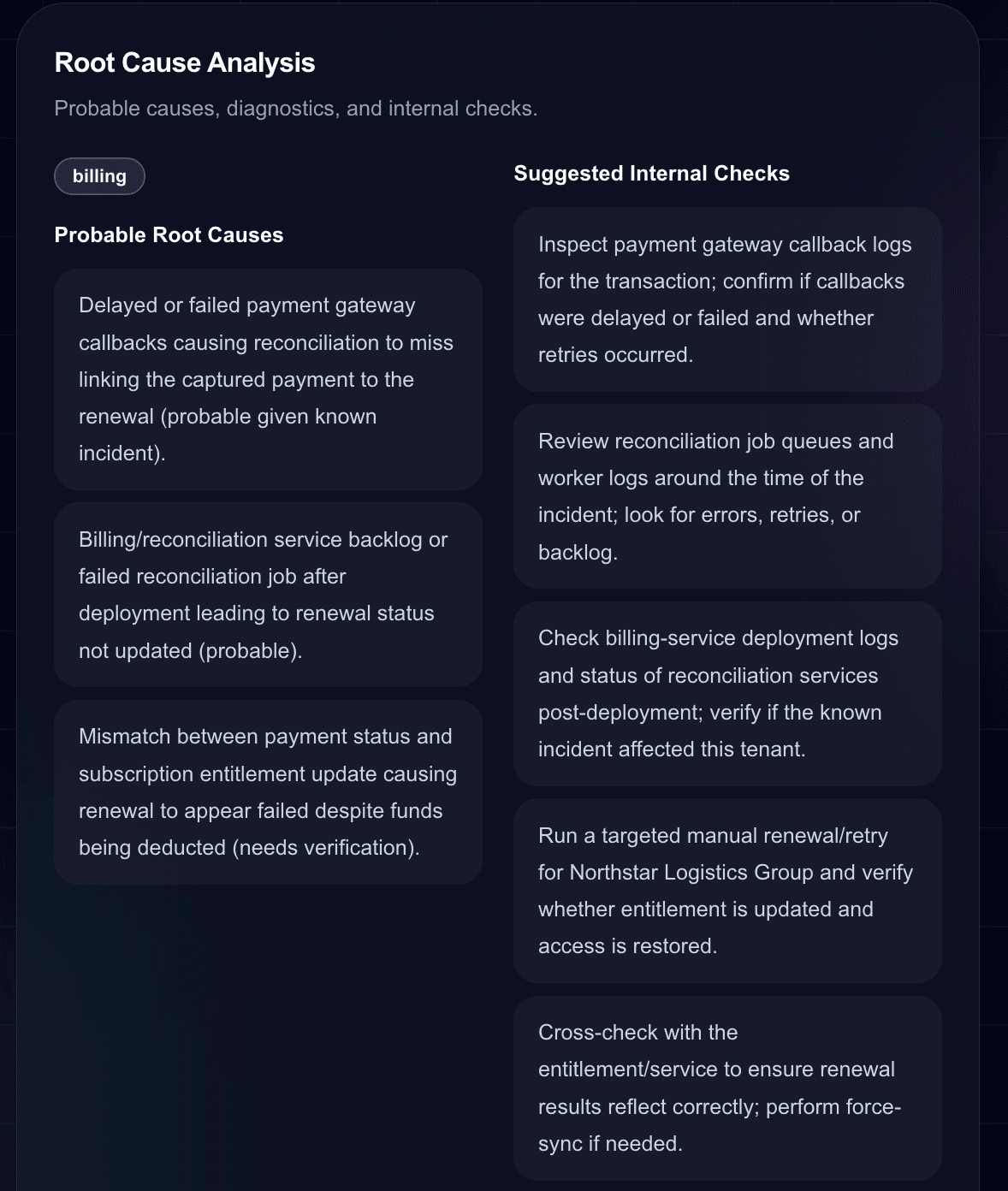
This does not replace engineering investigation. Instead, it shortens the path from ticket intake to useful technical triage.
Missing Information and Diagnostic Questions
Support teams often lose time because the first response does not ask for the right information. This project generates missing information and diagnostic questions that can be used by support agents or internal teams.
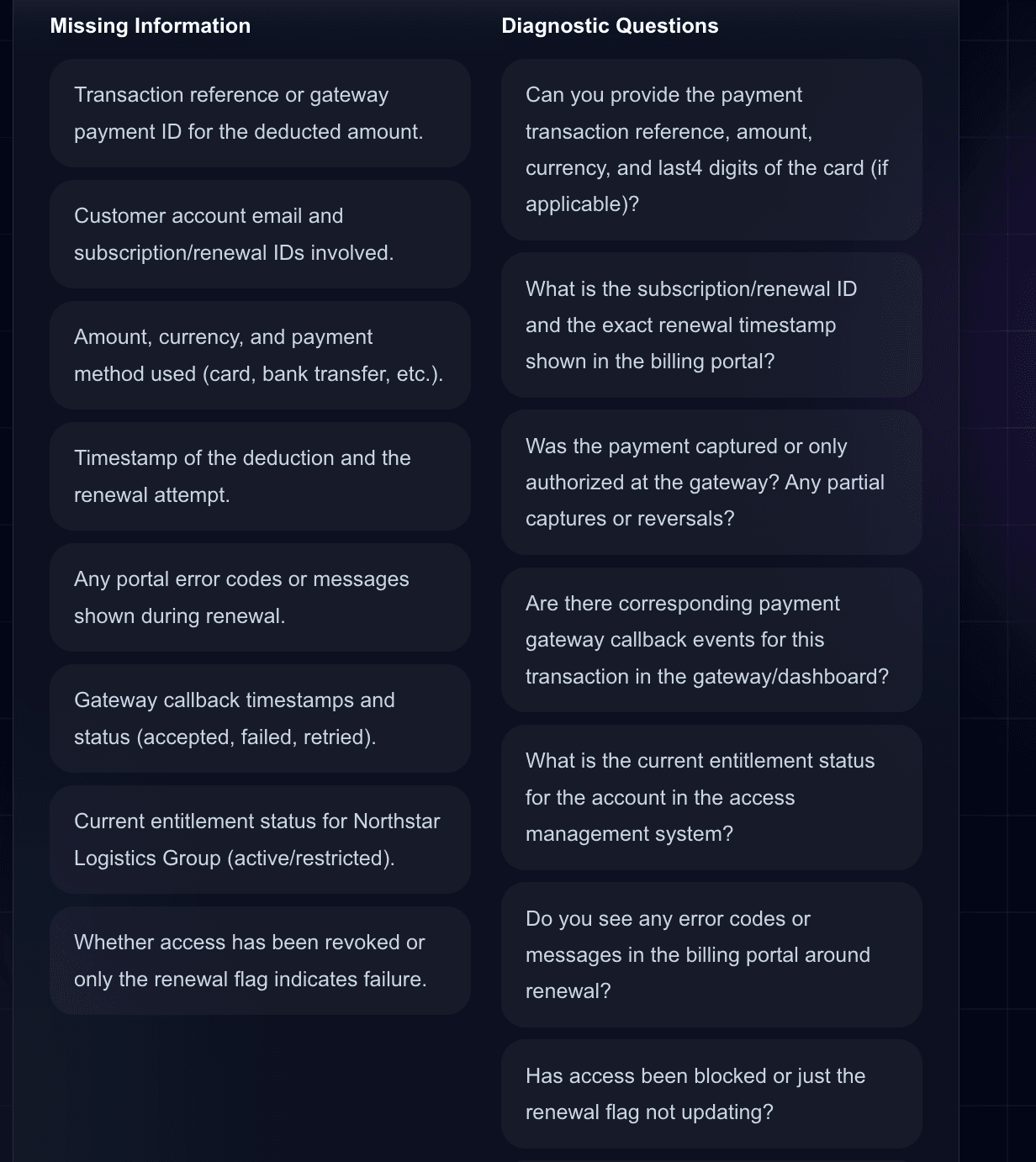
In this scenario, the system asks for payment transaction references, subscription IDs, timestamps, amount, currency, payment method, callback status, and entitlement state. These questions are practical, specific, and tied to the root-cause hypothesis.
Recommended Actions
The recommended actions section converts analysis into a prioritized operational plan. Instead of returning only a summary, the system recommends actions for billing, engineering, and customer success teams, each with priority and rationale.
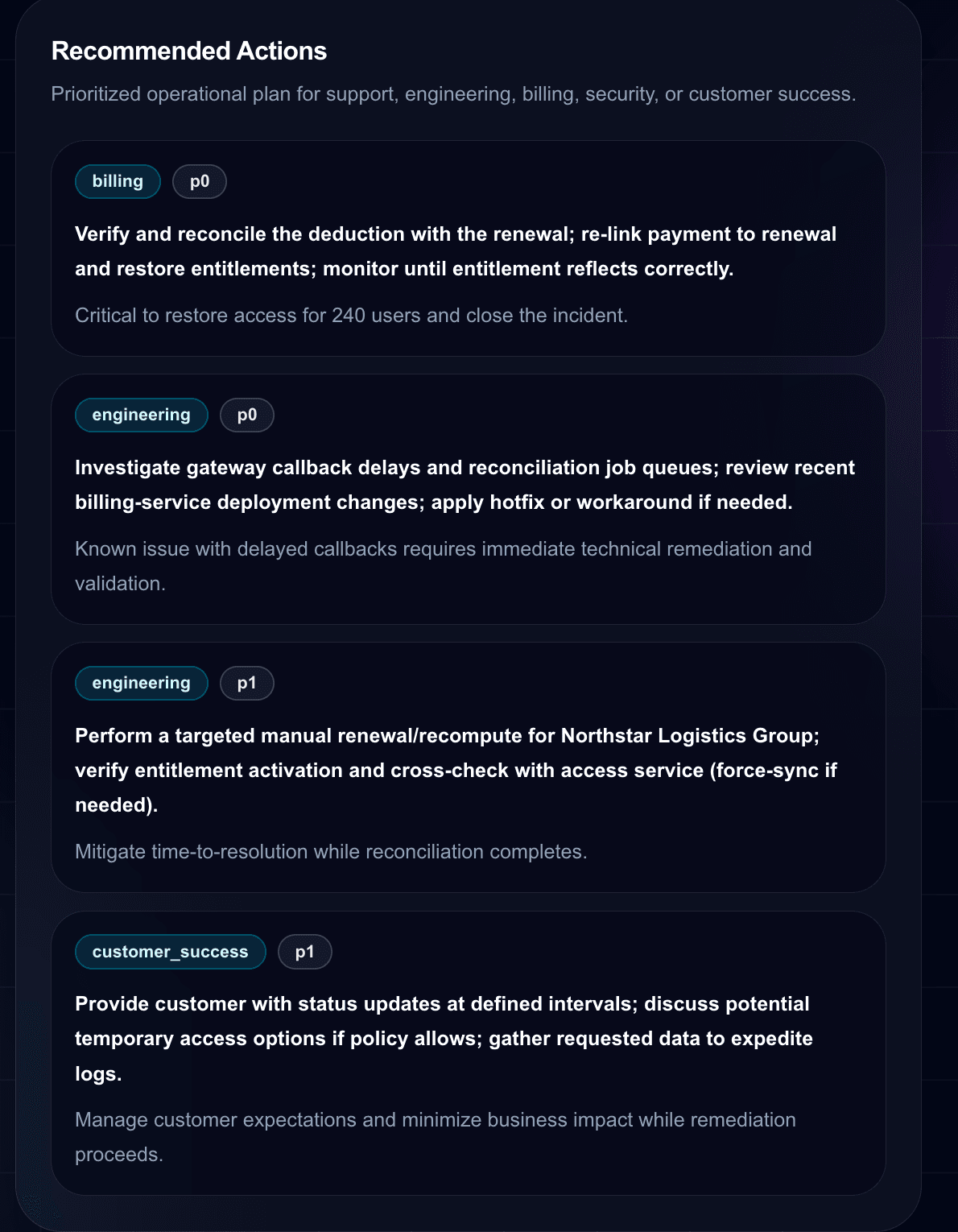
This kind of output is useful for helpdesk automation, internal Slack notifications, escalation tickets, incident workflows, and customer success playbooks.
Customer Response Draft and Internal Note
The project generates a safe customer-facing reply and a separate internal note. This separation is important. Customers need clarity, empathy, and next steps. Internal teams need operational detail, ownership, and technical checks.
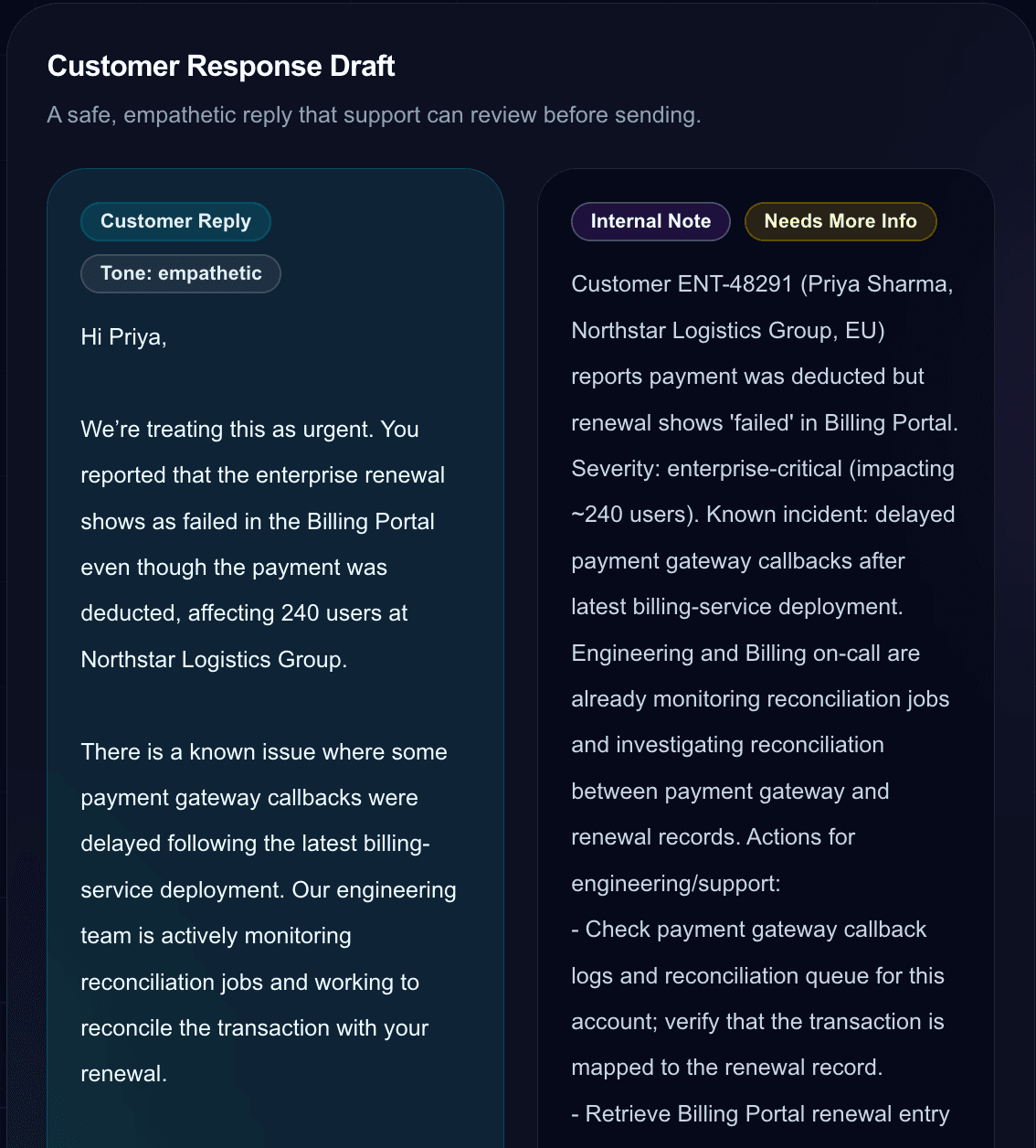
The customer reply avoids overpromising while acknowledging urgency. The internal note gives support teams the context needed to coordinate billing, engineering, and customer success activity.
Governance and Quality Checks
The governance section marks whether human review is required, estimates hallucination risk, indicates whether PII or secrets were detected, lists review reasons, and recommends the next best action.
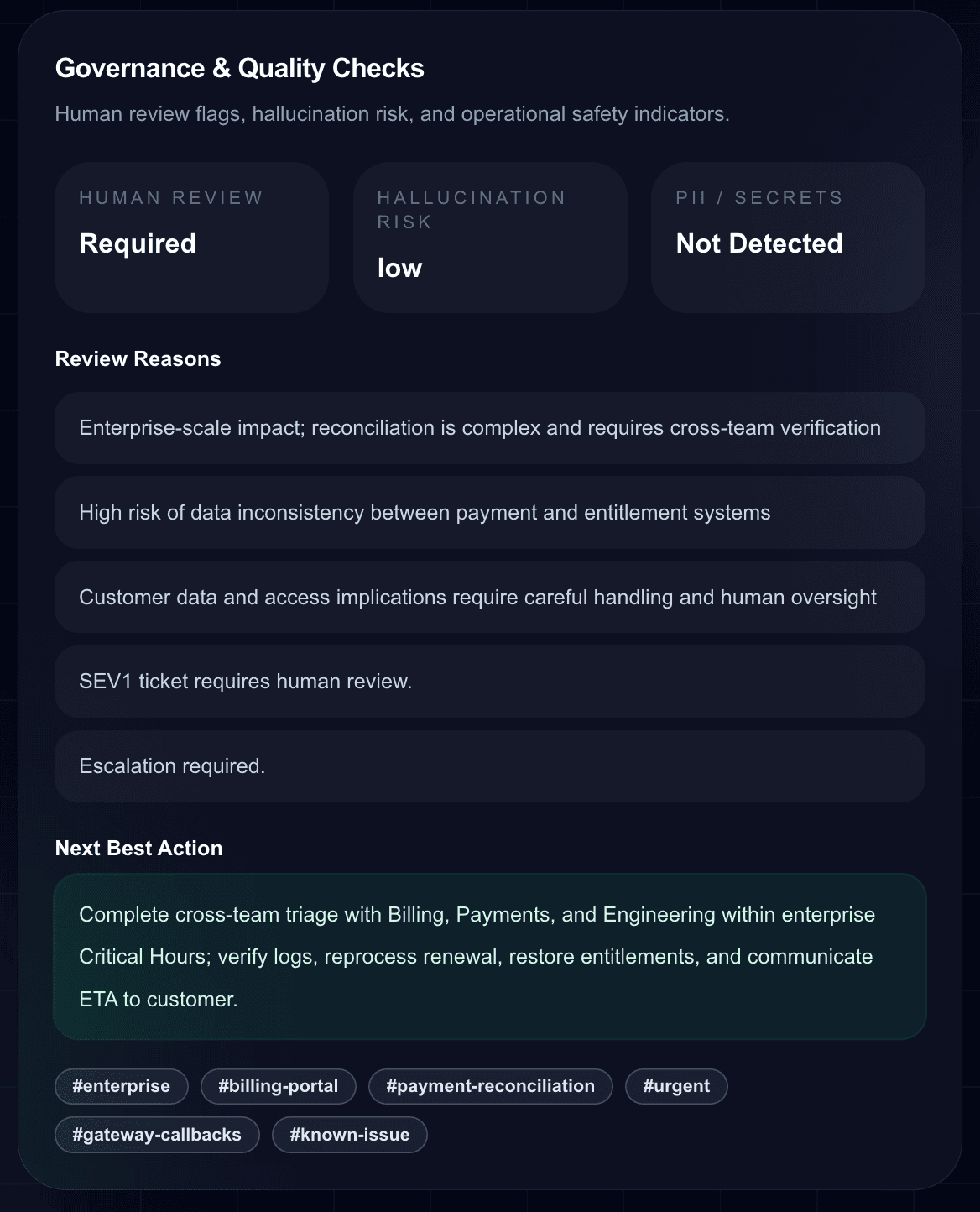
This is critical for enterprise adoption. AI systems should not silently make high-impact decisions. They should identify when human review is necessary, especially for SEV1 tickets, billing issues, security issues, customer access problems, or contractual SLA exposure.
Implementation Pattern
The project is implemented as a Next.js App Router application. The frontend uses a client-side dashboard page with form state, sample ticket loading, JSON preview, loading states, and structured result rendering. The backend exposes a route that validates input, redacts sensitive patterns, runs guardrails, calls the multi-agent orchestrator, validates structured output, and returns the final analysis.
This pattern can be extended into a full enterprise system by adding authentication, role-based access control, ticket storage, audit logs, CRM integration, helpdesk webhooks, RAG over support documentation, and customer-specific SLA policies.
Where This Fits in Enterprise AI
This project sits at the intersection of AI agents, support operations, workflow automation, customer success, and governance. It is a practical example of how AI can assist teams without pretending to fully replace human judgment.
The strongest use case is not automatic customer response without review. The stronger use case is support intelligence: faster triage, better escalation, more consistent investigation, safer drafts, and clearer handoffs between teams.
Potential Extensions
- Connect to Zendesk, Freshdesk, Intercom, Salesforce Service Cloud, HubSpot, Jira Service Management, or ServiceNow.
- Add retrieval over product documentation, known incidents, customer contracts, and SLA policies.
- Store ticket analyses in PostgreSQL, Supabase, MongoDB, or an enterprise data warehouse.
- Create dashboards for recurring root causes, SLA exposure, churn-risk tickets, and product issue clusters.
- Detect incident patterns across multiple similar tickets.
- Add multilingual ticket analysis and localized customer response drafts.
- Add approval workflows before customer replies are sent.
- Add audit trails for compliance, governance, and operational review.
Strategic Value
Enterprise support teams are under pressure to respond faster while handling more complexity. A multi-agent ticket analyzer can help support teams reduce time-to-triage, improve escalation quality, detect customer risk earlier, and transform unstructured support tickets into structured operational data.
The value is not just in answering a ticket. The value is in creating a repeatable intelligence layer that turns support conversations into signals for product, engineering, customer success, and leadership.
Conclusion
The Enterprise Multi-Agent Customer Support Ticket Analyzer demonstrates how AI agents can be used in a practical, governed, and enterprise-oriented way. It combines specialist analysis, structured output, guardrails, and a polished dashboard to show what a production-support intelligence workflow can look like.
This AI Lab project is intentionally implementation-focused. It shows how the pieces can be assembled into a working product direction: frontend, API route, multi-agent orchestration, validation, guardrails, and human-in-the-loop review.
FAQ
What is a multi-agent customer support ticket analyzer?
It is an AI system that uses multiple specialized agents to analyze support tickets from different perspectives, such as severity, SLA risk, sentiment, root cause, escalation, and response drafting.
Why use multiple agents instead of one prompt?
Multiple agents allow each responsibility to be handled by a focused specialist. This improves structure, consistency, and operational usefulness in enterprise support workflows.
Can this replace a support team?
No. The better use case is human-in-the-loop support intelligence. The system helps teams triage faster, ask better diagnostic questions, prioritize escalation, and draft safer responses.
What technologies are used in this project?
The project uses Next.js, React, Tailwind CSS, JavaScript, the OpenAI Agents SDK, Zod schemas, structured JSON output, and guardrail-based backend validation.
Can this be connected to Zendesk or ServiceNow?
Yes. The structured JSON output is designed so it can be integrated with helpdesk systems, CRM platforms, ticket routing workflows, and incident management tools.
Does the project include guardrails?
Yes. The backend design includes local safety checks, input guardrails, output guardrails, schema validation, secret redaction, and human review indicators.
What kind of tickets can this analyze?
It can analyze billing issues, outages, integration failures, security-sensitive tickets, customer complaints, SLA-risk tickets, and enterprise escalation cases.
What is the main business value?
The main value is faster triage, better escalation, reduced SLA risk, improved customer communication, and structured operational intelligence from support tickets.
About the Builder
Suhas Bhairav builds production-grade AI applications, multi-agent systems, RAG systems, knowledge graph workflows, and enterprise AI prototypes. Learn more at https://suhasbhairav.com.